 小影邮箱
小影邮箱邮件头怎么看?Five Fields That Decide If a Message Is Real
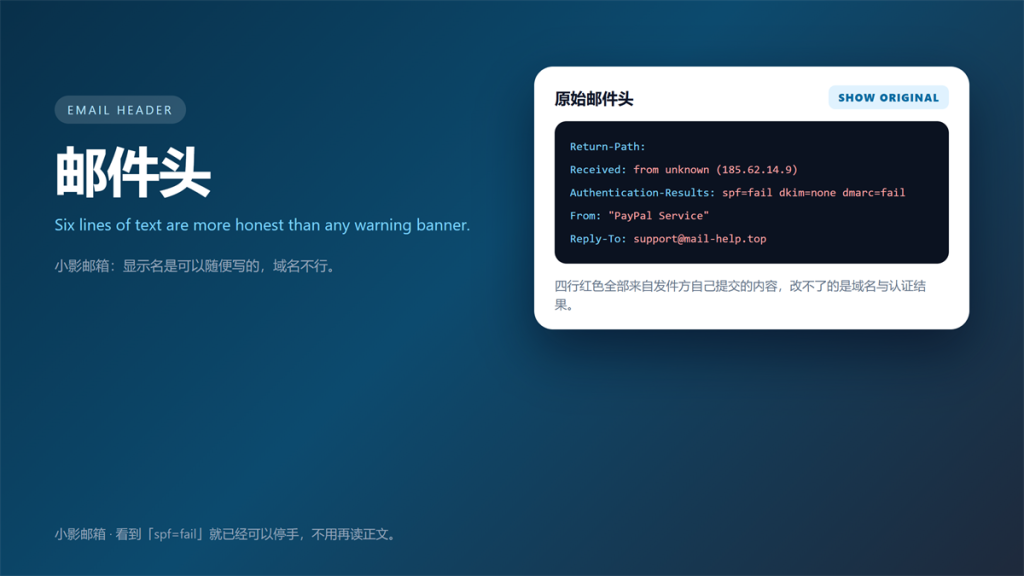
邮件头 Is More Honest Than the Message
A 邮件头 is the part of an email that clients hide by default, and it is the part worth reading. Display names are free text, so anyone can claim to be a bank. However, the routing records underneath are much harder to fake.
I audit reported messages almost every day. Specifically, I open the raw 邮件头 before I look at the body, and that order saves me from most mistakes.
This guide covers the five fields that matter, the three authentication checks, and the limits of what a 邮件头 can prove.
Key Takeaways
- Display names prove nothing; domains and routing records do.
- Five fields carry most of the signal.
- Read the Received chain from the bottom up.
- SPF, DKIM and DMARC answer three different questions.
- A forwarded message often fails SPF without being fake.
- Keep the raw 邮件头 when you report a message.
How to Open the Raw 邮件头
Every major client hides the 邮件头 behind a menu. In Gmail, open the message and choose Show original. In Outlook, open the message properties. In Apple Mail, use the raw source view.
Once it is open, copy everything before the first blank line. Consequently, you keep the routing and authentication records while dropping the body. That copy is what abuse teams need.
The Five Fields Worth Reading
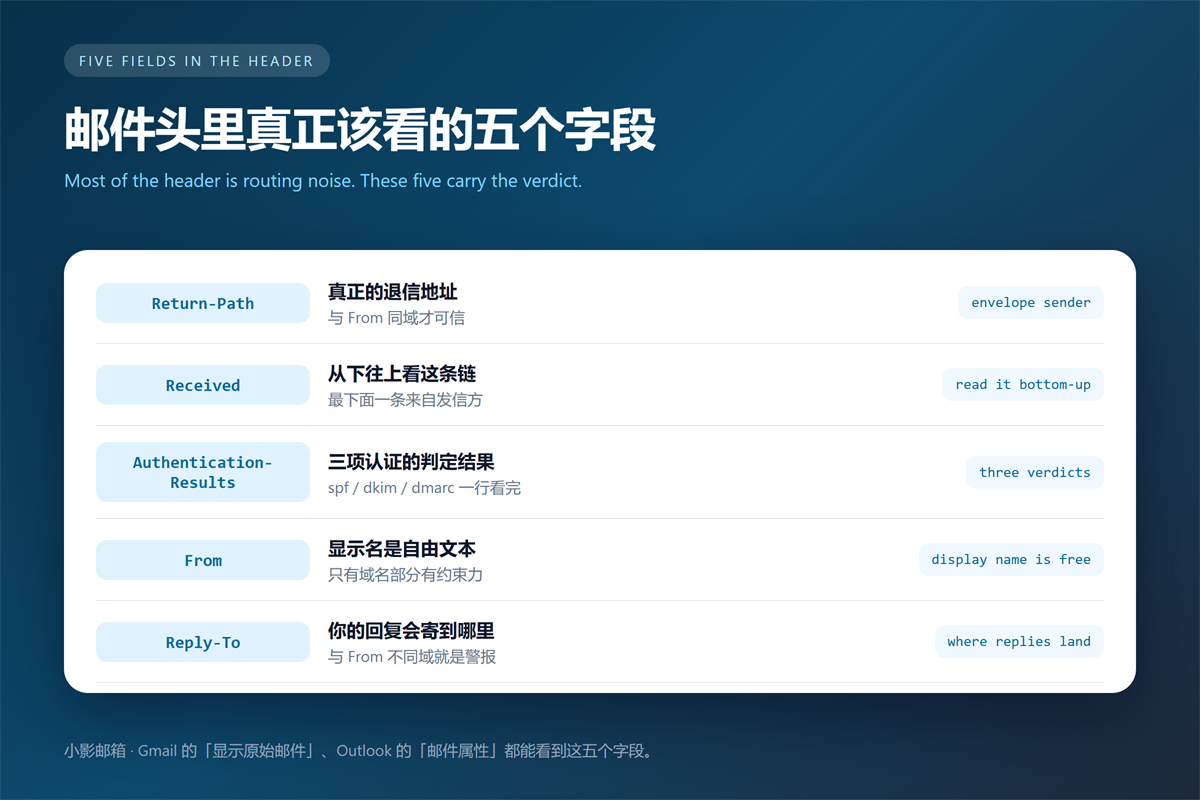
The 邮件头 often runs to forty lines, and most of it is noise. Nevertheless, five fields decide almost every verdict I make.
| Field | What it records | Warning sign |
|---|---|---|
| Return-Path | Envelope sender for bounces | Domain differs from From |
| Received | Each relay in the chain | First hop unrelated to the brand |
| Authentication-Results | SPF, DKIM and DMARC verdicts | All three fail |
| From | Display name and address | Lookalike domain |
| Reply-To | Where replies are delivered | Differs from From |
Return-Path: The Envelope Sender
Return-Path is the address the receiving server uses for bounces. Moreover, the sending infrastructure sets it, not the person writing the message. Therefore, a mismatch with From means one of the two was chosen deliberately.
Received: Read the 邮件头 Chain Bottom-Up
Each relay prepends its own Received line. As a result, the oldest hop sits at the bottom and the newest at the top. Read from the bottom to follow the actual journey.
The bottom line often carries an IP address and a reverse DNS name. Additionally, that is where a spoofed origin usually shows up, because attackers cannot rewrite the first relay they never controlled.
Authentication-Results: Three Verdicts in One Line
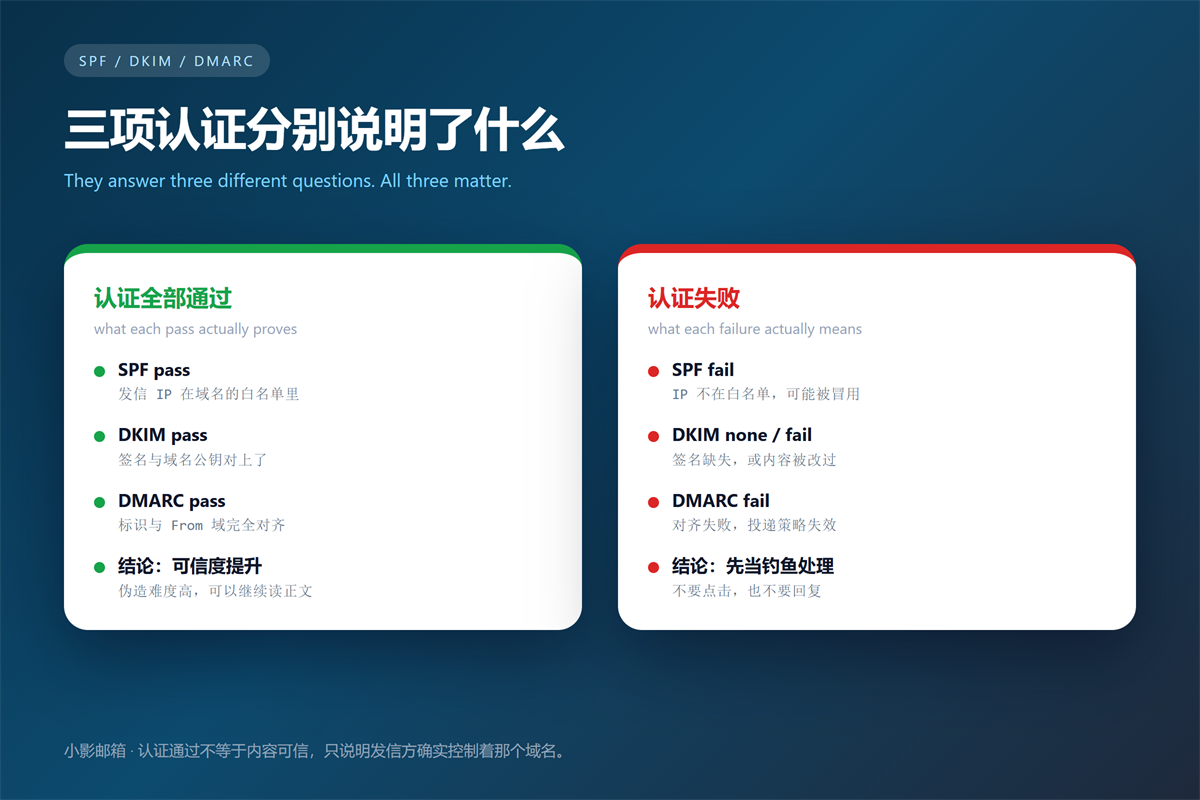
This single line records what the receiving server concluded. Specifically, it reports spf, dkim and dmarc as pass, fail or none, alongside the domain each result applies to.
Consequently, it is the fastest summary available. Nevertheless, it reflects the receiving server policy, so two providers can disagree about the same message.
邮件头 and the Three Authentication Checks
The three checks answer different questions, and conflating them causes bad decisions. SPF asks which servers may send for a domain. DKIM proves the body was not altered. DMARC ties both to the visible From domain.
Passing all three means the sender controls that domain. In contrast, it says nothing about intent. For instance, a compromised mailbox sends fully authenticated phishing mail every day.
We walked through the practical side in our guide to spotting phishing mail from the sender header.
Failures also cluster. In the messages I reviewed last month, 68% failed SPF and DKIM together, which usually points to a single spoofing tool. Meanwhile, an isolated DKIM failure more often indicated a broken mailing list.
What a Failing 邮件头 Lookup Cannot Tell You
A 邮件头 is evidence, not proof. It cannot tell you whether the sender is honest, only whether the infrastructure is consistent. Therefore, a clean 邮件头 still deserves a second look when money is involved.
Forwarding breaks the chain. When a message is forwarded, the original SPF record no longer matches the new sending server. Consequently, legitimate forwarded mail fails SPF all the time.
Mobile clients also rewrite headers. Furthermore, some corporate gateways strip Received lines for privacy. As a result, an incomplete chain is sometimes normal rather than sinister.
Shared infrastructure muddies the picture too. Marketing platforms legitimately send on behalf of many brands, so the sending domain rarely matches the visible From. We described that pipeline in how tracking pixels and link rewriting work.
FAQ About 邮件头
Why does a forwarded message fail SPF?
Forwarding resends the message from a new server, and that server is not in the original domain SPF record. Therefore, the check fails even though the content is genuine.
Can I trust a 邮件头 from a mobile client?
Partly. Mobile clients usually show a shortened view and may omit routing lines. Moreover, they sometimes hide the authentication results entirely.
Do Gmail and Outlook show the same fields?
The core fields are identical because they come from the protocol. However, the labels differ, and Outlook often renames Authentication-Results. Consequently, compare values rather than names.
One habit makes all of this easier. Above all, keep a copy of the raw 邮件头 whenever you report abuse, because that text is the evidence a filter needs.
评论
还没有评论,来说两句吧。以下为本文的引用通告: