 小影邮箱
小影邮箱邮箱注销会留下什么?What Deleting an Account Leaves Behind
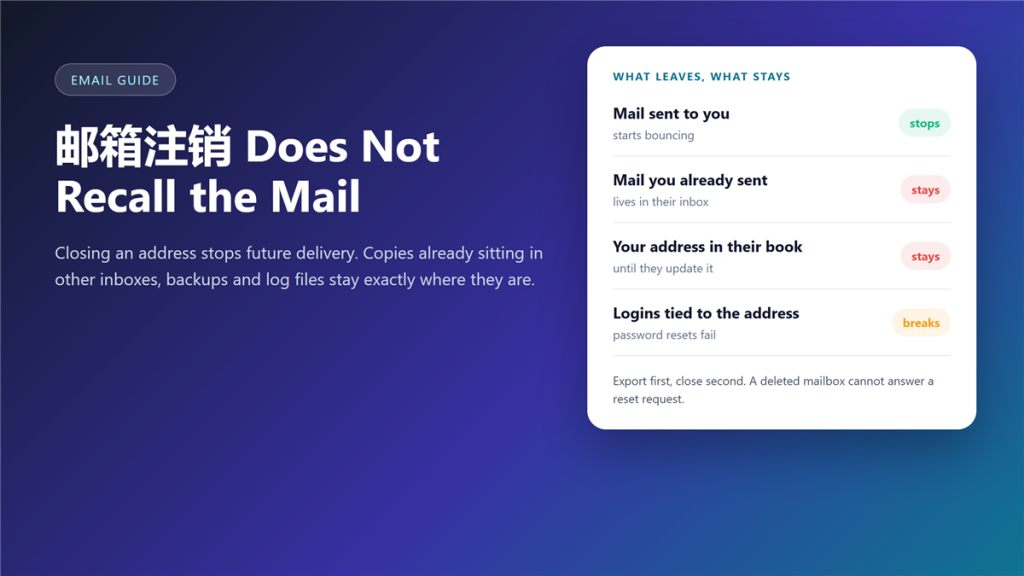
What 邮箱注销 actually removes
邮箱注销 stops future delivery, and that is all it does. I have closed four addresses over eight years, and every time I found messages still sitting in other people’s inboxes months later. The account disappears; the correspondence does not.
That distinction matters more than it sounds. Therefore, 邮箱注销 should be the last step of a plan, not the first click of one.
Key Takeaways
- Closing an address stops new mail; it does not recall old mail.
- Copies remain in recipients’ inboxes, archives and backups.
- Any login tied to the address will need updating by hand.
- Most providers hold the address 30 to 90 days before reuse.
- Export your own copy before you delete anything.
- A recycled address can receive mail meant for you.
- For throwaway inboxes, 邮箱注销 is usually not needed at all.
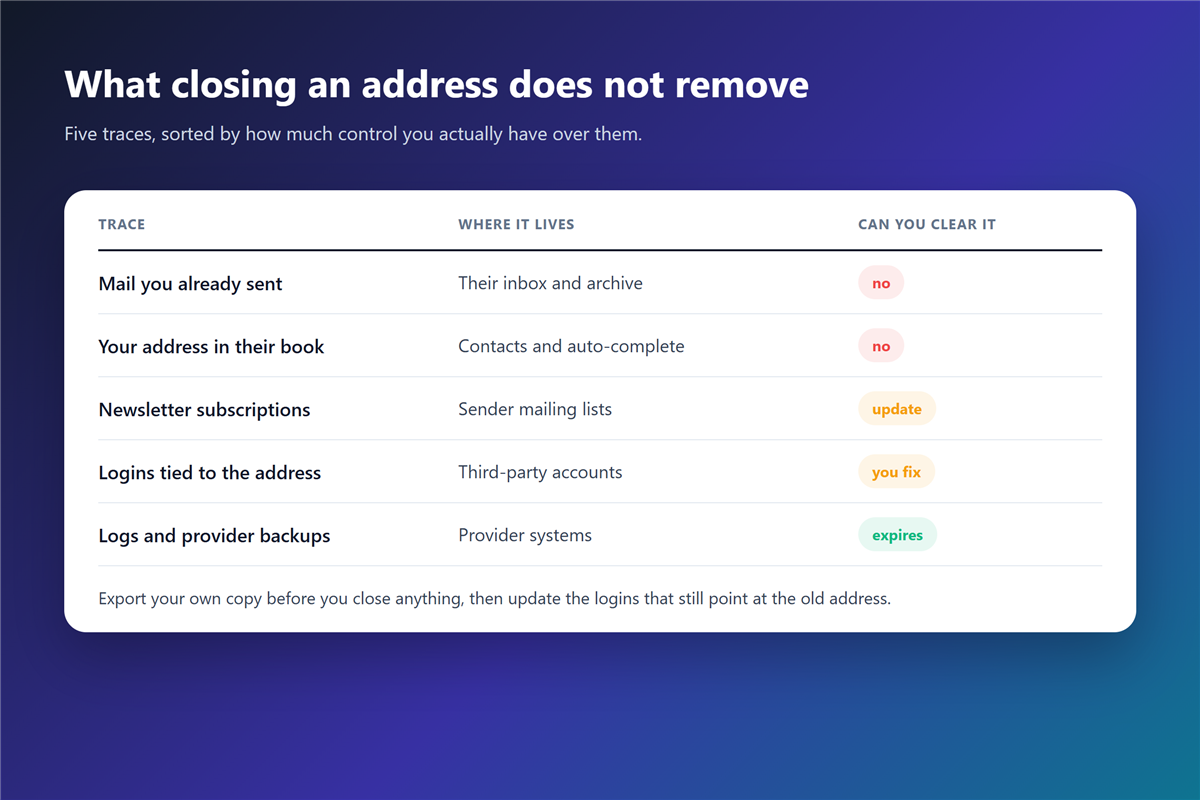
Five traces that stay behind
The list below is the one I check every time, and the first two are the ones people are surprised by.
Mail you already sent
Every message you sent lives in someone else’s mailbox, archive or backup tape. Deleting your account cannot reach any of those copies, and no provider claims otherwise. That is the core fact about 邮箱注销.
Your address in other people’s contacts
Auto-complete fills your address for years. Consequently, mail keeps going to an address you no longer read, and the sender has no way to know. 邮箱注销 does not update anyone else’s address book.
Logins that still point at the address
Banks, shops, work tools and forums use the address as a key. After 邮箱注销, a password reset links to a mailbox that no longer exists.
邮箱注销 and the recovery window
Providers rarely delete mail the moment you ask. Google keeps a deleted account for a limited window, and most hosts hold the address itself for 30 to 90 days before releasing it back into the pool. So 邮箱注销 stays reversible for a while.
Moreover, that window cuts both ways. It gives you a chance to change your mind, and it gives the next owner a chance to receive your password resets. Neither outcome is under your control once 邮箱注销 completes.
What to export before 邮箱注销
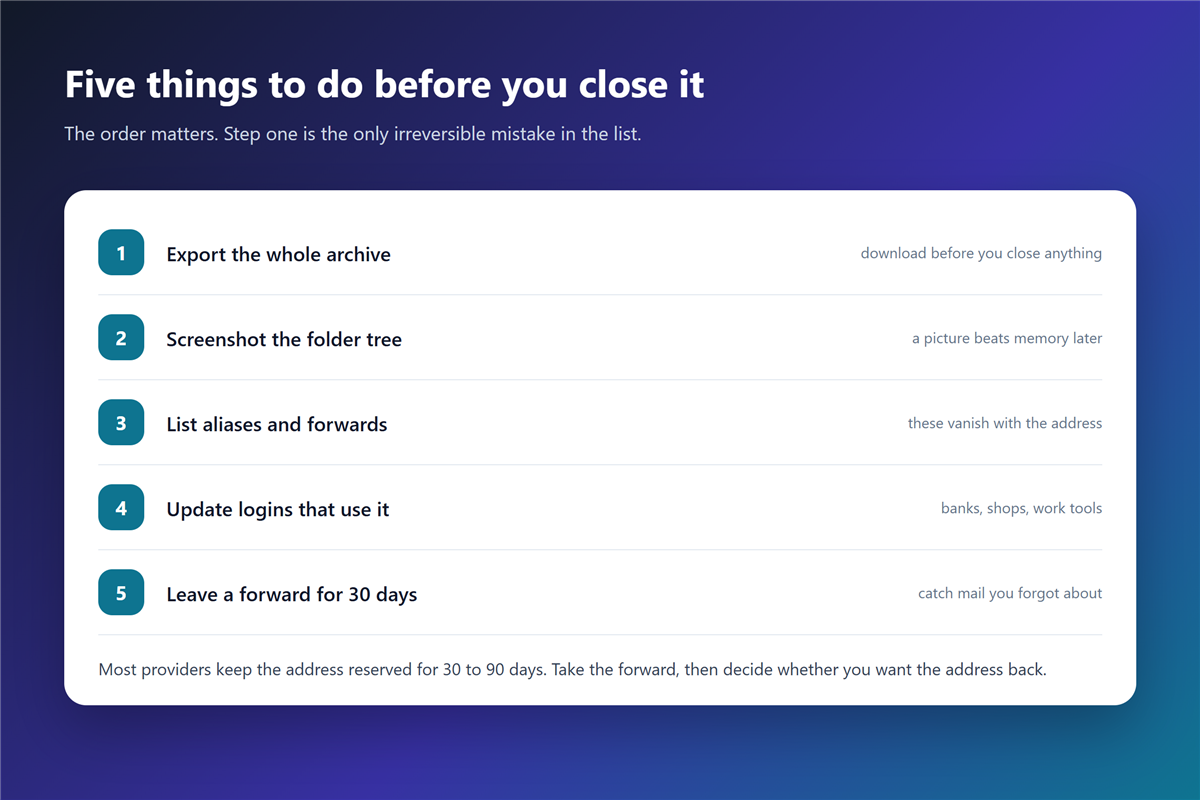
Download the full archive first, not a folder at a time. A complete export includes attachments, folder structure and timestamps; a partial one loses exactly the messages you will want later. Treat it as a proper 邮件归档 job, not a copy-and-paste.
Additionally, take a screenshot of the folder tree and write down every alias and forward. Those details are not inside the export file, and they are the ones I have regretted losing.
邮箱注销 when the address is compromised
If someone else already has access, closing the account is not enough. The intruder may have added a forward or a recovery address long before you noticed, and a plain 邮箱注销 removes your own access while leaving their copies intact.
Instead, clean the account first: change the 邮箱密码, revoke sessions (with 两步验证 enabled where the provider supports it), review the rules, then decide whether to close it. A mailbox that was clearly compromised needs the full 邮箱泄露 response steps before anything else.
A five-step close-out checklist
- Export the whole archive and store it offline.
- List aliases and forwards in a note.
- Update every login that uses the address.
- Set a forward or an auto-reply for 30 days.
- Close the account, then verify with a test message.
邮箱注销 for throwaway and alias addresses
Not every address deserves a ceremony. A temporary inbox is designed to expire, and a 邮箱注销 request for one is wasted effort.
Personal aliases are the middle case. They point at a real mailbox, so closing the alias only makes sense after you have checked where it was registered. The rules for keeping a set of 邮箱小号 under control are worth reading before you start deleting.
Delete, or just stop using it?
Sometimes the quieter option is better. Keeping an address alive and unread blocks a recycled-address risk, and it keeps password resets working while you migrate. Delaying 邮箱注销 is a legitimate strategy.
Of course, that only works while the account is still secure. Once an address has been breached or abandoned for years, 邮箱注销 is the cleaner end to the story.
Frequently asked questions
Does 邮箱注销 delete my data everywhere?
No. It removes your access and stops future mail. Copies held by other people, and copies in provider backups, follow their own schedules.
Can someone else claim my old address?
Usually yes, after a holding period of 30 to 90 days. That is why password resets should be moved before you close anything. Moving them first is the single most important step of 邮箱注销.
What happens to mail sent after the account closes?
It bounces back to the sender with a delivery failure notice, which at least tells them something changed.
Should I delete or just stop using it?
Keep it open while you migrate logins, then close it deliberately. An abandoned mailbox is harder to defend than a closed one.
评论
还没有评论,来说两句吧。以下为本文的引用通告: