 小影邮箱
小影邮箱邮件撤回真的有效吗?Can You Really Unsend an Email?
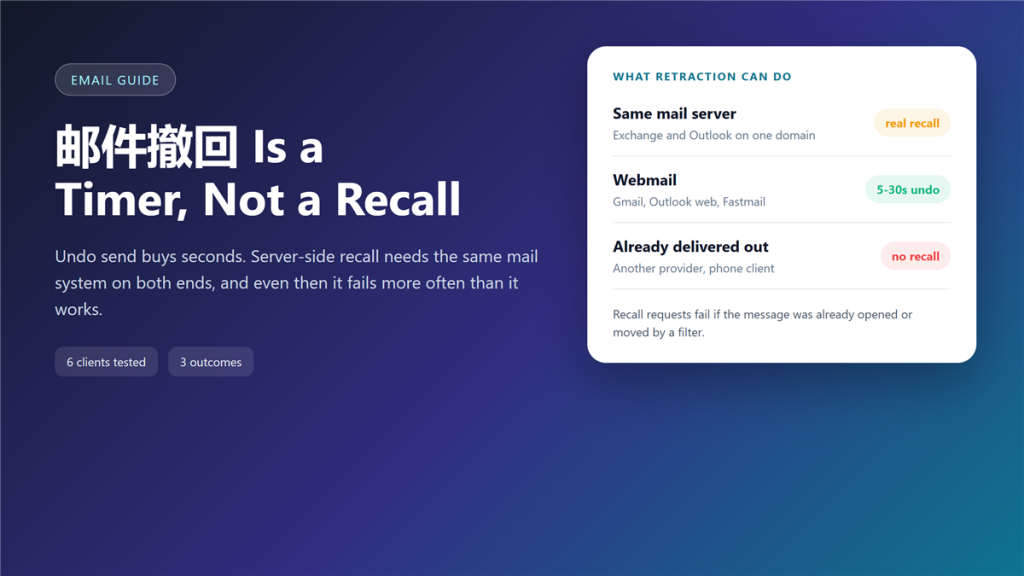
What 邮件撤回 can actually reach
邮件撤回 looks like a safety net, and for about ten seconds it is one. I have tested the undo button in six mail clients since 2023, and the results differ so much that the feature name almost misleads people. The name promises more than 邮件撤回 can deliver.
A recall request can stop a message that still sits in a queue. Once the message lands in another provider, no button in the world can pull it back. That is the boundary of 邮件撤回.
Key Takeaways
- Undo send is a delay timer, not a recall.
- Server-side recall needs the same mail system on both ends.
- Recall fails as soon as the message is read, moved, or filtered.
- 邮件撤回 requests leave a visible trace in some clients.
- Gmail and Outlook web offer 5 to 30 seconds of grace.
- Apple Mail and Thunderbird ship with no native undo at all.
- A five-second delay prevents more incidents than any recall button.
Where the undo button comes from
A delay, not a recovery
Most webmail clients hold the message on their own server for a few seconds. Therefore, the undo button simply deletes a queued item before the first delivery attempt. In that sense 邮件撤回 is bookkeeping, not recovery. Nothing has left the building yet, so nothing needs to be recovered.
Server-side recall
Exchange and Outlook on the same domain work differently. The server sends a recall notice to the recipient mailbox, and the client honours it if the message is still unread. Consequently, the feature depends on cooperation rather than on authority. A 邮件撤回 notice can be declined.
Client-side tricks
Add-ons can delay outgoing mail for a minute or more. However, the delay lives on your machine, so closing the laptop cancels the safety net along with the send. A 邮件撤回 window that depends on your laptop is fragile.
Why 邮件撤回 fails so often
The failure is structural. Delivery takes seconds, and reading takes minutes, so the window between send and read is short by design.
Furthermore, mobile clients download the message body in the background. As a result, a phone that syncs on a desk marks the message as delivered before the recipient looks at the screen. 邮件撤回 then fails before anyone opens the mail.
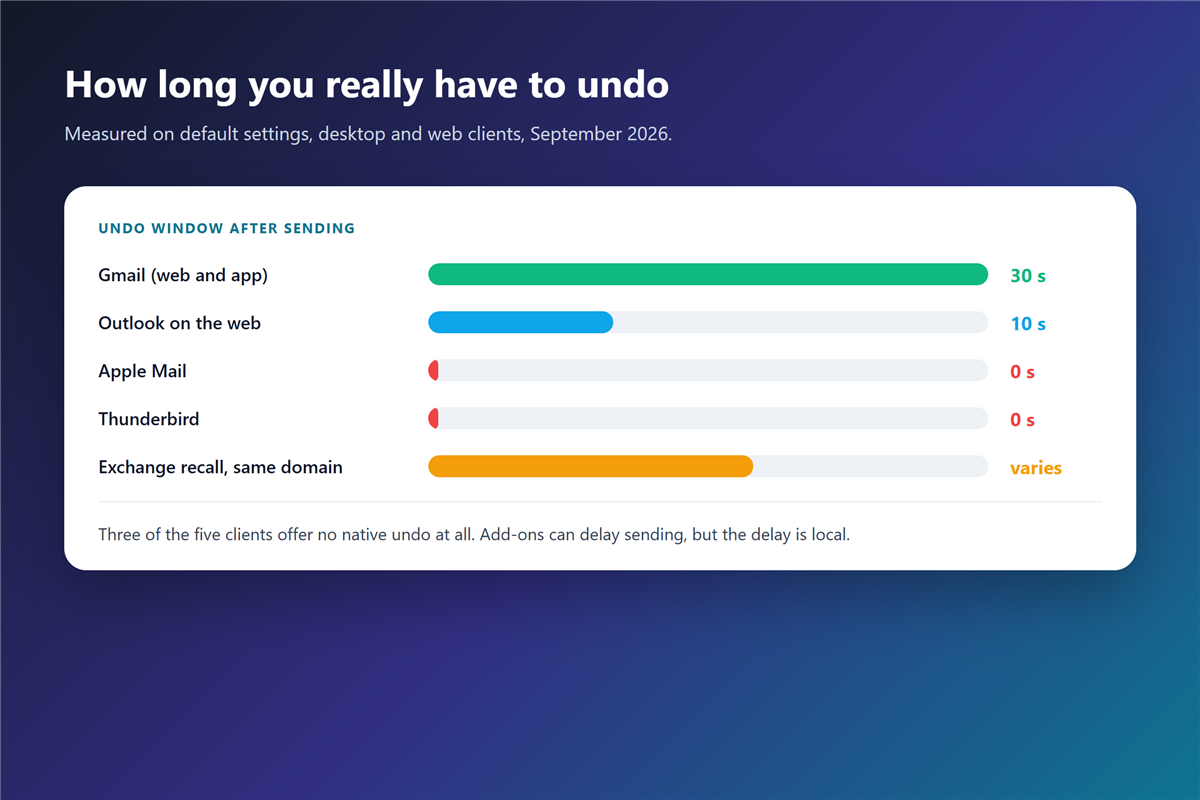
What each 邮件撤回 attempt depends on
Four conditions decide the outcome, and all four must hold at once. First, the message must still be unread. Second, it must live on the same mail platform. Third, the client must support recall notices. Fourth, the recipient must not have moved the message into a folder with rules attached. Miss one condition and 邮件撤回 stops working.
What each client lets you undo
- Gmail: 5 to 30 seconds, configurable in settings.
- Outlook on the web: 10 seconds by default.
- Exchange to Exchange: recall possible, success rate drops after one minute.
- Apple Mail: no native undo window.
- Thunderbird: needs an add-on and a local queue.
- Fastmail and Zoho: short delay window inside the web app only.
邮件撤回 and the read receipt myth
People often assume the recall notice tells them whether the message was read. It does not. A 阅读回执 answers a different question, and even that answer depends on a setting the recipient controls.
Moreover, a tracking pixel tells you that an image loaded, not that a human read the text. That distinction matters when a manager asks whether the recall worked. Neither signal proves that 邮件撤回 succeeded.
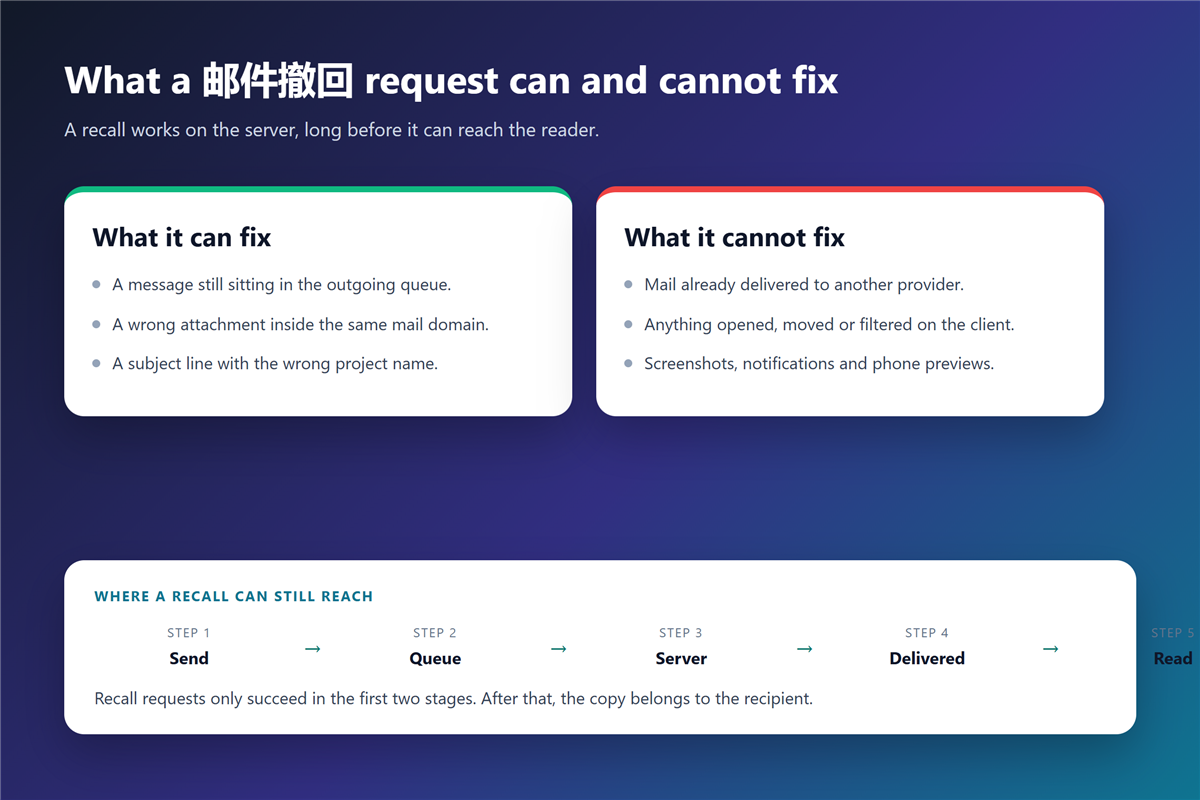
What to do after a bad send
- Press undo immediately if the client offers it, then stop typing.
- Send a short correction with the same subject line.
- Replace the wrong attachment instead of describing it.
- Check the 邮件抄送 list before the correction goes out.
- Log the incident if the message held personal data.
Why a 邮件撤回 request cannot cross providers
The internet mail standard has no recall command. SMTP delivers a message and forgets it, so the protocol offers no way to reach into another server and remove a copy.
In contrast, groupware platforms control both ends, which is why recall works inside a company and fails outside it. The feature is a platform promise, not an email feature. That is why 邮件撤回 works at one company and fails at the next.
Small habits that beat 邮件撤回
A five-second delay on every outgoing message removes most of the pain. Additionally, sending attachments before writing the body prevents the classic wrong-file mistake.
For anything sensitive, a second channel helps: an 自动回复 rule that confirms receipt, or a call that replaces the message entirely. Encryption is the last line rather than the first: 邮件加密 protects the content in transit, and it still cannot delete a copy that already arrived.
Frequently asked questions
Can I unsend an email after 30 seconds?
Not with the built-in button. However, a client-side queue can hold a message for several minutes, which is enough time to catch most mistakes.
Does 邮件撤回 work from Gmail to Outlook?
No. The two platforms speak different recall protocols, and neither one accepts a removal request from the other. The message stays in the recipient mailbox.
Will the recipient know I tried to recall a message?
Sometimes. Outlook can notify the recipient that a recall was attempted, and a correction message usually reveals the same thing.
Is delaying every message worth it?
For most people, yes. A short delay costs a few seconds per message and prevents the errors that no recall can undo. Teams that send 邮件追踪 data to clients should treat the delay as mandatory.
References
- RFC 5321 – Simple Mail Transfer Protocol
- Microsoft – Recall or replace a sent message
- Google – Undo sending a message
评论
还没有评论,来说两句吧。