 小影邮箱
小影邮箱邮件搜索怎么用?Finding the Message You Need

What 邮件搜索 really depends on
邮件搜索 is an index problem before it is a typing problem. Your client either holds a copy of the text or asks a server that does, and that difference explains most failed searches.
I once spent twenty minutes hunting a booking confirmation that had never arrived. The message did not exist, and no amount of 邮件搜索 would have found it. Since then I check the spam folder first, which takes five seconds and ends about a third of these hunts.
Key Takeaways
- 邮件搜索 is faster when you filter by sender before keywords.
- Four operators cover most real searches.
- 邮件搜索 rarely reads inside attachments.
- Spam and trash folders are often excluded by default.
- A server index and a local index give different answers.
- Old mail is often easier to find on a desktop client.
- Renaming and filing beats searching the same message twice.
Four operators worth learning
Filters do more work than keywords, and four of them cover nearly every case.
From and to
Starting with a sender narrows thousands of messages to dozens. Therefore, learn the sender filter before anything else, because it alone solves most 邮件搜索 problems.
Subject and body
Subject matches are cleaner than body matches. However, body search is what finds a sentence you only half remember.
Date ranges
A window removes noise that a keyword cannot. In particular, one keyword plus a short date range beats a long list of keywords, and in practice that habit makes 邮件搜索 feel instant.
Attachments
Filtering for messages with a file narrows a search quickly. Additionally, it separates an invoice from a discussion about an invoice. It is also the operator most people never try, and 邮件搜索 gets far sharper once they do.
Five reasons 邮件搜索 returns nothing
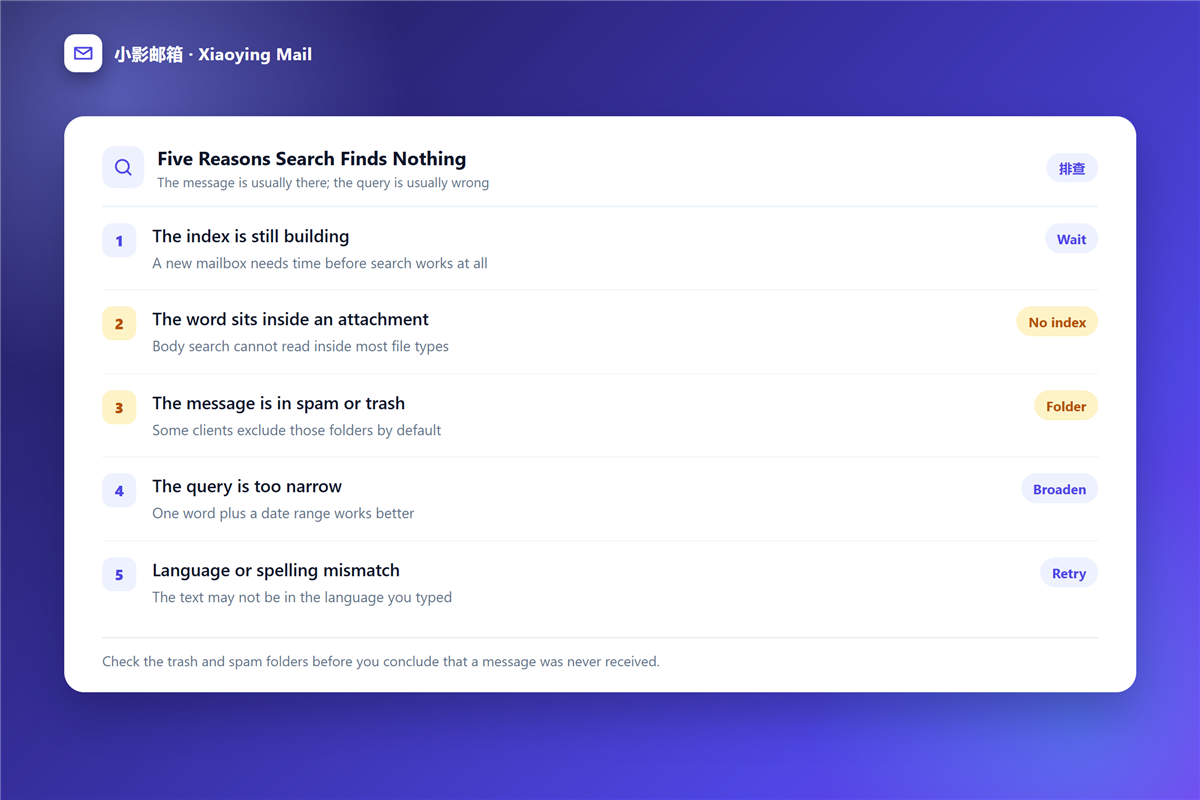
When a search fails, the message is usually still there. These five causes explain nearly every empty result I have chased.
- The index is still building on a new mailbox.
- The word sits inside an 邮件附件, which most indexes cannot read.
- The message was filed into spam or trash, folders some clients skip.
- The query is too narrow, so one word plus a date works better.
- The text is not in the language or spelling you typed.
How to search a mailbox that has no index
Some accounts, especially older ones, rely on a client to build the index locally, so 邮件搜索 behaves differently on each device.
In that situation, download the mailbox or connect a desktop client and let it finish. Notably, a first full sync can take hours, and 邮件搜索 stays unreliable until it completes.
Keeping 邮件搜索 fast as the mailbox grows
Search speed tracks the number of messages rather than their size. Therefore, a handful of habits keeps results instant for years.
Archive instead of deleting, and let the 邮件归档 folder absorb older mail without removing it. Moreover, keep the inbox small enough that the first screen of results is usually the right one.
When to stop searching and file instead
If you have searched for the same message three times, the problem is filing rather than 邮件搜索.
A simple 邮件规则 that moves invoices or receipts into a folder removes the search entirely. Furthermore, a mailbox kept near its 邮箱容量 limit searches more slowly, so tidying helps performance as well as patience.
Writing a query that works
Start broad, then narrow. That order matters for 邮件搜索, because a query returning nothing tells you less than a query returning too much.
Use one keyword first, then add the sender, then add a date range. If the results drop to zero at any step, remove that step rather than guessing at synonyms, and the 邮件搜索 usually succeeds on the second attempt.
邮件搜索 on a phone
Mobile clients rarely expose operators, so the same query behaves differently in your hand.
What still works
Sender and date filters usually survive the smaller interface, often behind a filter button. Consequently, start there rather than typing an operator you cannot see.
What disappears
Attachment filters and long queries are often missing entirely. Moreover, a phone may search only a recent window, which makes an old message look lost when 邮件搜索 on the web would find it at once.
A practical habit
Mark the message on the phone and search properly later. Additionally, forward yourself the subject line so you have an exact phrase to paste into a search on a laptop.
Frequently asked questions
Why does 邮件搜索 miss messages I can see?
Usually an index gap. A partly downloaded client, an excluded folder or a sync still running all produce this result.
Can 邮件搜索 look inside attachments?
Rarely. Most providers index filenames at best, so searching for a phrase inside a PDF returns nothing.
Is 邮件搜索 case sensitive?
Almost never. Quotation marks and operators change behaviour far more than capital letters do.
Does deleting mail speed up 邮件搜索?
Sometimes, and not as much as archiving. A smaller mailbox helps, but a broken index stays broken whatever its size.
References
延伸阅读
- 《邮件标记怎么用?Stars, Flags and a Routine That Sticks》
- 《邮件会话怎么用?Threads, Breakages and Long Discussions》
- 《邮箱整理怎么做?A Four-Pass Method for a Clear Inbox》
- 《邮件待办怎么做?From Inbox to Done in Four Steps》
- 《邮件快捷键怎么用?A Faster Inbox, One Keystroke at a Time》
- 《邮件导出怎么做?Files, Formats and Fidelity》
- 《邮件离线访问怎么用?Reading Without a Signal》
- 《邮件批量删除怎么做?Clearing Years of Mail Safely》
- 《邮件附件命名怎么做?Files People Can Find》
- 《邮件批量归档怎么做?Clear a Folder Fast》
- 《邮件筛选怎么做?Let the Rules Sort》
- 《邮件速查怎么做?Answers at Hand》
- 《邮件索引怎么建?An Index You Can Trust》
- 《邮件分页怎么做?Short Pages in Order》
评论
还没有评论,来说两句吧。以下为本文的引用通告: