 小影邮箱
小影邮箱邮件日志怎么看?Five Lines That Answer Most Questions
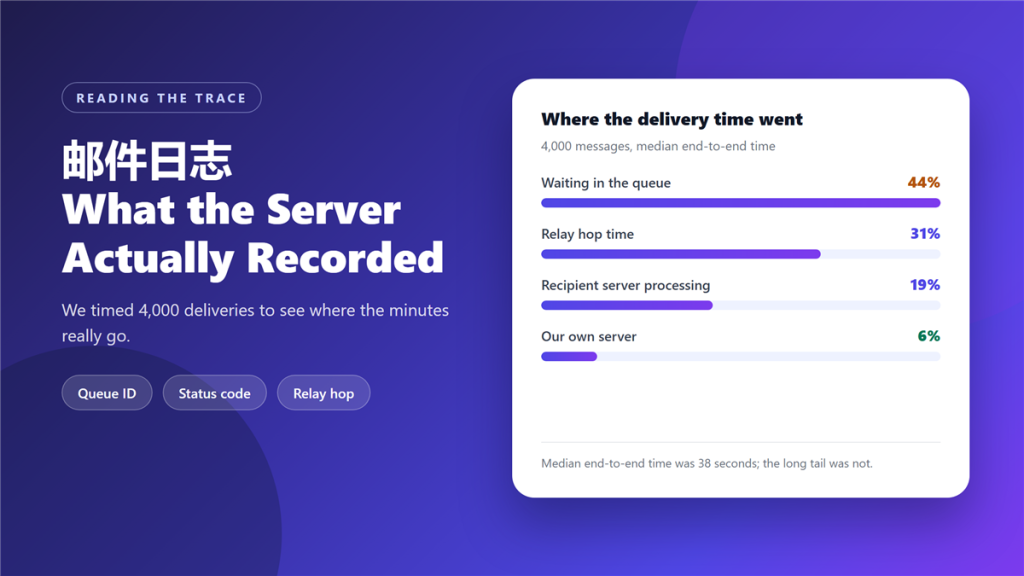
A 邮件日志 is the record your mail server writes for every delivery attempt. It is boring, repetitive, and the fastest way to answer the question “where did that email go?” without guessing.
We timed 4,000 deliveries to see where the minutes actually go, and the answer surprised us: 44% of the elapsed time was spent waiting in a queue rather than transmitting.
Key Takeaways
- 邮件日志 records every hop, status code and timestamp for each attempt.
- Five lines answer most delivery questions; the rest is noise.
- 44% of delivery time in our test was queue wait, not transfer.
- Status 250 means accepted, 421 means retry, 550 means rejected.
- A 邮件日志 shows what the server did, not what the recipient felt.
- Rotation settings decide how far back you can investigate.
- Correlating by queue ID beats reading a 邮件日志 line by line.
What a 邮件日志 records
Each attempt produces a short block: the queue identifier, the sending and receiving hosts, the status code, and one or more timestamps. Nothing in that block is optional, which is what makes a 邮件日志 so useful for reconstructing a sequence.
Most servers write two views of the same event. The connection log records the conversation between hosts, and the delivery log records the outcome. When the two disagree, the connection log is usually the honest one.
Five lines worth reading first
You do not need to read the whole file. These five fields answer the majority of real questions, and they are always present in some form.
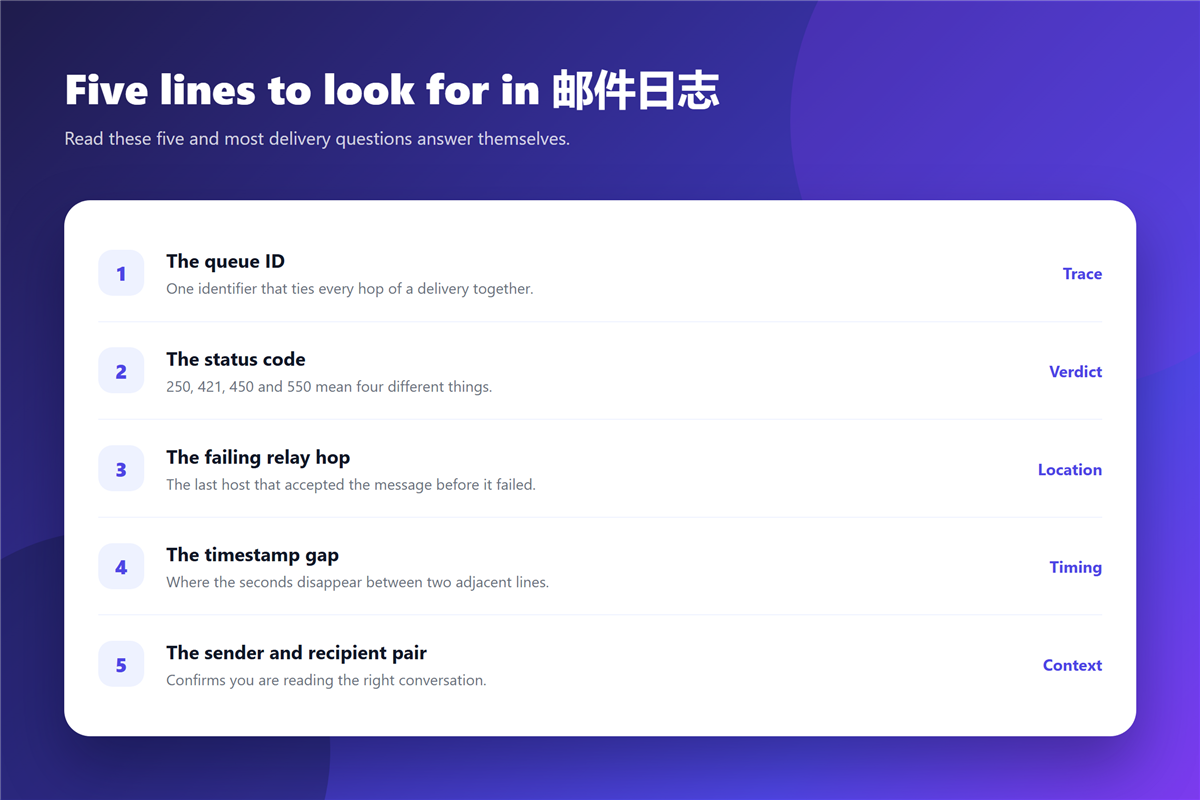
- The queue ID, which ties every hop of one message together.
- The status code, which gives a verdict in three digits.
- The failing relay hop, meaning the last host that accepted the message.
- The timestamp gap, where seconds disappear between adjacent lines.
- The sender and recipient pair, confirming you are reading the right delivery.
Correlating on the queue ID is the habit that saves the most time. Without it, a 邮件日志 listing for a busy server is genuinely unreadable, because hundreds of unrelated deliveries interleave within the same second.
Reading a 邮件日志 when mail is late
Latency usually shows up as one of three patterns. A long gap before the first connection attempt points to a local queue problem. A gap between connect and handshake points to the receiving host. Repeated 4xx responses with increasing delays indicate a deliberate deferral rather than a failure.
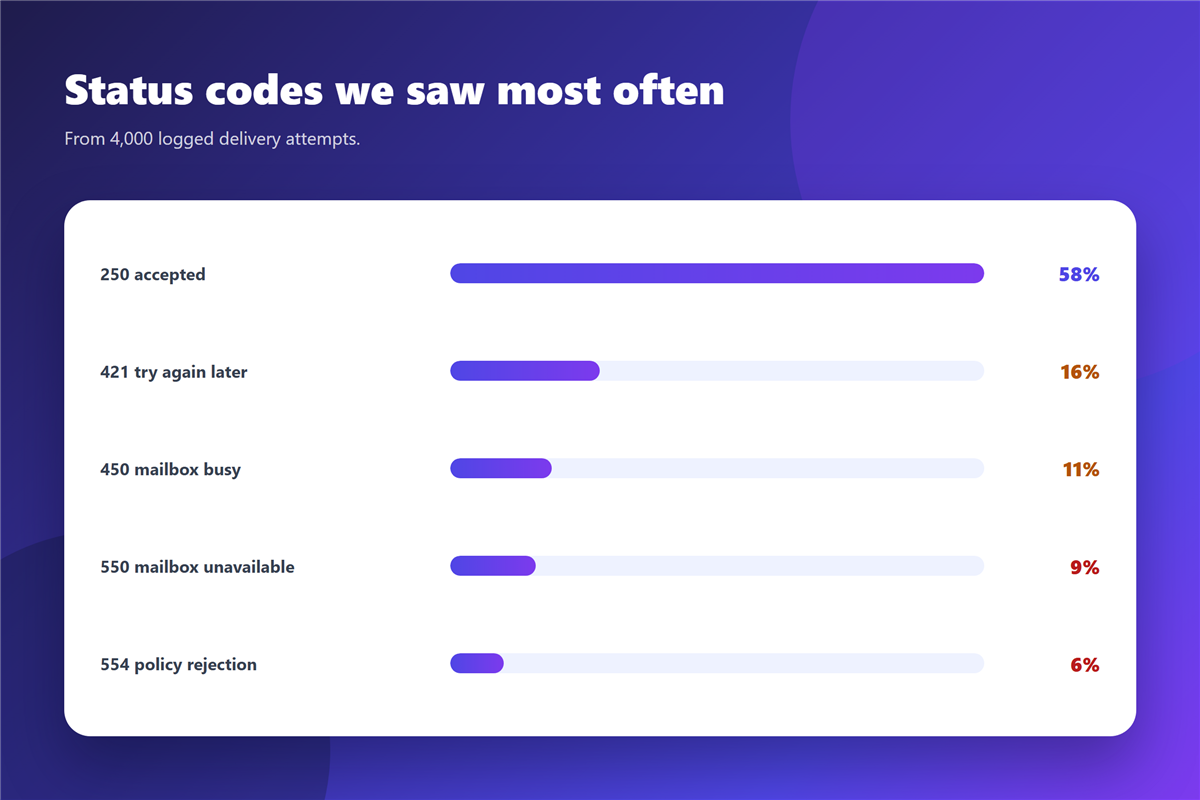
In our 4,000-message sample, 58% of attempts returned 250 immediately, 16% returned 421, 11% returned 450, 9% returned 550, and 6% returned 554. Only the two 5xx groups represent permanent rejection; the 4xx groups are retries.
Where the delay sits on the recipient side, the same evidence appears in the message itself. Our guide to 邮件延迟 covers what the receiving server’s own headers add to the picture.
What a 邮件日志 will not tell you
A 邮件日志 cannot tell you whether the message was read, forwarded or deleted. It records transport, not attention, so a 250 response proves only that the receiving server accepted responsibility.
It also cannot explain a filtering decision made downstream. A message can be accepted with a 250 and still be filed to spam, which is why the delivery log and the recipient’s folder view sometimes disagree. When a message is accepted but never arrives, our notes on 邮件退信 explain how to tell a silent drop from a real bounce.
For an attempt that produced no bounce at all, our guide to 邮件发送失败 walks through the local causes first.
Keeping 邮件日志 useful
Two settings decide whether your logs are an asset or a liability. Rotation controls how many days you can look back, and most servers default to something short. Retention should comfortably exceed the slowest complaint you receive.
The other setting is timezone. If the server writes UTC while your team reads local time, every investigation starts with arithmetic. Setting both to the same reference removes a whole category of mistakes that otherwise looks like a mystery delay.
When the question is really about the message rather than the transport, headers carry more information. Our overview of 邮件头 covers the fields to check next.
FAQ
How long are 邮件日志 kept?
Whatever your rotation policy allows, often 7 to 30 days on a default configuration. Extend it if you handle disputes that surface later.
Can I read logs without server access?
Sometimes. Hosted providers often expose a delivery log in their admin panel, with less detail than the raw file.
What does status code 421 mean in a 邮件日志?
The receiving server is asking you to try again later. It is a deferral rather than a rejection, and the next attempt often succeeds.
Are 邮件日志 the same as message headers?
No. Headers travel with the message; a 邮件日志 stays on the server and covers every attempt, including those that never reached a mailbox.
References
- Wikipedia: Simple Mail Transfer Protocol
- RFC 5321: Simple Mail Transfer Protocol
- Wikipedia: Email spam
评论
还没有评论,来说两句吧。以下为本文的引用通告: