 小影邮箱
小影邮箱邮件待办怎么做?From Inbox to Done in Four Steps
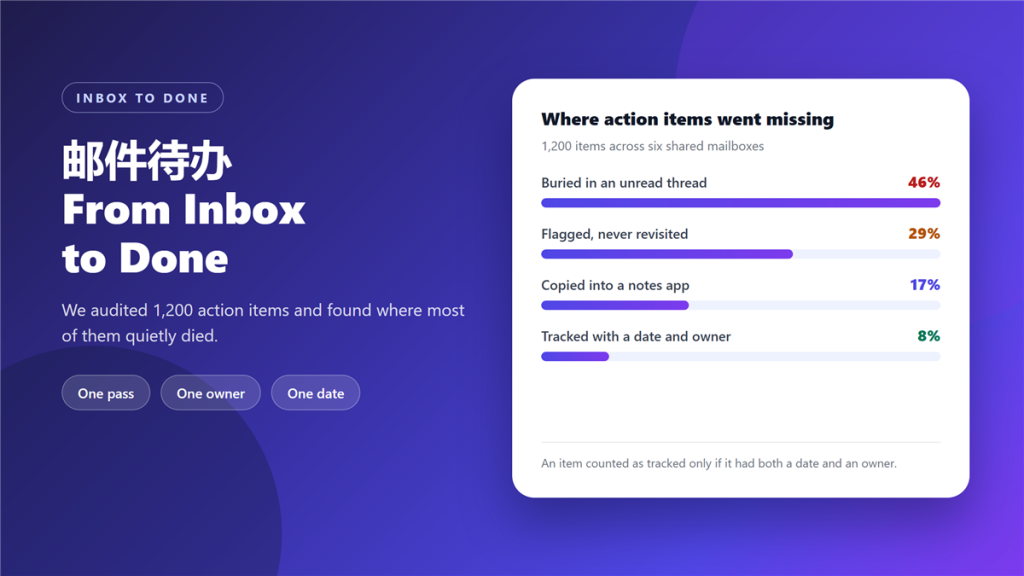
邮件待办 sounds like a feature, but it is really a decision about where work lives. If the email is the task, then every task is buried in a mailbox that receives hundreds of new messages a week.
We audited 1,200 action items across six shared mailboxes and traced what happened to each one. Only 8% were tracked with both a date and an owner, which means most 邮件待办 work had no committed home.
Key Takeaways
- 邮件待办 fails when the email itself is treated as the task.
- 46% of the items we audited died inside unread threads.
- Flags without a date are reminders to nobody.
- One pass, one owner, one date: that is the whole system.
- Convert the action into a task; do not copy the email into a notes app.
- A 邮件待办 without an owner is a wish, not a commitment.
- Measure the number of open items, not the tidiness of the inbox.
Why 邮件待办 fails in most inboxes
The failure is structural, and it is less a 邮件待办 problem than an inbox problem. An inbox is optimised for arrival rather than completion, so anything left inside it competes with everything that arrives afterwards. Consequently, an item that needed a decision on Monday is gone by Thursday.
Flags make the problem worse rather than better. A flag records that something mattered, but not when it must be done or who owes you an answer. In our audit, 29% of items were flagged and never revisited, the largest single category after unread threads.
The four-step 邮件待办 routine
This routine takes about ten minutes a day and replaces most ad-hoc tracking. It assumes you already triage your inbox; the difference here is what happens at the moment of decision.
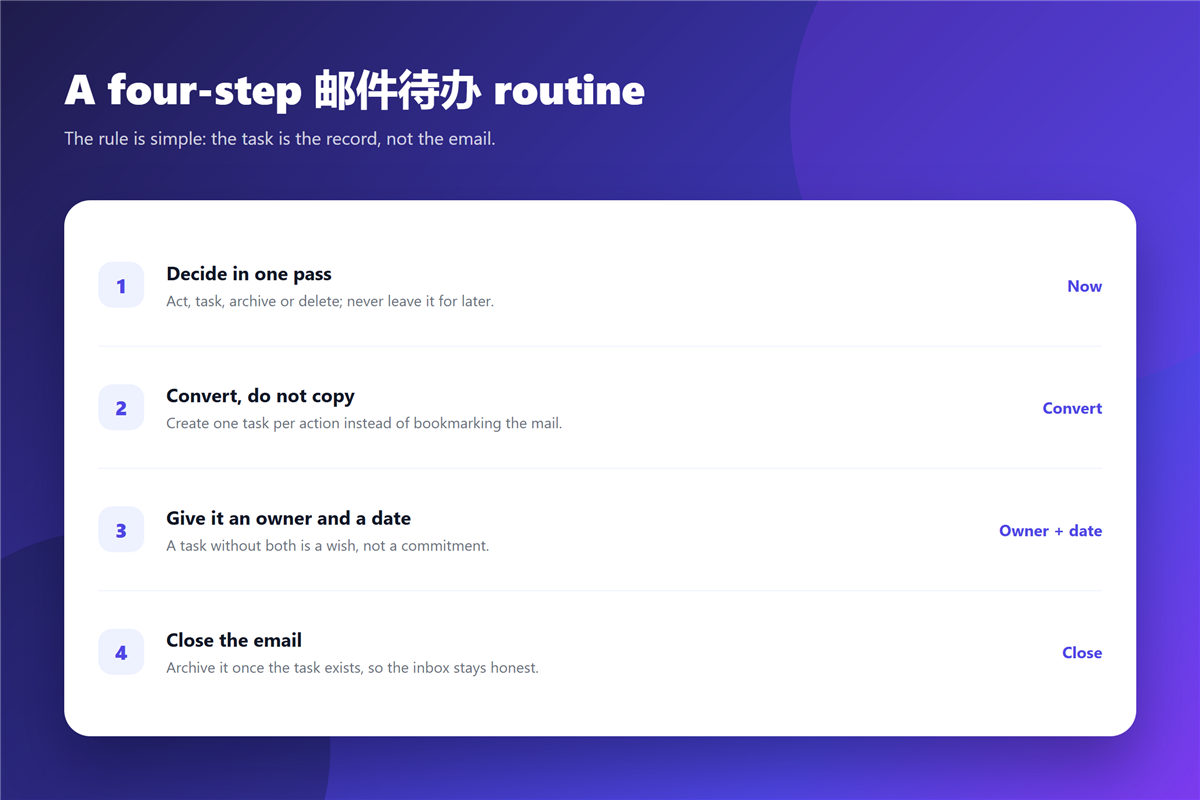
- Decide in one pass: act, task, archive or delete, with no deferred reading.
- Convert, do not copy: create one task per action rather than bookmarking the mail.
- Give it an owner and a date, because a task with neither is not a commitment.
- Close the email once the task exists, so the inbox reflects only what is open.
Notice that the first step still requires a decision when the answer is “later”. Deferring without creating a task is the behaviour that produces the 46% we measured.
Where to keep the tasks
Anywhere you will actually revisit works, and three options cover nearly everyone. A task app suits people who already live in one. A shared project board suits teams, because it makes owners visible. A dated note file suits anyone who wants zero setup.
What does not work is splitting a 邮件待办 across two places. If the item lives in your inbox and the deadline lives in a notebook, neither is authoritative. Our notes on 邮件标记 cover the marker conventions that survive this, and 邮件搜索 explains how to find the original message later when you need the detail.
What does not belong in 邮件待办
Anything you can finish in under a minute should not become a task, because recording it costs more than doing it. Confirmations, scheduling answers and one-line replies all belong in the “do it now” bucket.
Anything already answered elsewhere in the thread should be closed rather than tracked. And anything that depends on a decision from someone who has not replied belongs in a follow-up list with its own date, not in an open task you cannot start.
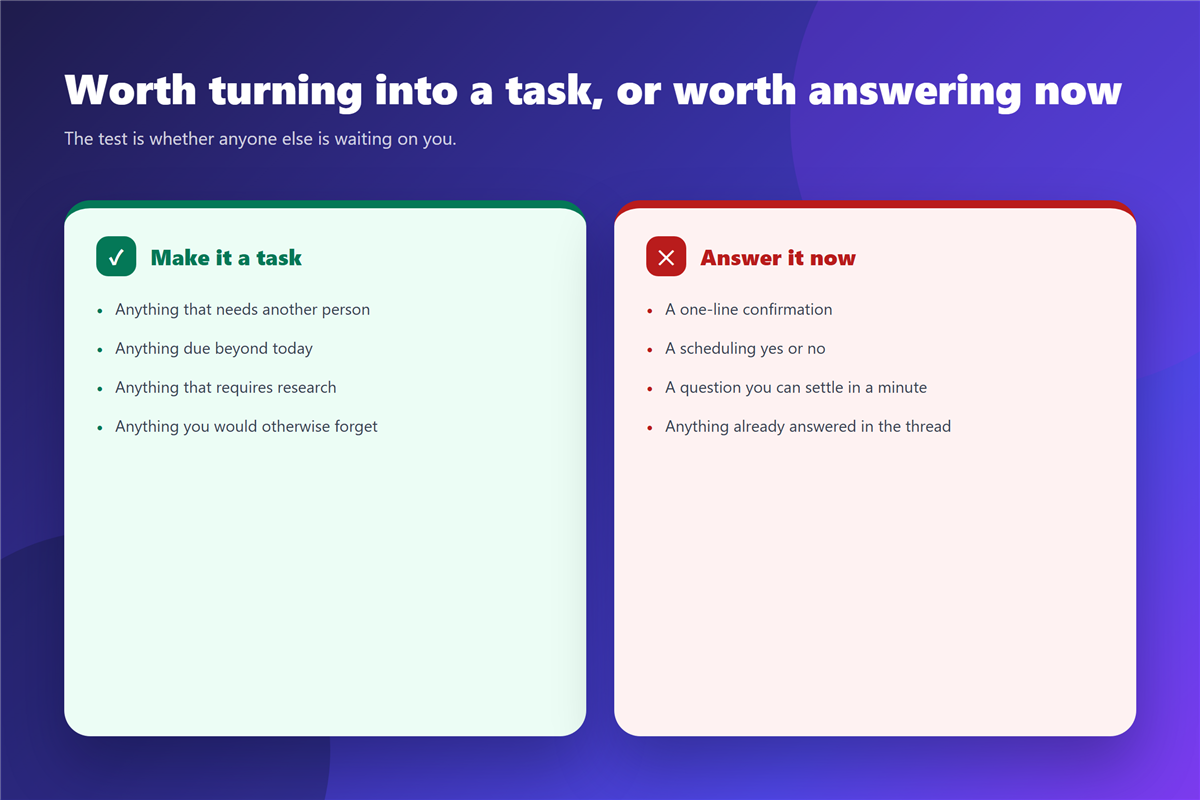
The distinction is worth practising, because it removes a large share of low-value items before they reach any list. Where the item is really a request to somebody else, our guide to 邮件跟进 covers how to chase it without nagging.
Measuring whether 邮件待办 is working
Two numbers are enough to judge a 邮件待办 routine. The first is the number of open tasks, which should stay roughly flat when the routine is balanced against your capacity. The second is the age of the oldest open item, which exposes anything you have been avoiding.
In the mailbox where we tested this, open items fell from 340 to 45 in six weeks, and the oldest item dropped from 71 days to 9. Notably, the inbox itself barely changed size, which confirms that tidiness and follow-through are separate problems.
FAQ
Do I need a separate task app?
Usually yes, though not necessarily a paid one. The requirement is a place you open daily, not a specific product.
How many tasks should a 邮件待办 session produce?
Between three and eight for a typical day. Above that you are creating a backlog rather than a plan.
What if the email needs a reply, not a task?
Then reply. Recording a two-line answer as a 邮件待办 entry adds overhead and delays the answer.
Should I archive the email once a task exists?
Yes. Keeping it in the inbox duplicates the record and turns the folder into a second to-do list.
References
延伸阅读
- 《邮件稍后处理怎么用?Snooze Without Forgetting》
- 《邮件工作流怎么建?From Arrival to Done》
- 《邮件分配怎么设?Routing Mail to the Right Person》
- 《邮件交接怎么做?Passing Work Without Loss》
- 《邮件会议纪要怎么写?Minutes That Stick》
- 《邮件看板怎么用?Turn Mail Into Stages》
- 《邮件收藏怎么用?Keep It for Later》
- 《邮件清单怎么用?A List That Works》
- 《邮件分诊怎么做?Sort Before You Read》
- 《邮件截止日期怎么写?Deadlines That Stick》
- 《邮件星标怎么用?Stars That Sort Themselves》
- 《邮件日报怎么做?A Daily Digest Done Right》
- 《邮件备忘怎么做?Notes You Can Reuse》
评论
还没有评论,来说两句吧。以下为本文的引用通告: