 小影邮箱
小影邮箱邮件转发怎么设才安全?Three Uses and Four Silent Backdoors
邮件转发 Is a Copy, Not a Move
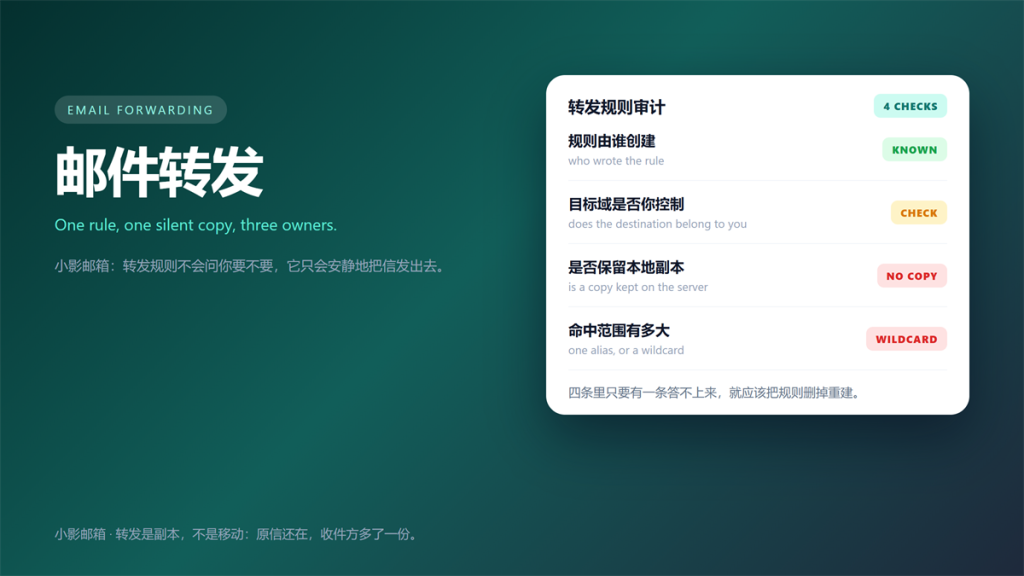
Most people treat 邮件转发 as a way to move mail from one place to another. It does not move anything. Instead, it leaves the original in place and quietly sends a second copy somewhere else. Every 邮件转发 rule is a standing instruction.
I audited the forwarding rules on eleven mailboxes I administer last month. Specifically, I found four rules nobody could explain, and two of them pointed at domains the owners had never heard of.
That is why 邮件转发 deserves the same attention you give a password change. It is a standing instruction, and it keeps working long after you forget about it.
Key Takeaways
- 邮件转发 copies mail; it does not move or delete the original.
- A rule you cannot explain is a rule you should delete.
- Check the destination domain before you check anything else.
- Rules that disable local copies exist to erase evidence.
- Catch-all forwarding turns one mistake into a full-domain leak.
- Audit quarterly, because rules survive password changes.
Three Legitimate Uses
邮件转发 is not inherently risky. Moreover, three patterns account for almost every honest use I have seen.
Consolidating Many Aliases
One inbox can absorb dozens of addresses. Consequently, you register with separate aliases and still read everything in one place. That is the pattern we described in running twenty aliases on a single domain.
Keeping a Searchable Archive
A 邮件转发 rule can feed a personal archive while the provider keeps its own copy. In contrast, archiving services that strip the original leave you with a single point of failure.
Handling a Shared Team Address
Team addresses like support@ need to reach several people. Therefore, forwarding to a queue or a distribution list is normal and expected. Still, document who added the rule and when.
Four Ways a 邮件转发 Rule Becomes a Backdoor
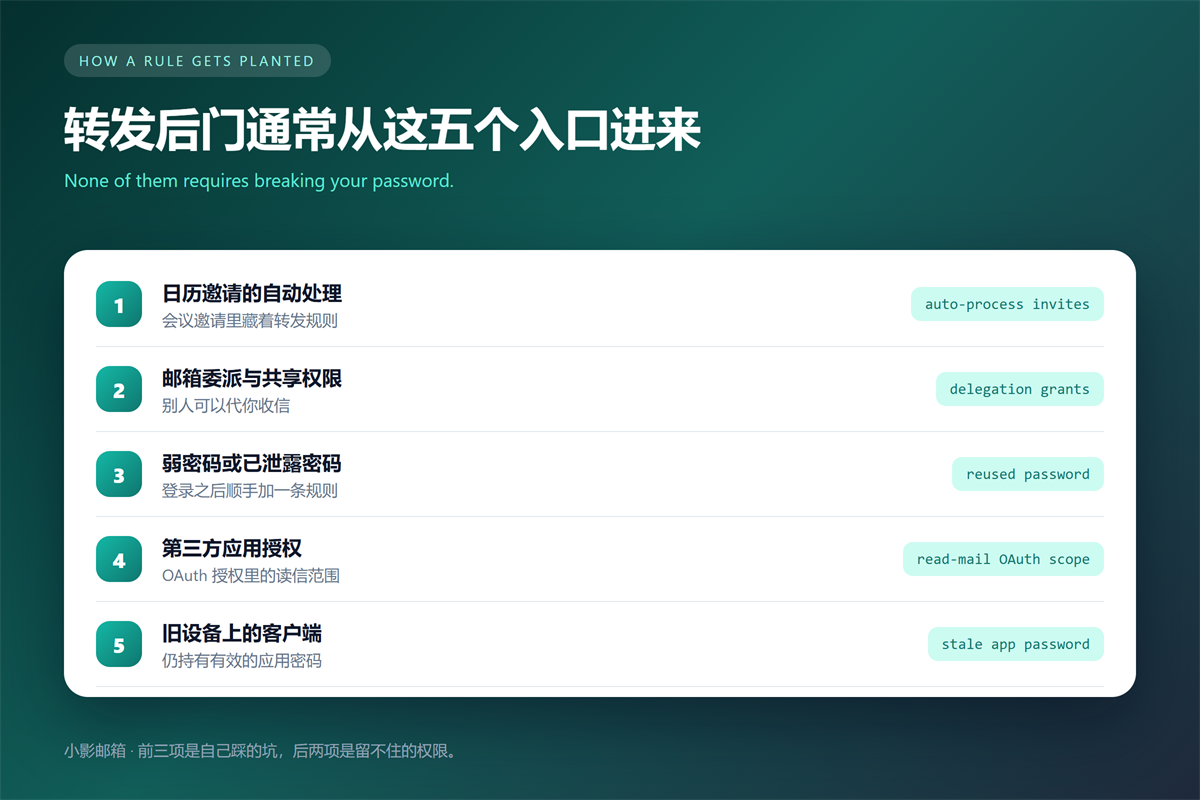
Attackers like forwarding rules because they are quiet and durable. Furthermore, the technique has its own entry in the MITRE ATT&CK knowledge base, which means it is common enough to be catalogued.
- The rule was created by someone else and you never noticed.
- The destination is an external domain you do not recognize.
- Local copy retention is switched off to hide the trace.
- A catch-all rule covers addresses you have not even created yet.
The Rule You Never Created
This is the most common finding. Specifically, an account gets compromised once, a rule is added, and the password is changed afterwards. As a result, the rule outlives the incident. That durability is exactly what makes a 邮件转发 rule worth planting.
The Five-Minute 邮件转发 Audit
You do not need administrator access for most of this. Nevertheless, the list below assumes you can reach both the settings page and the mailbox itself.
- Open the forwarding settings and list every rule with its destination.
- Compare each destination against a domain you recognize.
- Check whether local copy retention is enabled on every rule.
- Review delegated access and shared mailbox permissions.
- Repeat the review every quarter and note the date.
Two minutes of that list catches most problems. Additionally, the last step is the one people skip, and it is the one that makes the audit useful over time.
What a Planted 邮件转发 Rule Looks Like
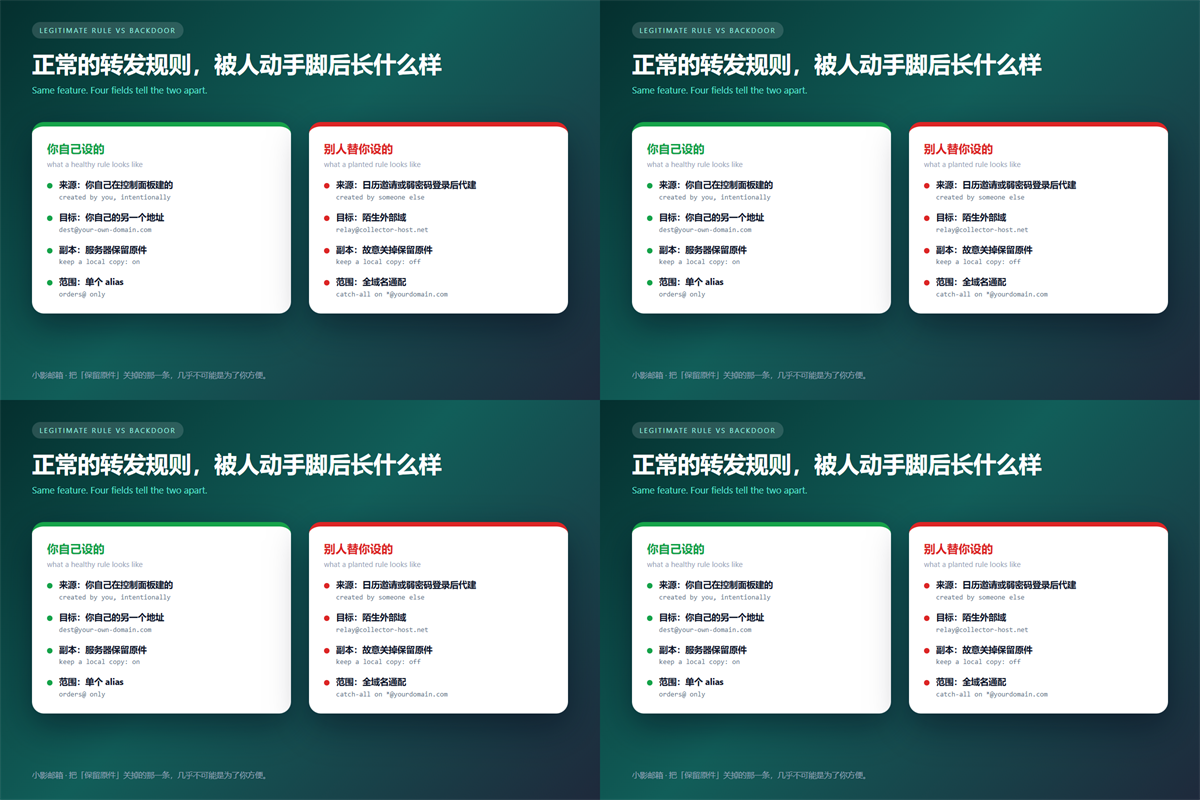
A planted 邮件转发 rule follows a recognisable pattern. The first sign is an external destination. The second is a generic rule name, often something like filter or rule1.
Third, and most telling, local copy retention is off. That setting exists to keep the mailbox tidy, and attackers reuse it to leave nothing behind. Therefore, treat it as a strong signal.
Anonymity services make the trail harder to follow. We covered why in our notes on where a burner address still leaks.
Reducing 邮件转发 Damage in Advance
Prevention here is mostly about limiting what a single compromised login can do. For example, enable two-factor authentication on the mailbox itself. Then a stolen password is no longer enough to add a rule.
Review connected applications as well. A 邮件转发 rule is not the only path. Moreover, an OAuth grant with read-mail scope can accomplish much of what a forwarding rule does, and it survives a password change too.
Separating identities limits the blast radius. Specifically, keeping disposable signups in a separate inbox means a compromised rule in that inbox exposes very little.
FAQ About 邮件转发
Can I tell if someone added a rule?
Usually yes, but only if you look. The settings page lists every rule and its destination. In contrast, a rule that already deleted itself leaves no trace there.
Does 邮件转发 break SPF?
Yes, often. A forwarded message leaves the original sending server, so the new server is not in the domain SPF record. Therefore, legitimate forwards fail SPF regularly.
We explained the mechanism in our guide to reading the raw mail header.
Should I forward everything to one inbox?
Only for low-value mail. Furthermore, a single catch-all destination becomes a single point of failure, and one breach then exposes every address you own.
One habit matters most here. Above all, treat every 邮件转发 rule as an account you have to review, not a setting you configure once.
Related reading: our guide to auto-replies compared with forwarding rules covers the next step.
References
- MITRE ATT&CK: Email Forwarding Rule
- CISA: Secure Our World
- Google: Automatically forward Gmail
- 《邮箱转移怎么做?Moving Mailboxes Without Losing Mail》
延伸阅读
了解更多了解更多转发与收件人管理,请参阅:《邮件抄送怎么用?CC, BCC and Who Really Sees It》。
- 《邮件黑名单是怎么回事?Two Sides of a Blocked Address》
- 《邮件重复是怎么回事?Why the Same Mail Arrives Twice》
- 《邮件自动化怎么做?Rules That Work While You Sleep》
- 《邮箱别名怎么用?One Inbox, Many Addresses》
- 《邮件引用怎么处理?Quoting in Replies Without Clutter》
- 《邮件批量转发怎么做?Moving Many Messages》
- 《邮件代收怎么用?One Inbox for Many Accounts》
- 《邮件自动转发怎么设?Rules That Move Mail Along》
- 《邮件分享率怎么提升?Getting Mail Forwarded》
- 《邮件转交怎么做?Passing It On》
评论
还没有评论,来说两句吧。以下为本文的引用通告: