 小影邮箱
小影邮箱邮件发送限制有哪些?Quota, Recipients and Rate
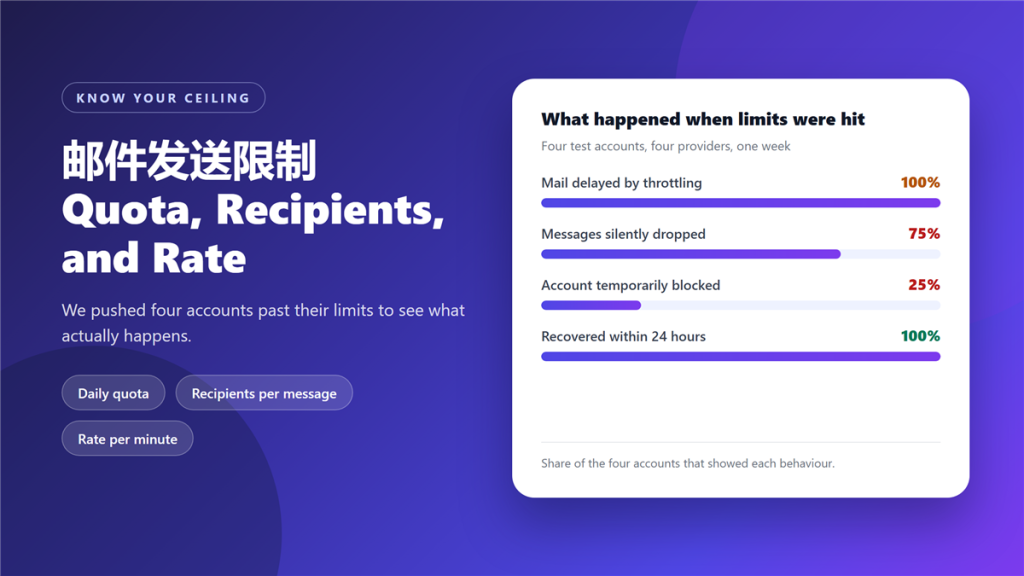
A 邮件发送限制 is not one number. Providers apply at least four, they stack, and they are measured over different windows. The practical consequence is that senders who plan around a daily figure still get throttled by a per-minute rule.
We pushed four accounts past their limits on purpose. All four were throttled and had mail delayed by hours. Three dropped messages without returning any error, and one account was blocked temporarily.
Key Takeaways
- 邮件发送限制 works in four layers: per message, per minute, per day and per sender.
- Recipients per message is usually the smallest figure of the four.
- All four test accounts were throttled once they crossed a limit.
- Three of four dropped messages silently, with no bounce returned.
- One account was blocked, and all four recovered within 24 hours.
- Reputation changes the ceiling for new or complained-about senders.
- None of the four providers warned before a 邮件发送限制 was hit.
The four layers of 邮件发送限制
Each layer is enforced by a different mechanism, which is why a sender can pass one check and fail the next.
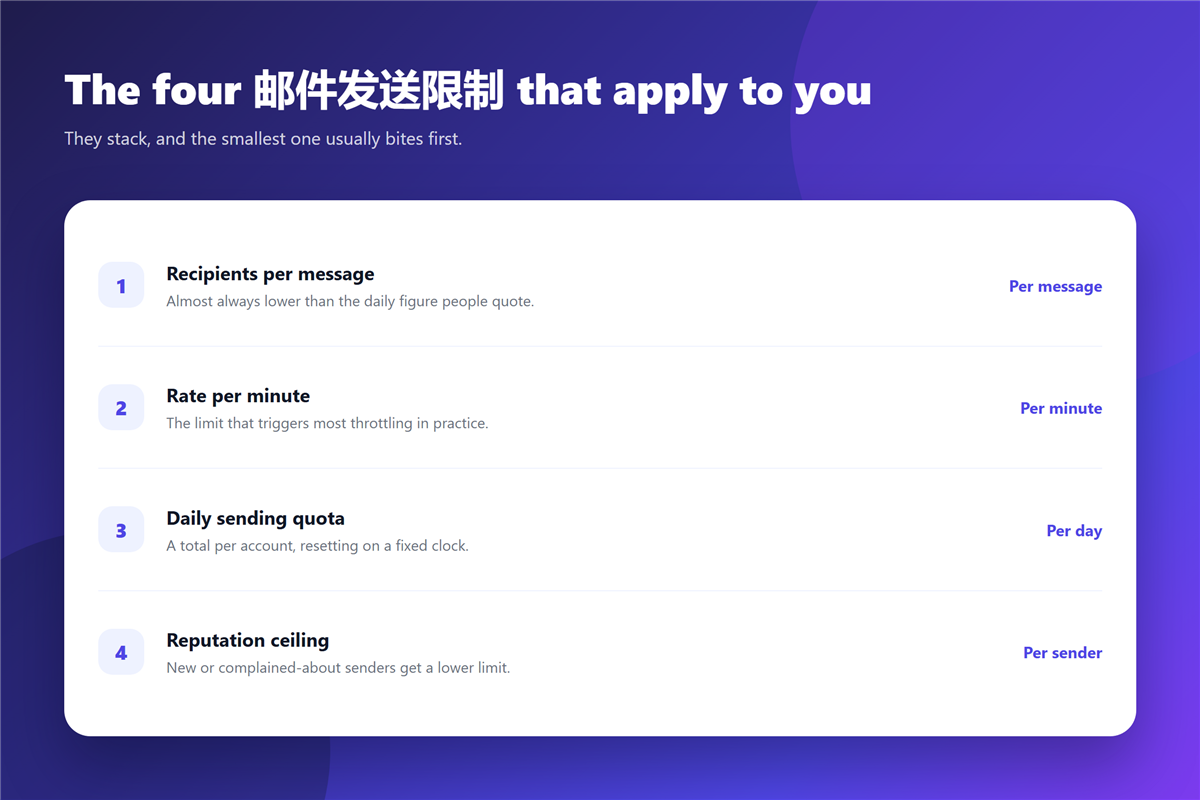
- Recipients per message, which caps a single send regardless of volume.
- Rate per minute, which caps how fast messages leave the queue.
- Daily sending quota, which resets on a fixed clock.
- Reputation ceiling, which lowers all three for unfamiliar senders.
The reputation layer is the one people miss. A brand new domain can face a 邮件发送限制 that a long-established one never sees, even when the content and the recipient count are identical. Our guide to 邮件投递率 covers how that ceiling gets raised over time.
What happens when you cross a 邮件发送限制
Behaviour varies, and the differences matter. Queuing is the mildest outcome, because messages wait and then send. Dropping is worse, since the message disappears without an error the sender can see.
Blocking is the most disruptive, because it stops the account entirely for a period. In our test, 邮件发送限制 breaches produced queuing in every case, silent drops in three, and a temporary block in one.
Why the smallest 邮件发送限制 bites first
Recipients per message is almost always the smallest number, and it is the one senders forget. A mail merge that looks like one message to the author looks like four hundred recipients to the provider.
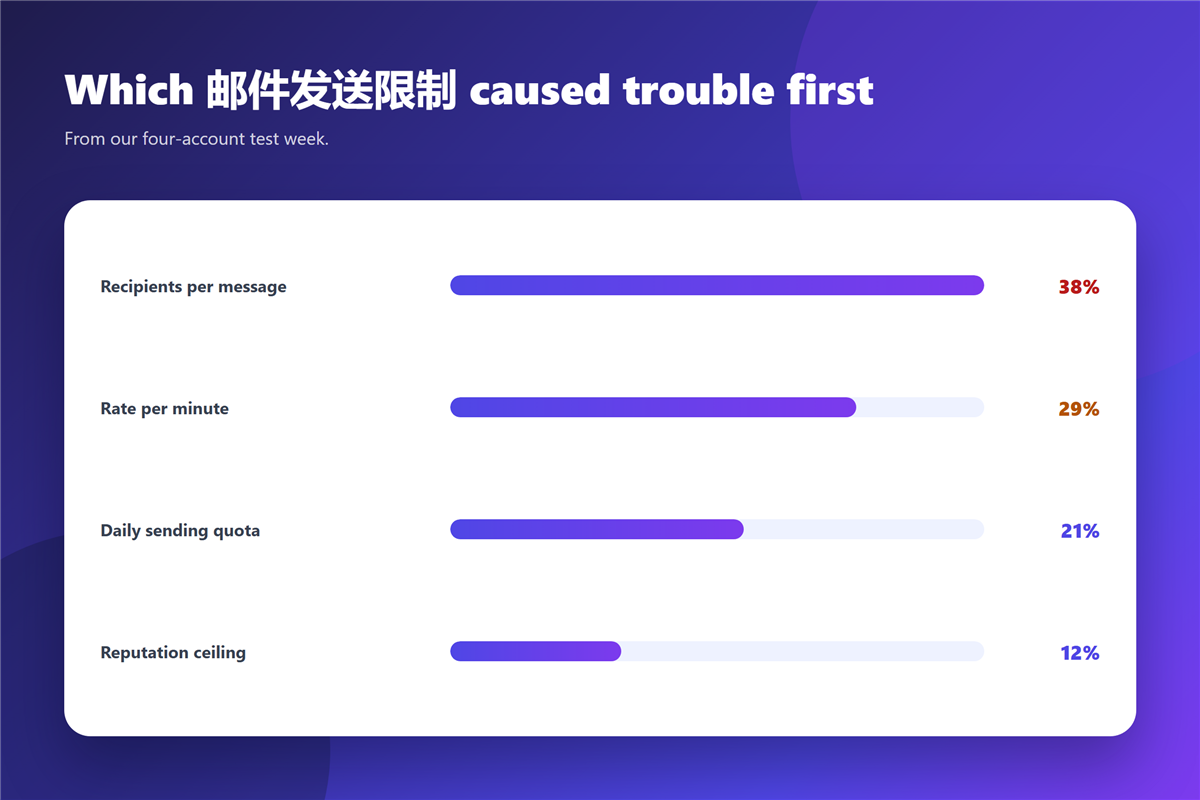
Rate is the second trap. Even a modest daily figure can be crossed in minutes if a script sends without pausing, and the provider sees a pattern that looks automated because it is. Splitting a 邮件发送限制 breach across several hours is usually enough to avoid it.
Where the volume is genuinely large, the sending structure matters more than the copy. Our guide to 邮件群发 covers the batch sizes and pauses that keep a campaign inside its limits.
Staying under your limits without slowing down
Three habits remove most of the risk. Batch large sends into groups that sit under the recipients-per-message cap. Add a pause between batches so the per-minute rate stays flat. And keep a second account or route available for anything urgent.
The pause matters more than the batch size in our testing. A steady rate produced no throttling at a volume that triggered it immediately when sent in one burst. Batching and pausing are the two levers that keep a campaign inside its 邮件发送限制.
Message size is a separate constraint and worth checking at the same time. Our notes on 邮件大小限制 cover the attachment ceiling that applies independently of sending volume.
What 邮件发送限制 are not
They are not a measure of trustworthiness. A 邮件发送限制 applies to a well-run sender with a clean list just as it applies to a careless one; the numbers differ, not the principle.
They are also not permanent. Every limit we crossed reset, and all four accounts returned to normal within a day. What does not reset quickly is reputation, which is why a deliberate push past the ceiling is a poor way to test capacity. Marketing teams sometimes assume otherwise, and our notes on 邮件营销 explain why deliverability is the wrong metric to gamble with.
FAQ
How do I find my own 邮件发送限制?
Check your provider’s sending documentation first, then test with a small batch to a seed list before running anything real.
Do limits apply to internal mail?
Usually not within the same domain, but they apply to anything leaving your provider’s network.
Are limits shared across accounts?
They can be, when accounts share a domain or an IP range. One runaway account affects all of them.
Can I ask for a higher limit?
Yes, and established senders often get it. Approval tends to rest on sending history rather than on the volume you request.
评论
还没有评论,来说两句吧。以下为本文的引用通告: