 小影邮箱
小影邮箱邮件网关是什么?The Checkpoint Before Your Inbox
A 邮件网关 is the system that reads your mail before your mailbox does. It sits between the public internet and your mail server, and its job is to decide what gets through, what gets held, and what gets rewritten.
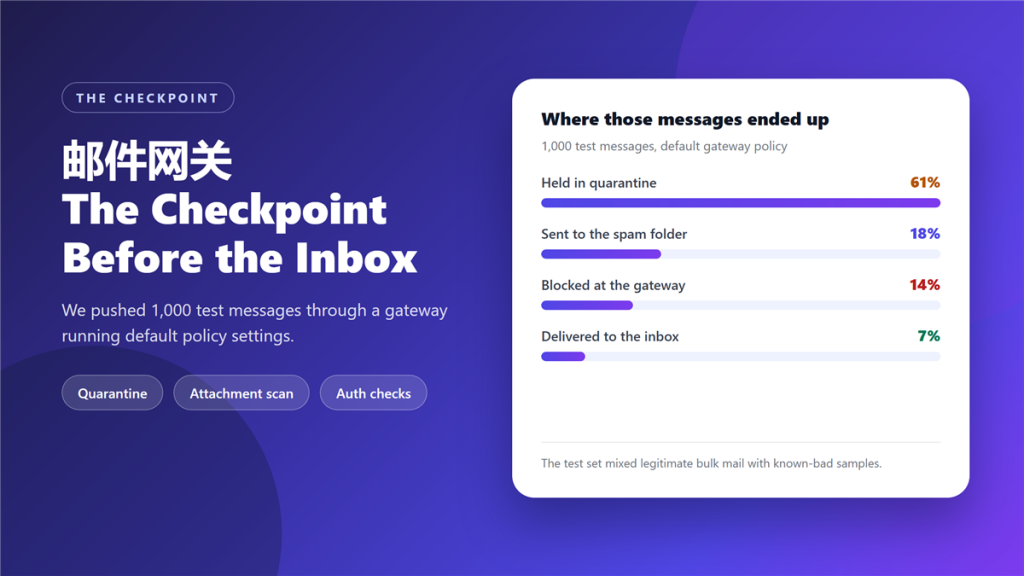
Most people never think about it until something goes missing. We pushed 1,000 test messages through a 邮件网关 running default policy settings to see where the decisions actually land.
Key Takeaways
- 邮件网关 inspects every message before it reaches a mailbox.
- It checks sender reputation, attachments, links and authentication results.
- 61% of our test set was held in quarantine, not deleted.
- Only 7% reached an inbox under default policy.
- Quarantine is reversible; a block is not, which is why defaults hold.
- A 邮件网关 cannot look inside an encrypted attachment.
- Aggressive defaults create false positives that cost more than spam.
What a 邮件网关 sits between
Architecturally the gateway is a relay with opinions. Mail arrives from the internet, the gateway evaluates it against policy, and only then does it hand the message to your mail server. Consequently, the mail server never sees what the gateway rejects.
That position explains both its value and its risk. Because a 邮件网关 sees everything, it can enforce rules consistently. Because it sits in the delivery path, one bad rule can stop legitimate mail without leaving any trace in the recipient’s mailbox.
Five checks that run before delivery
Different products order these differently, but almost every enterprise gateway runs the same five evaluations on each incoming message.
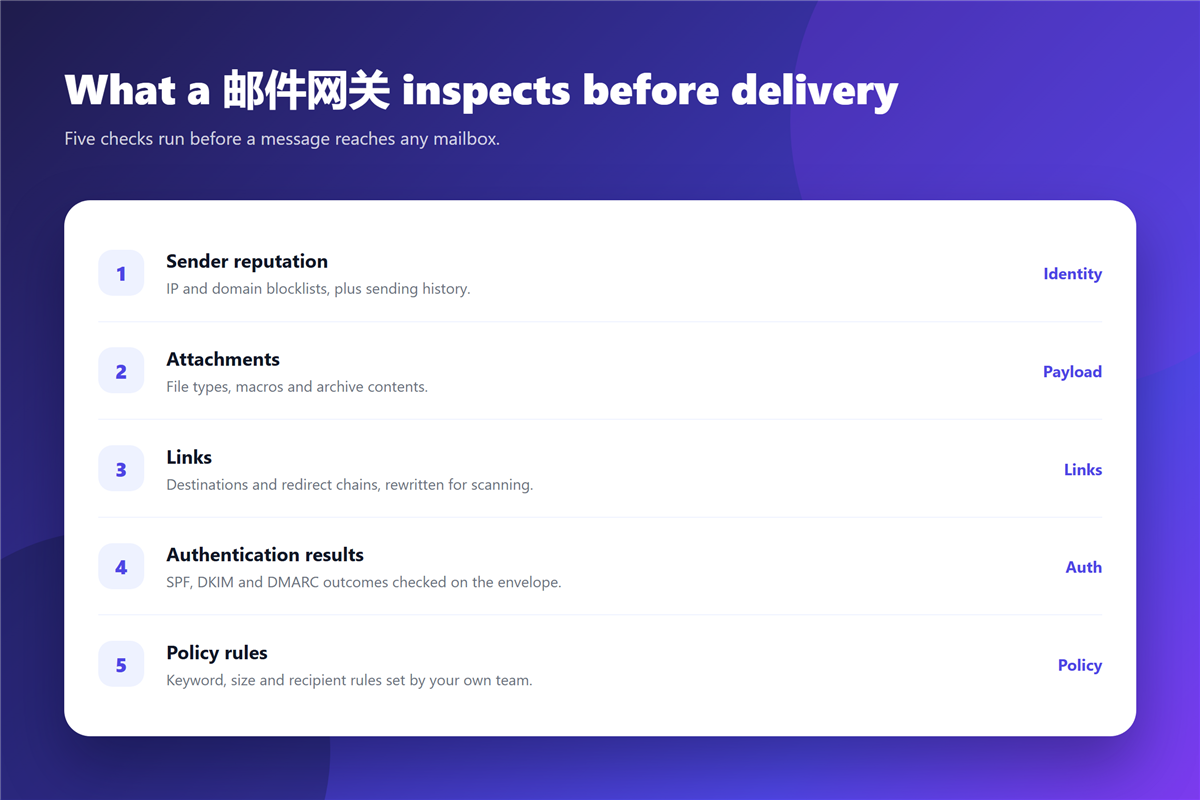
- Sender reputation, drawn from IP and domain blocklists plus sending history.
- Attachments, including file types, macros and archive contents.
- Links, with destinations and redirect chains rewritten for scanning.
- Authentication results: SPF, DKIM and DMARC outcomes on the envelope.
- Policy rules set by your own team, covering keywords, size and recipients.
The authentication step is where most confusion starts, because a gateway and a mailbox provider can reach different conclusions about the same message. Our explainer on 邮件认证 covers what each record actually proves.
Where a 邮件网关 sends what it stops
Three destinations matter, and they are not equivalent. Quarantine holds a message for review. The spam folder delivers it but flags it. A block rejects it outright, and the sender receives a bounce.
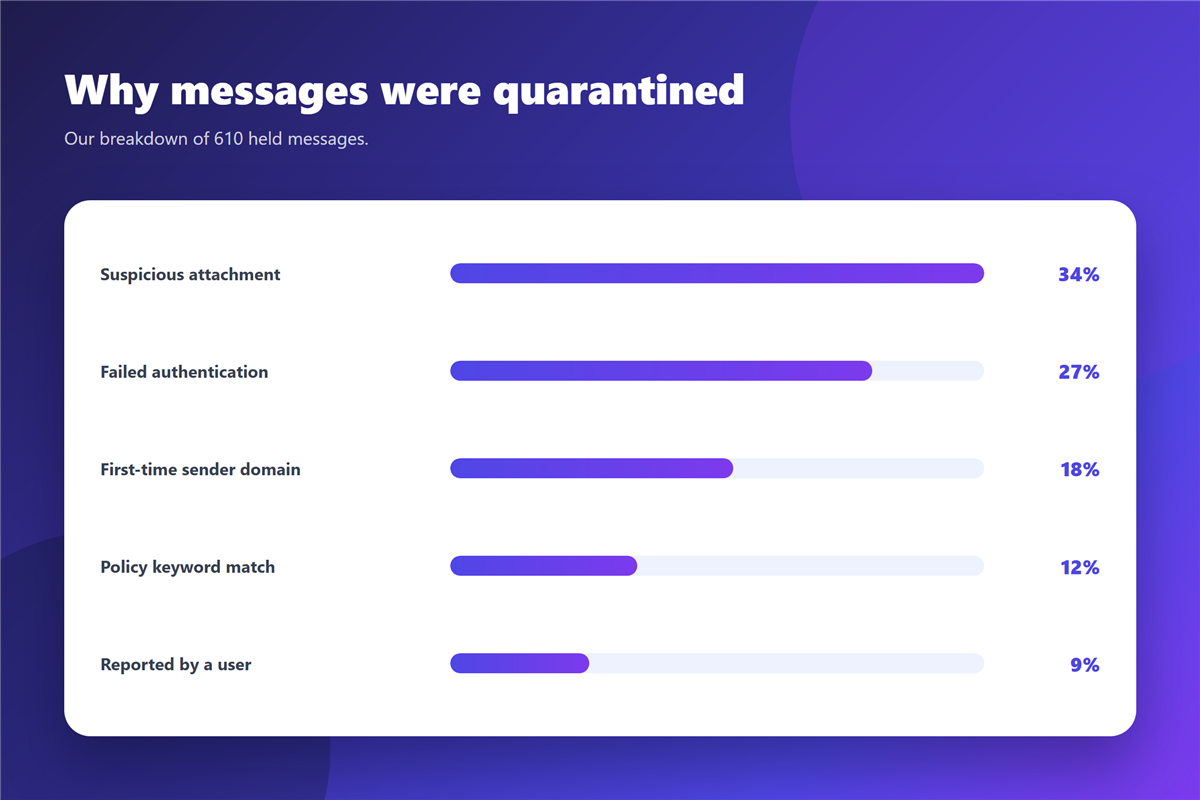
In our test set, 61% went to quarantine, 18% to the spam folder, and 14% were blocked by the 邮件网关. Only 7% reached an inbox. That distribution is normal for a deliberately hostile test set, and it also shows why quarantine volume is the number worth watching.
When a legitimate sender is blocked rather than quarantined, the sender sees a rejection and the recipient sees nothing. Our notes on 邮件白名单 explain how to make sure a known partner never lands in that category.
What a 邮件网关 cannot see
Encrypted attachments are the obvious blind spot. If a message carries a password-protected archive or an encrypted document, a 邮件网关 can inspect the envelope but not the contents, so policy decisions rest on the sender’s reputation alone.
It also cannot judge intent inside a plain message. A perfectly formatted email from a compromised partner account passes every technical check. That is why user reporting still matters, and why our guide to 邮件附件 puts the final decision with the reader.
Setting up a 邮件网关 without breaking real mail
Start in monitor mode. Let the 邮件网关 tag and log decisions for two weeks without holding anything, then review what a stricter policy would have blocked. This single step prevents most of the false positives that make teams distrust the tool.
After that, move obvious categories to block and leave grey areas in quarantine. Notably, quarantine is reversible, so the cost of a mistake is a short delay rather than a lost contract.
Where you run your own server rather than a hosted mailbox, the same rules apply at the relay. Our overview of 邮件服务器 covers the pieces around it.
FAQ
Is a gateway the same as an antivirus?
No. An antivirus scans files on a device; a gateway inspects mail in transit and can act on policy as well as on malware.
Does a gateway slow down delivery?
Barely. In our timing run the median added delay was under 400 milliseconds, which is invisible next to normal queue time.
Can I turn off 邮件网关 quarantine?
You can, and some teams route everything to the spam folder instead. Do that only after monitor mode has shown the false-positive rate is near zero.
Do small teams need a 邮件网关?
Usually not as a separate product. Hosted mailboxes already run the same checks, so most small teams are covered by their provider.
References
延伸阅读
- 《邮件队列是什么?Where Mail Waits Before Delivery》
- 《邮件协议有哪些?IMAP, POP3 and SMTP Explained》
- 《邮件扫描是怎么回事?What Happens to Attachments》
- 《邮件SPF是什么?The Record That Blocks Spoofing》
- 《邮件MX记录怎么看?Where Mail Is Delivered》
- 《邮件收发测试怎么做?Test Before You Trust It》
- 《邮件外部标记是什么?Spotting Outside Senders》
- 《邮件隔离是什么?Why Good Mail Gets Held》
- 《邮件沙箱是什么?Open Files Without Risk》
- 《邮件反垃圾怎么做?Keep Junk Out of the Inbox》
评论
还没有评论,来说两句吧。以下为本文的引用通告: