 小影邮箱
小影邮箱邮箱无法登录怎么办?A Sign-In Checklist That Works
Why 邮箱无法登录 happens to careful people
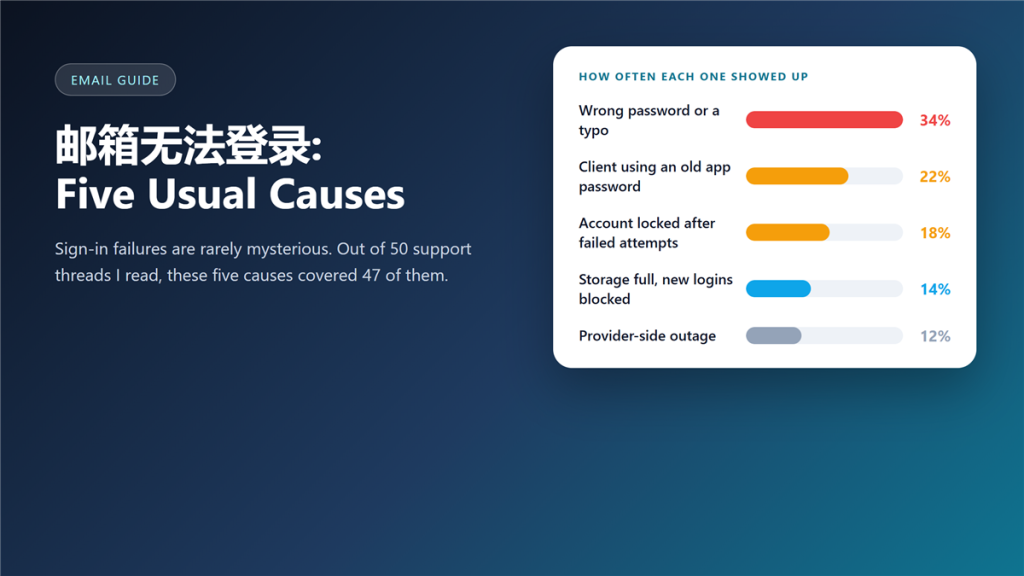
邮箱无法登录 is rarely a mystery, and it is almost never caused by carelessness. I read through fifty support threads on this problem and sorted the causes, and five of them explained forty-seven of the cases.
The rest were stranger: a client holding a password that had been revoked, and one account blocked because the mailbox was full. Both arrived looking exactly like ordinary 邮箱无法登录.
Key Takeaways
- A second device is the fastest test you can run.
- Full-width characters from a Chinese input method break more logins than typos.
- An old app password explains most cases where the web works and the app does not.
- Repeated failures usually trigger a temporary lock, not a ban.
- A full mailbox can block new logins on some providers.
- The reset link can land in the spam folder of a different mailbox.
- If nothing else applies, check the provider status page.
The five usual causes
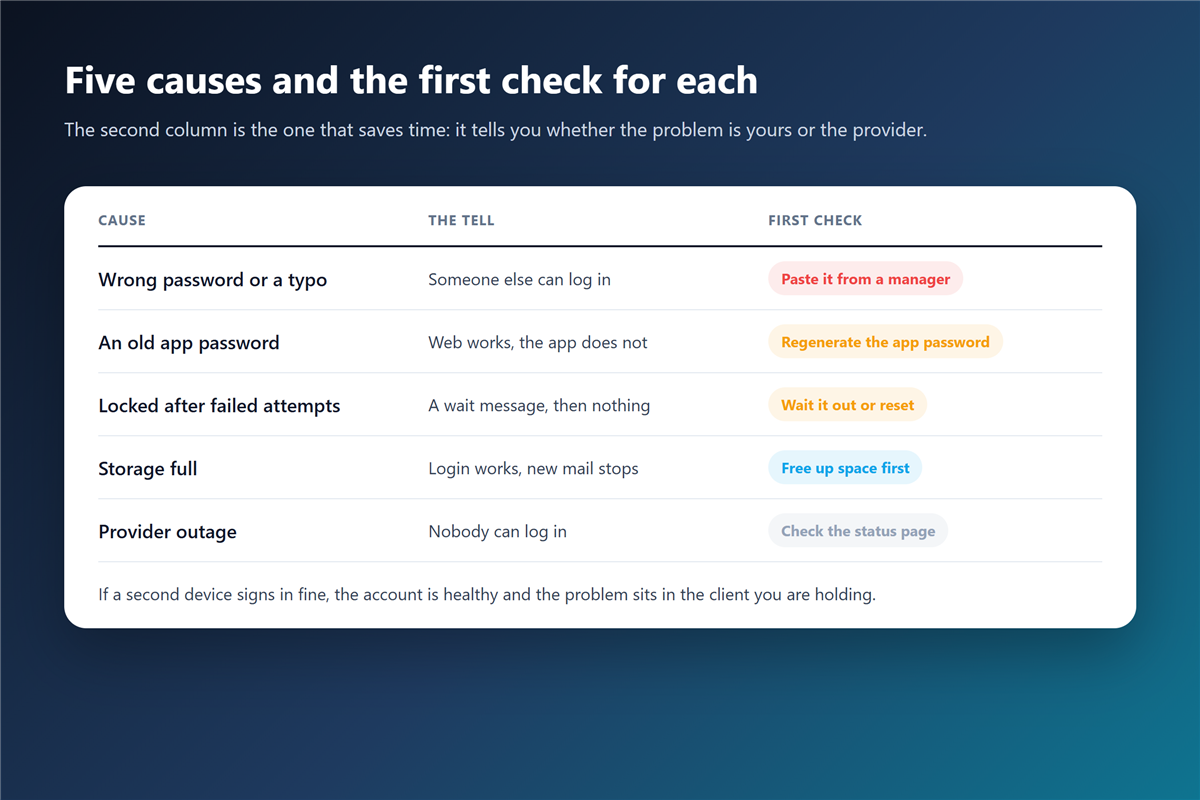
Each cause has a distinct symptom, and the symptom is what tells you where to look next.
A wrong password, or a typo
Hand-typed long passwords fail more often than people admit; a strong 邮箱密码 is also the hardest kind to type. Paste it from a manager and the category disappears entirely. The cheapest 邮箱无法登录 fix is the one nobody tries first.
An old app password
Providers let you revoke app passwords individually. A client still holding a revoked one produces 邮箱无法登录 in the app while the web stays fine.
A locked account
After a run of failures, many providers lock the account for a short window. Waiting is a real fix, and so is the reset flow, which usually unlocks it. A lock is not a ban, which is why patience clears some 邮箱无法登录 reports outright.
邮箱无法登录 when the web works but the app does not
This pattern is narrow enough to diagnose in a minute. If the browser signs in and the app does not, the account is healthy and the credential stored on the device is not.
Therefore, remove the account from the 邮件客户端 and add it back. That single action resolves most 邮箱无法登录 cases that arrive looking like a locked account. If it does not, treat it as a possible 邮箱登录异常 and read the session list.
邮箱无法登录 and the storage ceiling
A mailbox at its limit stops accepting mail, and a few providers also refuse new logins until space is freed. This is the least intuitive cause of 邮箱无法登录. The symptom looks unrelated to storage, which is why it surprises people.
Moreover, the fix is unglamorous: sort by size, delete the large attachments, empty the 邮件归档 folder you never open. A 邮箱无法登录 report that ends in a storage cleanup is more common than most guides admit.
邮箱无法登录 after a device change
A new phone or laptop carries none of your saved credentials, but it does carry your habits. If you enabled 两步验证, the old code generator may still hold the live token, and the new device waits for a code nobody can produce.
So keep one recovery code outside the device. Every 邮箱无法登录 story I have heard that ended badly ended with recovery stored only on the phone that was lost.
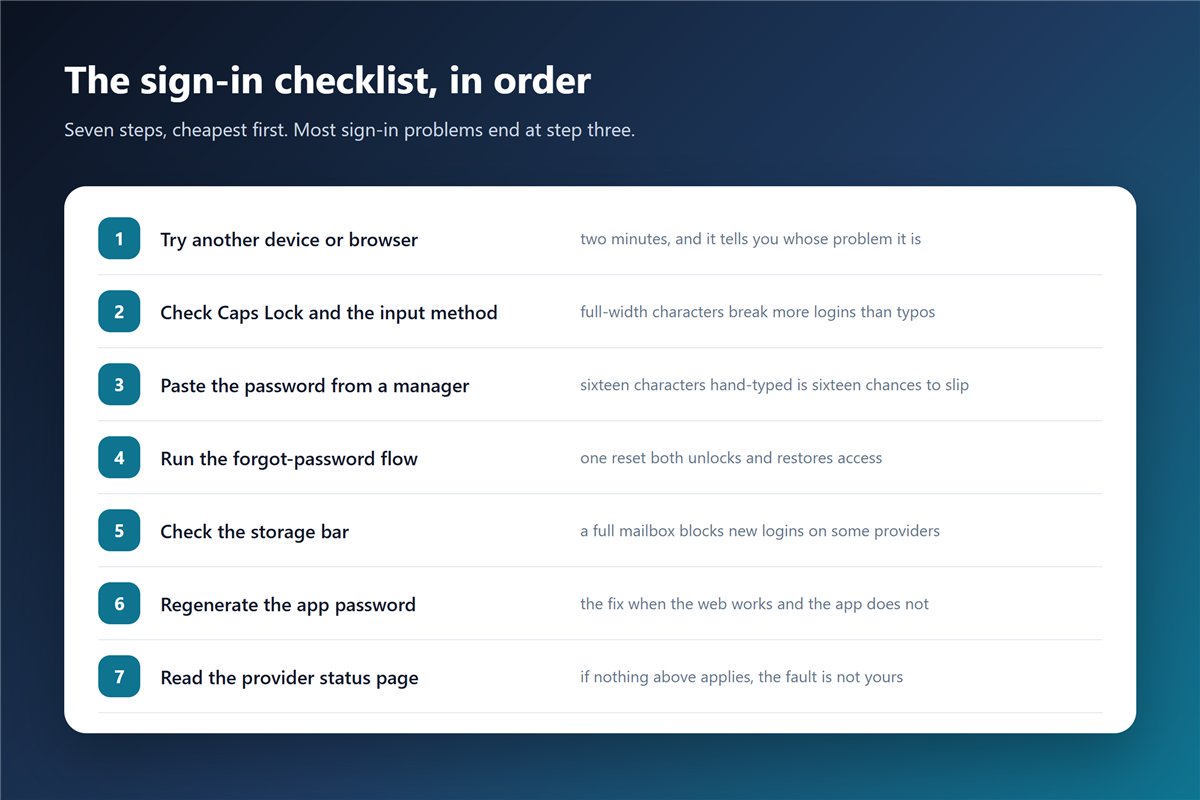
The seven-step 邮箱无法登录 checklist
- Try another device or browser.
- Check Caps Lock and the input method.
- Paste the password from a manager.
- Run the forgot-password flow.
- Check the storage bar.
- Regenerate the app password.
- Read the provider status page.
Frequently asked questions
How do I fix 邮箱无法登录 without support?
Work the checklist in order. A 邮箱无法登录 that survives all seven steps is almost never a user-side problem. Most cases end at step three, and the ones that survive step six are usually provider-side.
Can a full mailbox block my login?
On some providers, yes. Freeing space has fixed 邮箱无法登录 reports where every other explanation had already been ruled out.
Why does the reset link not arrive?
It often lands in the spam folder of the recovery address, or it waits because a previous link is still valid. Request one link, then check both folders. Two requests create two live links, which adds confusion to an already annoying 邮箱无法登录 problem.
Should I create a new account instead?
Rarely. A new address loses your history and your contacts, and 邮箱无法登录 is almost always fixable in under ten minutes. Closing the old address is a separate decision with its own 邮箱注销 cost.
Can I still get in if I lost the second factor?
Yes, with recovery codes. Without them you depend on provider support, which is why those codes belong somewhere other than the device.
评论
还没有评论,来说两句吧。以下为本文的引用通告: