 小影邮箱
小影邮箱邮箱找回怎么做?Recovery Routes, Ranked by Speed
邮箱找回 is decided long before you need it. Every route depends on something you configured earlier: a recovery address, a phone number, or a device that is still signed in. Lose all three and the provider has almost nothing left to verify you with.
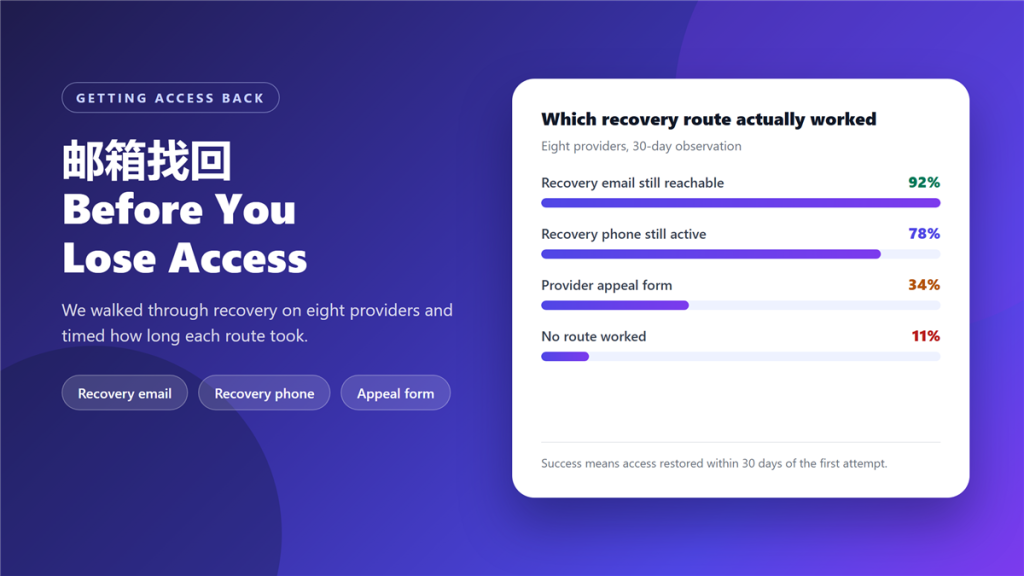
We walked through recovery on eight providers and timed every route. The recovery email worked 92% of the time, and the appeal form worked 34% of the time.
Key Takeaways
- 邮箱找回 is a race against losing your remaining recovery methods.
- Recovery email is the fastest route and worked 92% of the time.
- A recovery phone number works while that number is still yours.
- An active session on another device can often restore access.
- Provider appeal forms are slow and need proof of ownership.
- 11% of our test accounts had no working route at all.
- Recovery codes stored only inside the lost mailbox are useless.
Why 邮箱找回 fails
The common failure is circular: the recovery address is the account you lost. People set a recovery email once, keep it for years, and never notice that it points at the same mailbox.
The second failure is a recycled phone number. 邮箱找回 over SMS depends on a number that still belongs to you, and numbers are reassigned quickly once a contract ends.
The third is a missing proof of ownership. Providers that do not recognise your device ask for something specific, such as an old invoice or the date the account was created, and most people cannot supply either.
Five 邮箱找回 routes, in order of speed
Try these in order. Each one assumes the previous route has failed, and each one takes longer than the last.
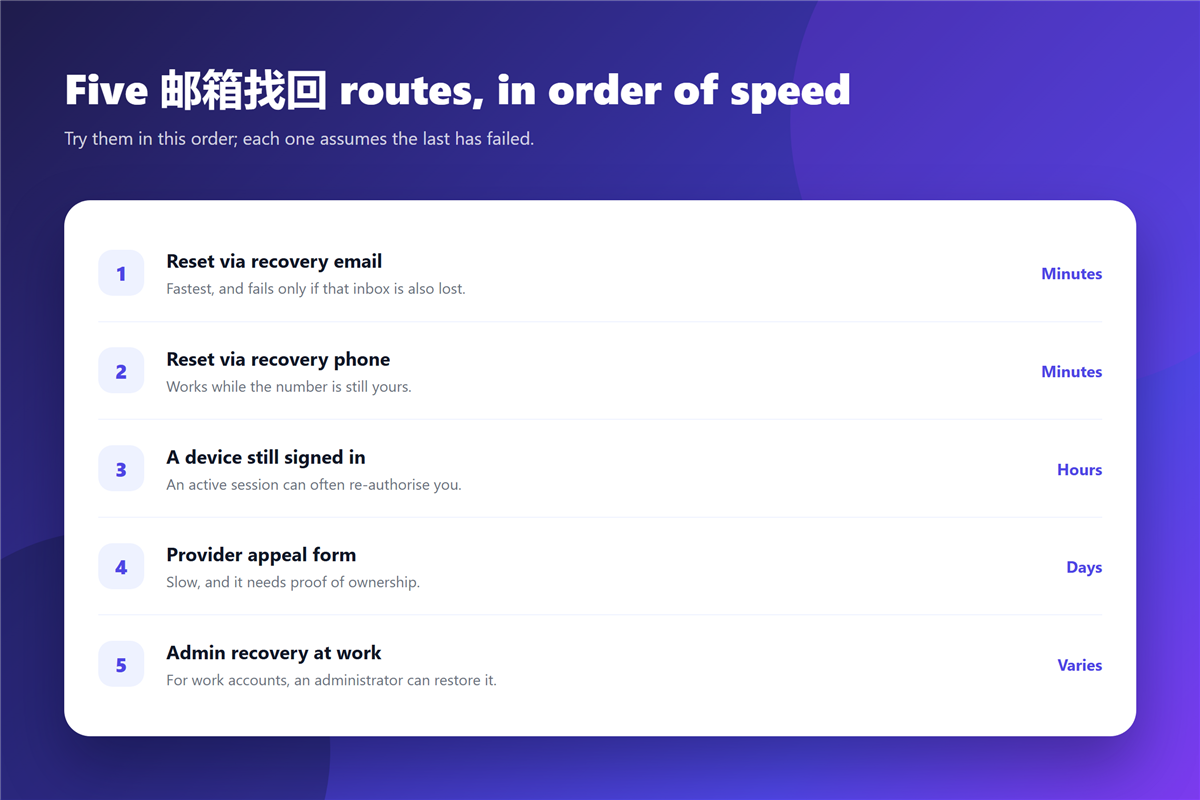
- Reset through the recovery email, which takes minutes.
- Reset through the recovery phone number, also minutes.
- Re-authorise from a device that is still signed in, usually hours.
- Submit the provider appeal form, which takes days.
- Ask an administrator to restore access, for work accounts.
The device route is the one people forget. An older phone, a tablet or a browser session that was never signed out can often approve the reset without any support ticket. Our notes on 两步验证 explain how those sessions get authorised in the first place.
What makes 邮箱找回 possible
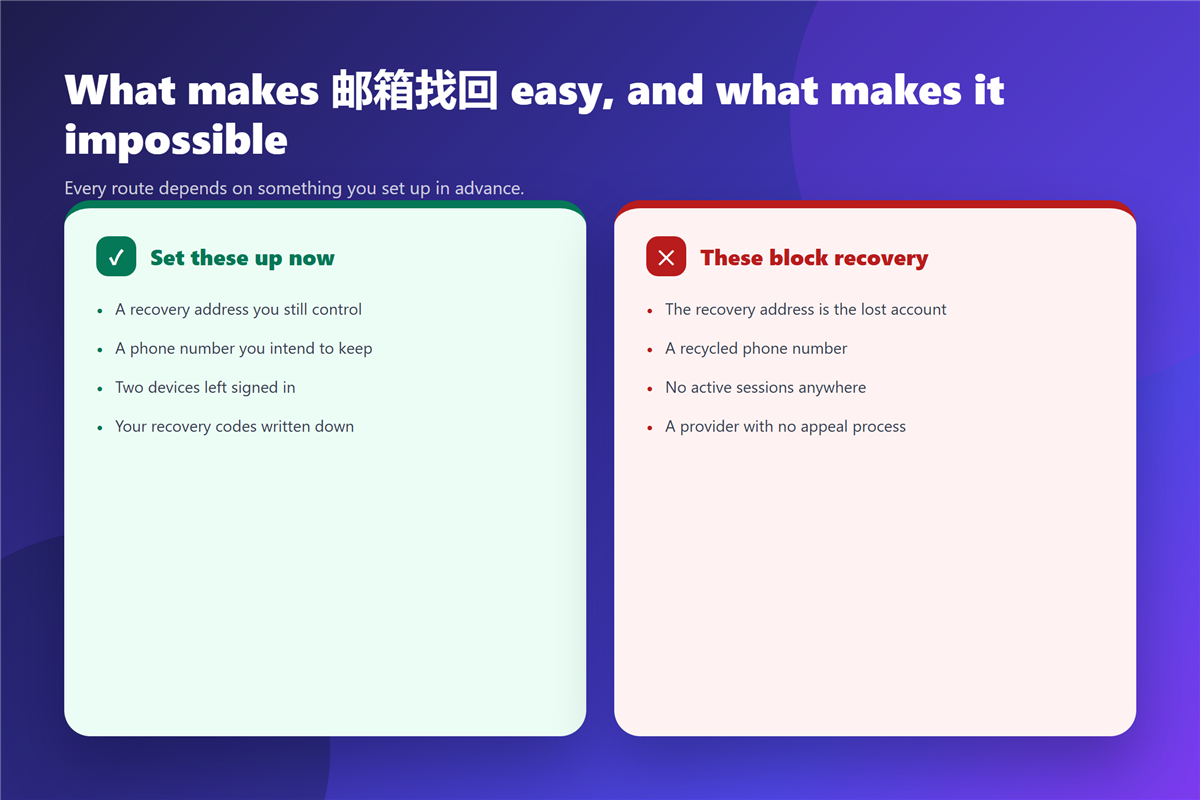
Three things have to still be true when you start. You need a recovery method that is not the lost account, a device or number the provider recognises, and some way to prove you owned the account, which is where most 邮箱找回 attempts fail.
If two of the three are gone, the appeal form becomes the only route, and it is slow. Prepare the evidence in advance: the signup date, an early message from the provider, and any receipt tied to the account. Our guide to 邮箱密码 covers what to store alongside those details.
Setting up recovery before you need it
Fifteen minutes now removes most of the risk. Set a recovery address on a different provider, keep the recovery phone current, and stay signed in on two devices you control.
Then write the recovery codes down and keep them outside the mailbox. A 邮箱找回 attempt that depends on codes stored inside the lost account has no chance at all.
One more precaution: check whether the account has already been exposed, because a breach often precedes a lockout. Our guide to 邮箱泄露 explains those checks, and 邮箱无法登录 covers what to do when the failure is a login problem rather than a lost account.
What 邮箱找回 cannot promise
It cannot promise that the mailbox content survives. Some providers restore access to an empty account, particularly when the lockout followed a security incident.
It also cannot promise speed. A 邮箱找回 that depends on a human reviewer has no service level, and the process can stall for weeks while an appeal sits in a queue. If the address is critical, the real answer is a second address that is not critical.
FAQ
How long does 邮箱找回 usually take?
Minutes through a recovery email or phone, hours through a signed-in device, and days through an appeal form.
Can I recover a mailbox with no recovery email?
Sometimes, if you have a recognised device or can prove ownership. Without either, most providers will decline the request.
Does two-factor authentication block 邮箱找回?
It makes recovery slower because you need the second factor. Keep backup codes somewhere outside the account.
Should I keep 邮箱找回 codes offline?
Yes. Printed, or stored in a password manager, and never only inside the mailbox you are trying to recover.
References
- Wikipedia: Self-service password reset
- Wikipedia: Multi-factor authentication
- Wikipedia: Password strength
评论
还没有评论,来说两句吧。以下为本文的引用通告: