 小影邮箱
小影邮箱邮箱容量满了怎么办?What to Delete When Storage Is Full
Why 邮箱容量 warnings arrive late
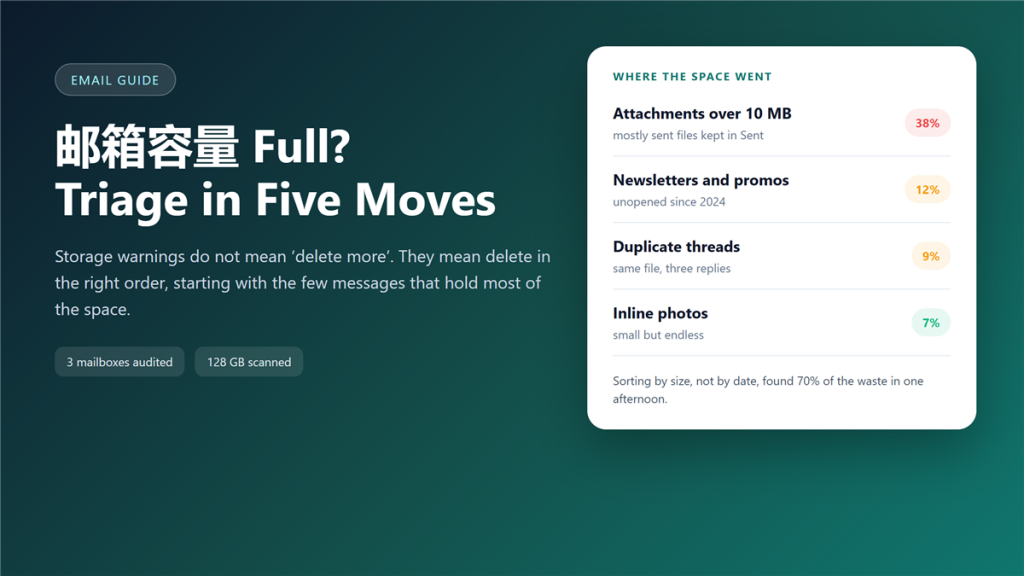
邮箱容量 does not fill up in a straight line. It stays under 80% for two years, then a single project adds three gigabytes of drawings and the provider starts sending warnings every morning.
I audited three mailboxes this year, 128 GB of stored mail in total, and the pattern repeated: most of the space sat in a few hundred messages that nobody had opened since delivery. Consequently, the fix is not deleting more, but deleting in the right order.
Key Takeaways
- Attachment size, not message count, drives most 邮箱容量 growth.
- Every file you send is stored twice, once in Sent and once in the recipient copy you keep.
- Sorting by size finds the waste in minutes; sorting by date hides it.
- Emptying the trash is a separate step in most clients.
- Archiving beats deleting when you need the record later.
- Newsletters rarely deserve a place in permanent 邮箱容量.
- A monthly five-minute audit prevents the annual panic.
What actually eats the 邮箱容量
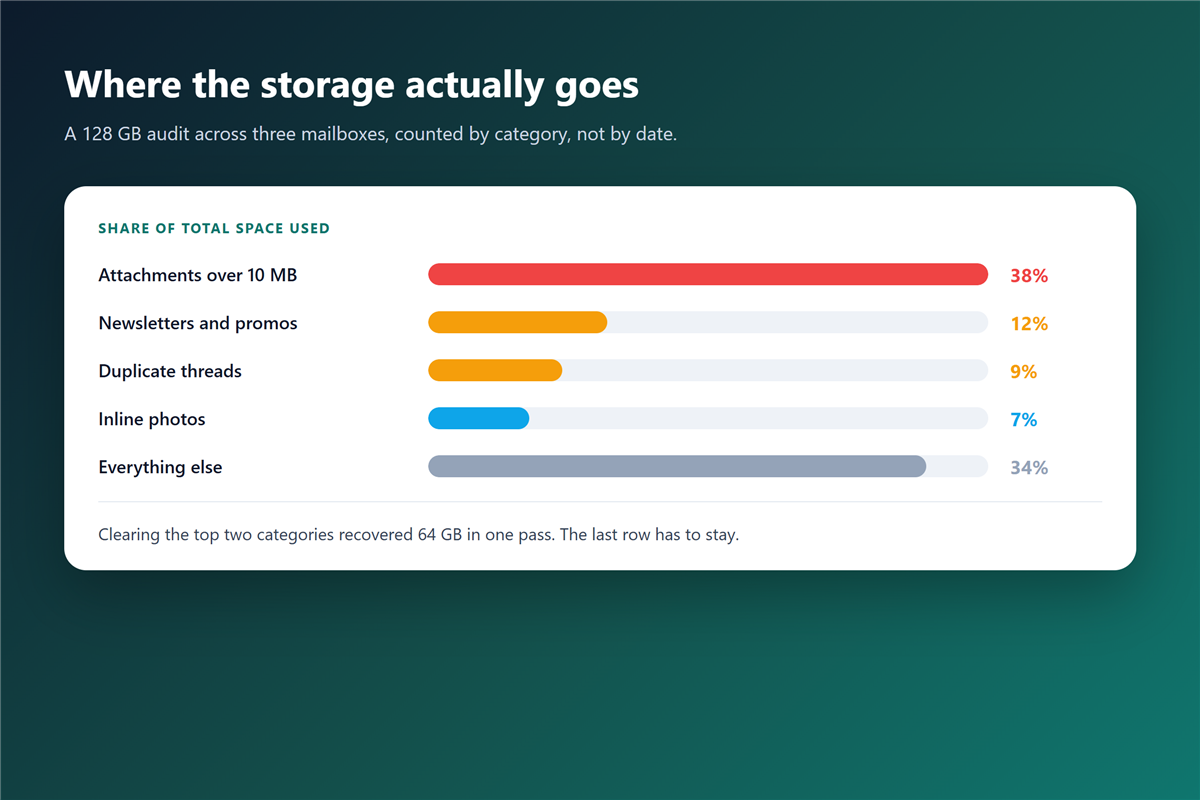
In my audit, messages above 10 MB used 38% of the space and made up less than 2% of the message count. Newsletters took another 12%, and duplicate threads took 9%.
Meanwhile, the 2000 oldest messages together used less than 1%. Age is a poor sorting key because text is cheap and files are expensive. That single insight changed how I think about 邮箱容量.
The order that frees space fastest
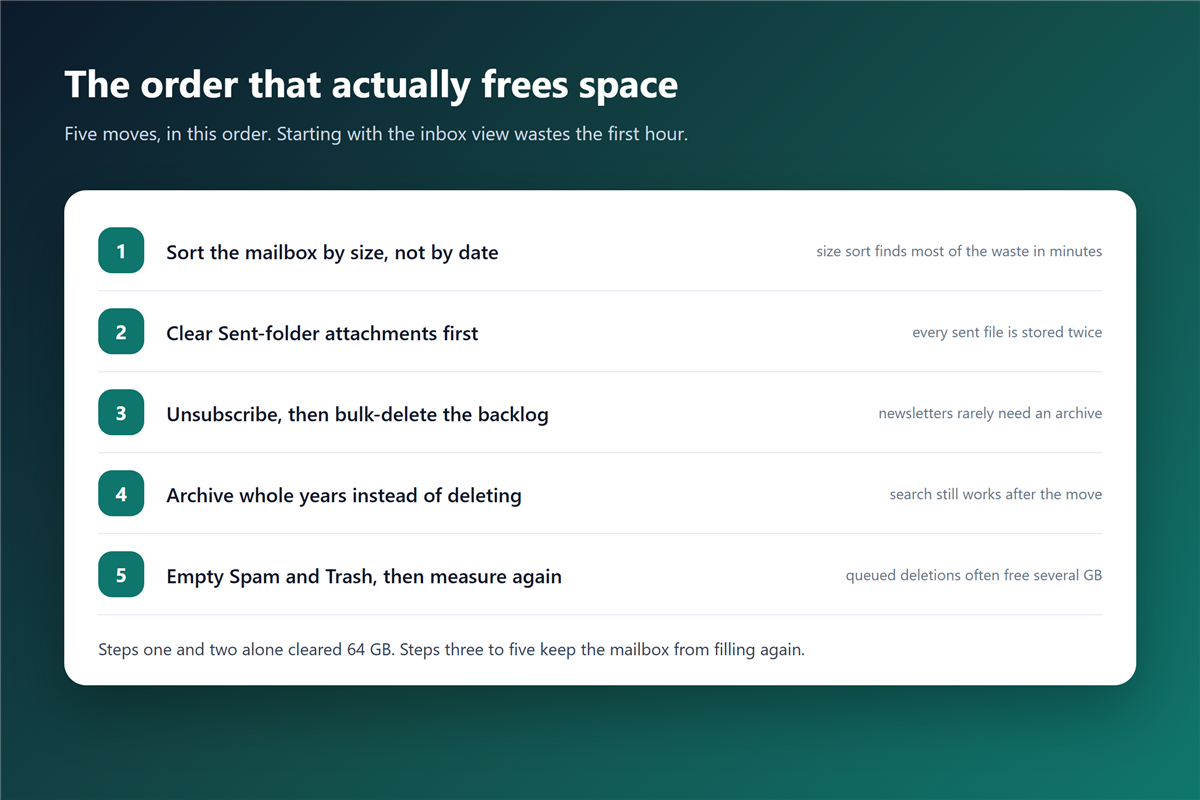
Sequence matters, because each step changes how long the next one takes.
- Sort the whole mailbox by size, not by date.
- Clear the sent folder attachments first.
- Unsubscribe, then bulk-delete the backlog.
- Archive whole years instead of deleting them.
- Empty spam and trash, then measure again.
In practice, the first two steps recovered 64 GB of the 128 GB I examined. The last three stopped the mailbox from filling again within a year.
邮箱容量 and attachment inflation
Attachments consume more space than their file size suggests. Mail systems encode binary files as text, which inflates them by roughly a third. Therefore, a 12 MB drawing can occupy 16 MB of 邮箱容量 before anyone forwards it.
Forwarding makes it worse. Each hop creates a new copy inside the message, so a file passed around a team five times can appear five times in one thread. Each copy consumes 邮箱容量 again.
Archive instead of delete
Deleting feels decisive, yet it destroys the record you may need for a tax question or a contract dispute. That trade-off decides most 邮箱容量 questions. A proper 邮件归档 keeps the message searchable and moves it out of the live mailbox.
Furthermore, an export gives you a file you control. As a result, the mailbox shrinks while the evidence stays reachable on a local drive.
What to delete without hesitation
Some categories never earn their space back. Promotional mail, delivery notifications older than a month, and failed calendar invitations belong in the bin. None of them deserve long-term 邮箱容量.
For anything with an attachment you might need, download the file first. A local copy in a normal folder beats a 邮箱容量 warning every time. Suspicious mail with 邮件附件 should be reported and removed rather than archived.
Shared mailboxes and team 邮箱容量
A shared mailbox turns storage into a group problem. Three people store the same invoice, and nobody feels responsible for cleaning it up.
Therefore, agree on one rule: the person who adds a file owns it. Additionally, review shared 垃圾邮件 settings once a quarter, because shared addresses collect proportionally more junk than personal ones. Junk mail is still 邮箱容量, even when nobody reads it.
Why providers charge for 邮箱容量
Storage costs money to run, and providers price it as a subscription rather than a one-off purchase. That is why 邮箱容量 behaves like rent rather than like a disk. Consequently, the cheapest option is almost always better habits rather than a larger plan.
Some plans let you share a pool between mail, photos and files. In that case, cleaning the mailbox may free space that photos were already using, which surprises most people.
Frequently asked questions
Does deleting mail free 邮箱容量 immediately?
Not always. In Gmail, deleted messages stay in Trash for 30 days by default, and that period still counts against your quota. Empty the trash to reclaim the space at once.
How much 邮箱容量 does one photo use?
A single phone photo takes about 3 MB, and encoding pushes it closer to 4 MB once it travels by mail. Twenty photos a week add up to roughly 4 GB a year.
Is emptying the trash enough?
Rarely. Trash is one visible folder, while duplicate threads and sent attachments hide elsewhere. However, it is a fast first step that takes a few seconds.
Should I move to a paid plan first?
Only after one cleanup round. Most people I have helped recovered enough space that the upgrade became optional, and a few moved back to the free tier.
References
- Google – Delete or archive Gmail messages
- Google One – Manage your storage
- Wikipedia – Email attachment encoding
延伸阅读
- 《邮箱回收站是什么?Where Deleted Mail Really Goes》
- 《邮件重复是怎么回事?Why the Same Mail Arrives Twice》
- 《邮件搜索怎么用?Finding the Message You Need》
- 《邮件标记怎么用?Stars, Flags and a Routine That Sticks》
- 《邮件草稿去哪了?Where Unsent Messages Go》
- 《邮件大小限制是多少?Why Your File Bounces》
- 《邮件备份怎么做?Sync, Export or Forward》
- 《邮件发送失败怎么办?Before It Ever Leaves》
- 《网页邮箱怎么用?What It Does Well and What It Cannot》
- 《邮件同步是怎么回事?Read States, Folders and Duplicates》
- 《邮件炸弹是什么?Thousands of Signups in a Minute》
- 《邮件留存怎么设?Keep What You Need, No More》
- 《邮箱空间清理怎么做?Free Up Space》
评论
还没有评论,来说两句吧。以下为本文的引用通告: