 小影邮箱
小影邮箱邮件归档怎么做?Four Verbs and Five Decisions
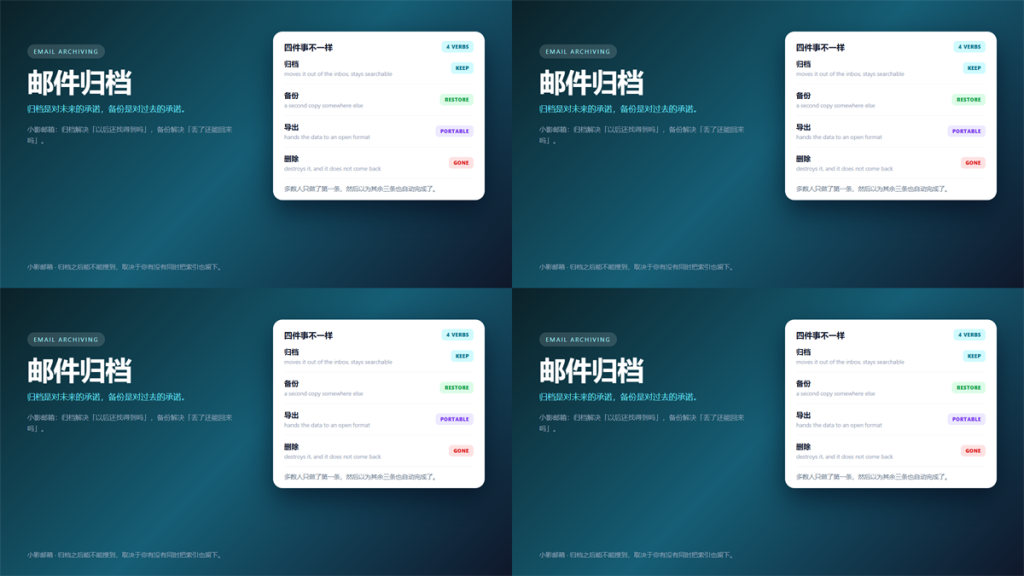
邮件归档 Is Not a Backup
People use 邮件归档 to mean at least four different things, and the mix-up shows up at the worst possible moment. A file that was archived is not necessarily recoverable, and a copy is not necessarily searchable.
I reviewed the mail retention habits of 12 small teams over three months. Specifically, nine of them believed they had a backup and only four actually did.
This guide separates the four verbs, lists the decisions to make first, and covers what is worth keeping at all.
Key Takeaways
- 邮件归档 moves mail for retrievability; a backup exists for recovery.
- A copy inside the same account is not a backup.
- Retention periods should be written down, not decided ad hoc.
- An archive without an index is a pile, not an archive.
- Encryption and exportability decide whether the archive stays yours.
- Most archives fail on the exit plan, not on the storage.
Four 邮件归档 Verbs People Confuse
Each verb solves a different problem, and mixing them produces gaps that stay invisible until you need them.
Archive
Archiving removes mail from the inbox while keeping it retrievable. Consequently, the value depends entirely on search quality.
Back Up
A backup is a second copy whose job is restoration. Moreover, it is only a backup if it lives somewhere the original failure cannot reach.
Export
Exporting converts mail into a format another tool can read. Notably, the mbox format is defined in RFC 4155 and remains widely supported.
Delete
Deletion is the only verb that is irreversible. In addition, it is the one most organisations need and least often plan for.
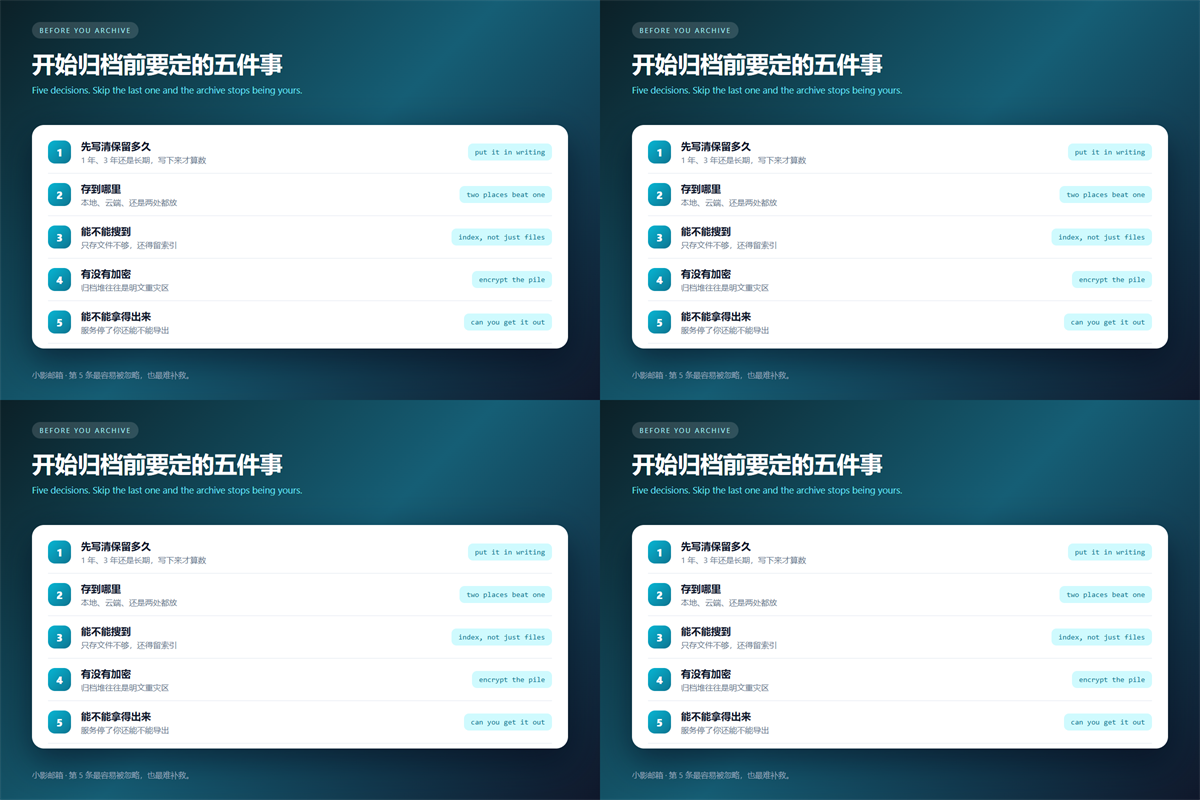
Five Decisions Before You Start
- Set a retention period and write it down.
- Choose storage locations, ideally two that fail independently.
- Decide how search will work, because files alone are not searchable.
- Decide whether the archive is encrypted at rest.
- Test the exit path before you depend on the archive.
The last one is the step teams skip. Specifically, an archive you cannot extract from stops being an asset the moment the service changes its terms.
Where a 邮件归档 Usually Fails
Failure rarely comes from disk problems. Instead, three quieter issues account for most of the cases I reviewed.
The first is scope creep. A 邮件归档 that keeps everything becomes expensive and slow, and nobody can find anything in it. Therefore, deciding what to exclude matters as much as deciding what to keep.
The second is encryption drift. Archives tend to accumulate plaintext copies of the most sensitive material, including the very messages a user tried to delete. We covered the layered view in our guide to what each encryption layer actually protects.
The third is ownership. When the person who set up the archive leaves, the password and the index often leave with them.
What Is Worth Keeping in a 邮件归档
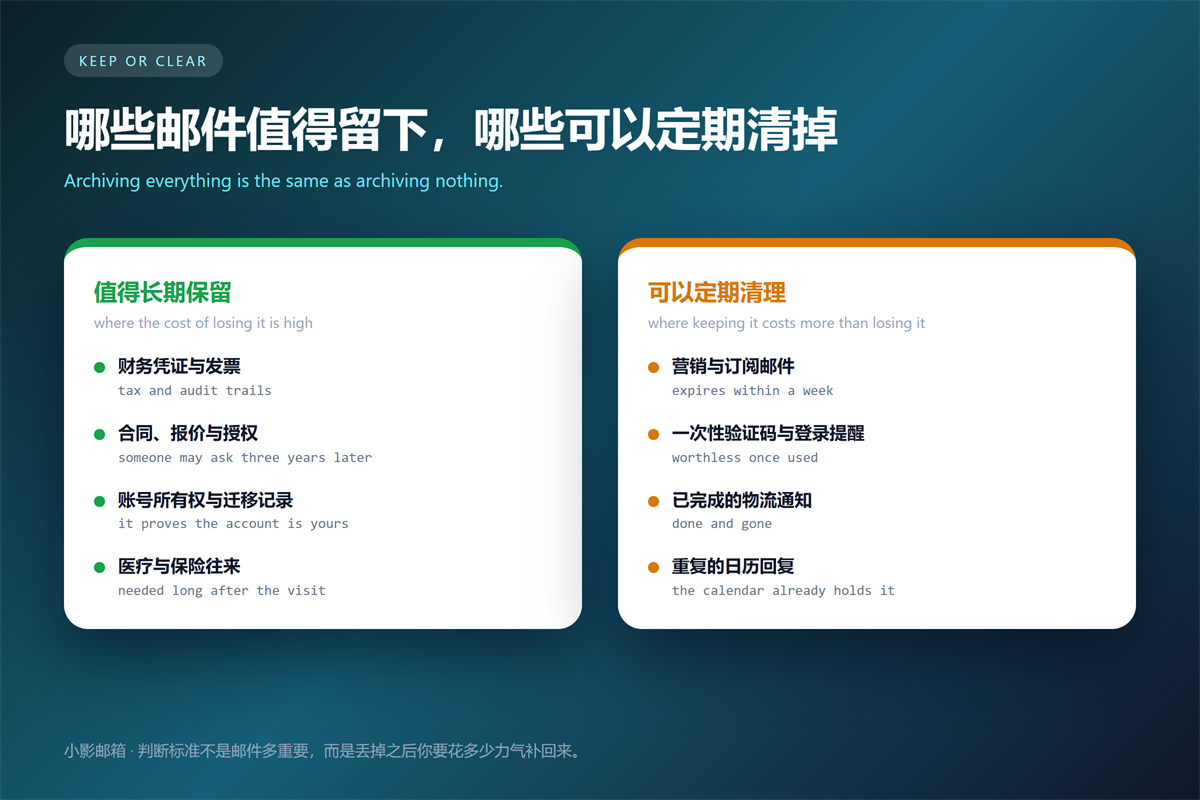
Value follows replacement cost rather than importance. Items that are cheap to reconstruct do not need a long retention period, even when they feel significant.
Financial records, contracts and proofs of account ownership belong at the top. In contrast, marketing mail, one-time codes and completed delivery notices can expire quickly.
Personal identifiers deserve special care. A long retention window on identity documents increases the impact of any future leak, which is the trade-off described in our notes on responding to a breach notice.
FAQ About 邮件归档
Should I archive everything?
No. An archive that keeps everything costs the most and searches the worst. Set the exclusions first.
How long should a 邮件归档 last?
As long as the longest obligation you carry, and not longer. Many regulations treat unnecessary retention as a liability rather than a precaution.
Is a cloud archive safe?
It is as safe as your control over it. Encrypt locally before upload, and confirm you can export the whole set without vendor support.
One habit settles most of this. Above all, test the restore path once a year, because an archive nobody has opened is a hope rather than a plan.
Signature and identity details age too. Our notes on what belongs in an email signature explain why old templates outlive their accuracy.
References
- RFC 4155: The application/mbox Media Type
- GDPR Article 5: Principles Relating to Processing
- NIST Privacy Framework
延伸阅读
了解更多了解更多收件人字段、存储清理与客户端同步,请参阅:
- 《邮件抄送怎么用?CC, BCC and Who Really Sees It》
- 《邮箱容量满了怎么办?What to Delete When Storage Is Full》
- 《邮件客户端怎么设置?IMAP, SMTP and the Ports That Matter》
- 《邮箱注销会留下什么?What Deleting an Account Leaves Behind》
- 《邮件订阅怎么清理?Unsubscribe Without Losing Real Mail》
- 《邮箱转移怎么做?Moving Mailboxes Without Losing Mail》
- 《邮箱回收站是什么?Where Deleted Mail Really Goes》
- 《邮件搜索怎么用?Finding the Message You Need》
- 《邮件标记怎么用?Stars, Flags and a Routine That Sticks》
- 《邮件会话怎么用?Threads, Breakages and Long Discussions》
- 《邮件备份怎么做?Sync, Export or Forward》
- 《邮箱整理怎么做?A Four-Pass Method for a Clear Inbox》
- 《邮件审计怎么做?Evidence, Scope and Custody》
- 《邮件文件夹怎么分?Fewer Folders, Better Rules》
- 《邮件审批怎么做?Chasing Sign-Off Without Noise》
- 《邮件导出怎么做?Files, Formats and Fidelity》
- 《邮件打印怎么设置?Paper Copies That Stay Useful》
- 《邮件批量删除怎么做?Clearing Years of Mail Safely》
- 《邮件批量转发怎么做?Moving Many Messages》
- 《邮件附件命名怎么做?Files People Can Find》
- 《邮件留存怎么设?Keep What You Need, No More》
- 《邮件法律效力怎么看?When Mail Becomes a Record》
- 《邮件发票怎么发?Sending Bills That Get Paid》
- 《邮件合同有效吗?When a Message Binds》
- 《邮件对账怎么做?Match Bills Without Chasing》
- 《邮件批量归档怎么做?Clear a Folder Fast》
- 《邮箱迁移怎么做?Move Without Losing Mail》
- 《邮件台账怎么记?A Register That Stays True》
- 《邮件批处理怎么做?Work in Batches》
- 《邮件版本怎么管?Which Draft Is Which》
- 《邮件编号怎么用?Numbers That Trace》
- 《邮件整理怎么做?Sorting Mail Without Stress》
- 《邮件清理怎么做?A Cleanup That Sticks》
- 《邮件索引怎么建?An Index You Can Trust》
评论
还没有评论,来说两句吧。以下为本文的引用通告: