 小影邮箱
小影邮箱邮件标记怎么用?Stars, Flags and a Routine That Sticks
What 邮件标记 is really for
邮件标记 is a promise you make to your future self, and it works only when the symbol has exactly one meaning. A star that means five different things means nothing at all.
My own inbox once held 412 starred messages. I had used the star for urgent work, for reading later, for receipts and for two projects. Clearing that backlog took one evening, and the fix was simply to decide what a star meant before using it again.
Key Takeaways
- 邮件标记 works when each symbol has one meaning.
- A star should mean today, not eventually.
- Snooze is the only mark that acts without you.
- Unread is not a to-do list, however convenient it feels.
- Four buckets cover most inboxes.
- Review 邮件标记 on a fixed day, not when you remember.
- Clearing a 邮件标记 backlog once beats tidying it daily.
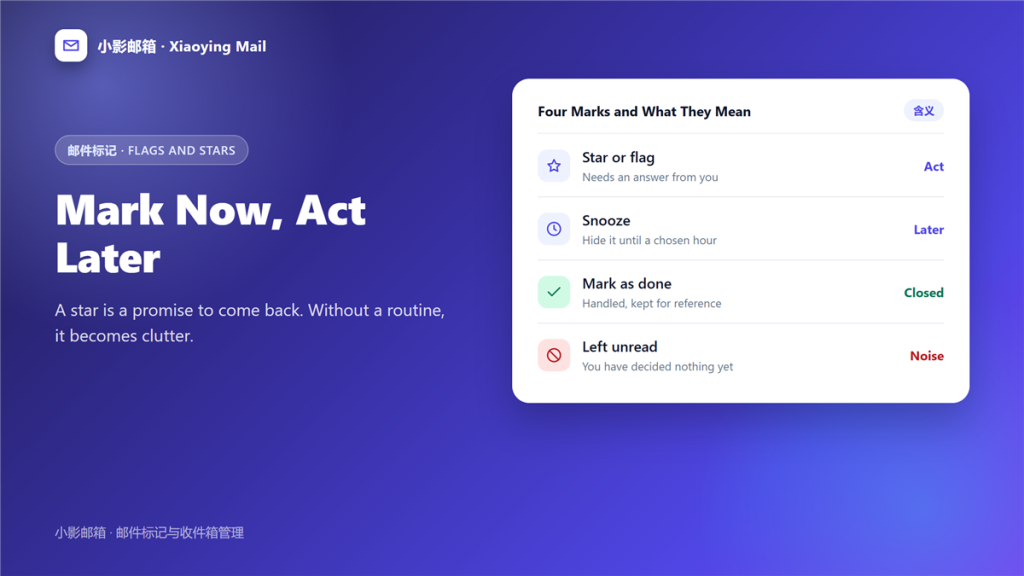
Four marks and what each one should mean
Pick the meanings and keep them. The value of 邮件标记 comes from the habit, not from the symbol.
Star or flag
Use it for messages that need an answer today. Therefore an empty inbox can still hold a full day of work, which is the point of the mark and the reason one 邮件标记 beats a list.
Snooze
Snooze hides a message until a chosen hour. Notably, it is the only 邮件标记 that acts on its own, which is why it suits deadlines better than memory does.
Mark as done
Some clients let you close a message without deleting it. Consequently, handled mail stops competing for attention while staying searchable.
Left unread
This is not a mark at all, and that is the problem. Moreover, an unread count mixes mail you have not seen with mail you decided to postpone.
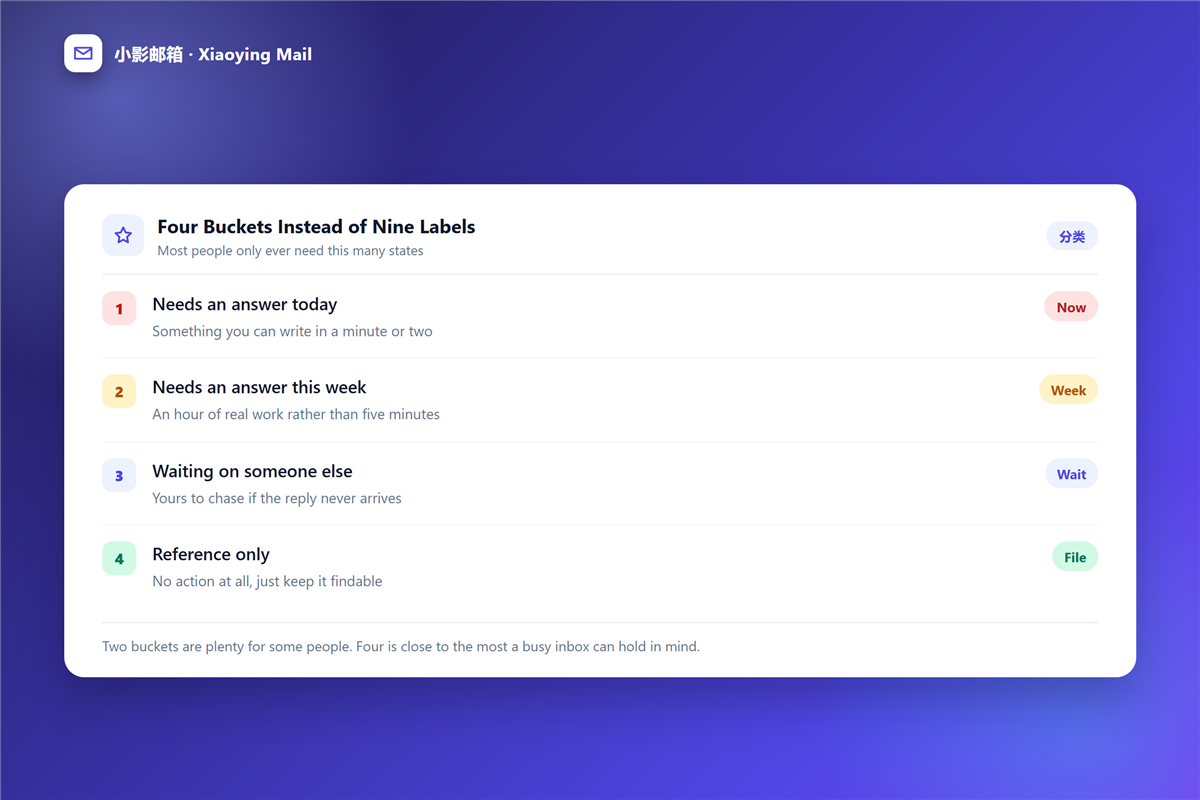
Four 邮件标记 buckets instead of nine labels
Most people need four states, and adding more reduces the chance of using any 邮件标记 consistently.
- Needs an answer today.
- Needs an answer this week.
- Waiting on someone else.
- Reference only, no action at all.
A 邮件规则 can move the fourth bucket automatically. Furthermore, keeping the first bucket small is what makes 邮件标记 useful rather than decorative.
Why 邮件标记 pile up
Backlogs form for three reasons, and all three are structural rather than personal.
One symbol, several meanings
When a flag can mean urgent, interesting or unfinished, you cannot trust it. As a result, you re-read every flagged message to find out which one it was.
No review day
Marks without a review become storage. In contrast, a fixed weekly slot turns the same marks into a working list.
Unread as a to-do list
Unread mail accumulates from everywhere, including newsletters you never meant to act on. Eventually the count stops carrying information, and 邮件标记 loses its anchor.
How to clear a starred 邮件标记 backlog
Set aside an hour, sort by sender and work in passes rather than message by message, because a 邮件标记 backlog is usually repetitive.
- Archive anything older than a month that needed no reply.
- Unstar receipts and file them as reference.
- Turn anything still relevant into a dated task.
- Delete notifications that no longer matter.
- Keep only what you will act on this week.
When storage is also tight, the same pass solves two problems, because a mailbox near its 邮箱容量 limit tends to be full of unread notifications rather than important mail.
Making 邮件标记 stick
Habits survive when they cost almost nothing, so a 邮件标记 routine should stay under five minutes a day.
Clear the first bucket each morning and the second on Friday. Additionally, let the 邮件归档 folder absorb finished threads so the inbox stays short, and use 邮件搜索 instead of keeping mail visible for reference.
One more rule helps more than any symbol. If a message has been marked for two weeks without action, delete the mark and decide once, because a permanent mark is a decision you are avoiding.
邮件标记 across devices and clients
Flags live on the server in most modern setups, and that is what makes them useful on a phone as well as a laptop.
What syncs
Stars, flags and read state travel with the message. Therefore a 邮件标记 set on one device appears on the next one within seconds.
What does not
Colours assigned locally, and any rule you wrote inside one app, stay where you made them. Moreover, a POP3 account keeps its own copy, so two machines can disagree about the same message.
Why it matters
A reliable 邮件标记 is one you can trust from anywhere. Consequently, choosing a client that stores flags on the server is the quiet precondition for the whole routine.
Frequently asked questions
Is 邮件标记 the same as a folder?
No. A folder stores a message in one place, while 邮件标记 can be layered on top and removed without moving anything.
How many 邮件标记 should I use?
Two to four. Beyond that, the meanings overlap and you stop trusting any of them.
Should I star mail I plan to read later?
Better to snooze it. A star predicts no time, while snooze sets one, and that difference is what keeps 邮件标记 honest.
Do 邮件标记 sync between devices?
Usually yes, because flags live on the server. However, a POP3 account downloads copies, so marks can differ between machines.
References
- Wikipedia: Getting Things Done
- Wikipedia: Time management
- Wikipedia: Personal information management
延伸阅读
- 《邮件日历邀请怎么用?When Meetings Go Missing》
- 《邮件优先级怎么用?Urgent Labels Nobody Reads》
- 《邮件跟进怎么写?Timing, Wording and the Third Try》
- 《共享邮箱怎么用?Ownership, Labels and Handover》
- 《邮箱整理怎么做?A Four-Pass Method for a Clear Inbox》
- 《邮件待办怎么做?From Inbox to Done in Four Steps》
- 《邮件快捷键怎么用?A Faster Inbox, One Keystroke at a Time》
- 《邮件文件夹怎么分?Fewer Folders, Better Rules》
- 《邮件标签页怎么用?Sorting Mail Before You Read It》
- 《邮件收件箱怎么管?Triage It Before It Grows》
- 《邮件未读标记是什么?Read States Across Devices》
- 《收件箱清零怎么做?A Habit, Not a Sprint》
- 《邮件看板怎么用?Turn Mail Into Stages》
- 《邮件分组怎么设?Sort People, Not Noise》
- 《邮件置顶怎么用?Keep It on Top》
- 《邮件加急怎么标?Marking It Urgent》
- 《邮件星标怎么用?Stars That Sort Themselves》
- 《邮件角标怎么加?Small Marks That Signal》
评论
还没有评论,来说两句吧。以下为本文的引用通告: