 小影邮箱
小影邮箱邮件服务器是什么?Mail Server Basics Without the Jargon
What a 邮件服务器 actually does
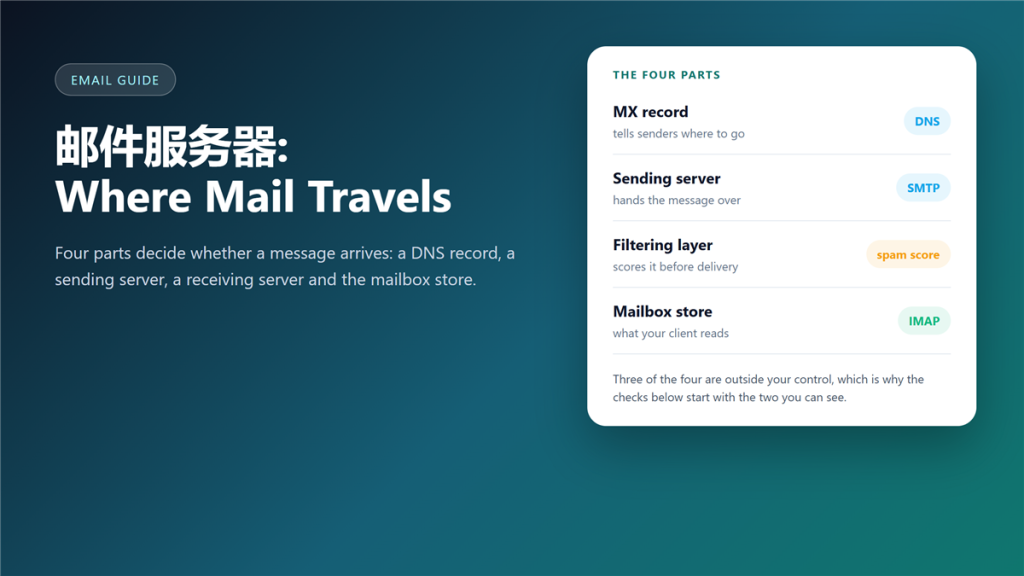
A 邮件服务器 is software that accepts a message from one side and hands it to the other. That is the whole job, and almost every confusing thing about email follows from how carefully it does that job.
I once spent two days blaming a client for a delivery problem that was actually a missing DNS record. Since then I check the path before I check the software.
Key Takeaways
- Four parts decide delivery: DNS, sending server, receiving server and the mailbox store.
- MX records tell the world where your mail should go.
- SMTP moves mail between servers; IMAP serves it to your client.
- Filters run after delivery, which is why spam can be both delivered and hidden.
- Most failures are visible in the headers of a delivered message.
- Running your own 邮件服务器 is possible and rarely worth it.
- An open relay is the one misconfiguration that gets a server blocked everywhere.
The five hops between send and inbox
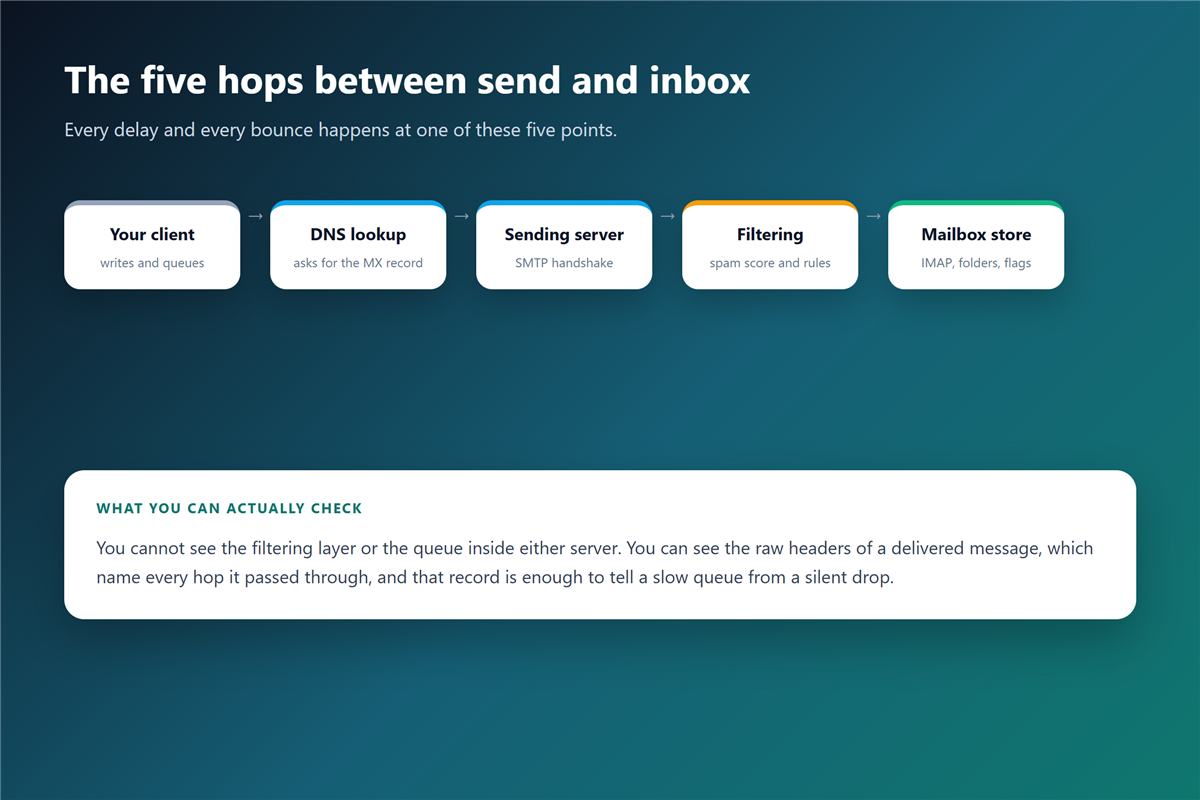
Picture a message travelling through five checkpoints. Each one can delay it, reject it or alter it, and only the first is under your direct control.
Your client writes the message
The app builds the message and asks a 邮件服务器 to take it. Until that handshake succeeds, nothing has been sent at all.
DNS answers with an MX record
The sending side asks DNS where the recipient domain wants mail. A missing or wrong MX record is the most common reason that mail vanishes without a bounce.
The 邮件服务器 handshake over SMTP
Two servers greet each other, check names and agree to transfer. This conversation is where a rejection happens in real time, so it is the step that produces an instant 邮件退信.
邮件服务器 roles you will meet
Documentation uses four acronyms, and they describe jobs rather than boxes. One machine often wears several of them at once.
MTA: the relay
The mail transfer agent passes messages between 邮件服务器 systems. When you read about a relay, this is the component being described.
MDA: the deliverer
The mail delivery agent writes the message into a mailbox or a folder. It is also the stage where a full mailbox rejects mail.
IMAP and POP: the reading side
IMAP keeps the mailbox on the server and syncs state; POP downloads messages and often removes them. A desktop 邮件客户端 is just a window onto whichever of the two you picked. The difference explains why one device shows mail that another device never receives.
Where 邮件服务器 problems show up
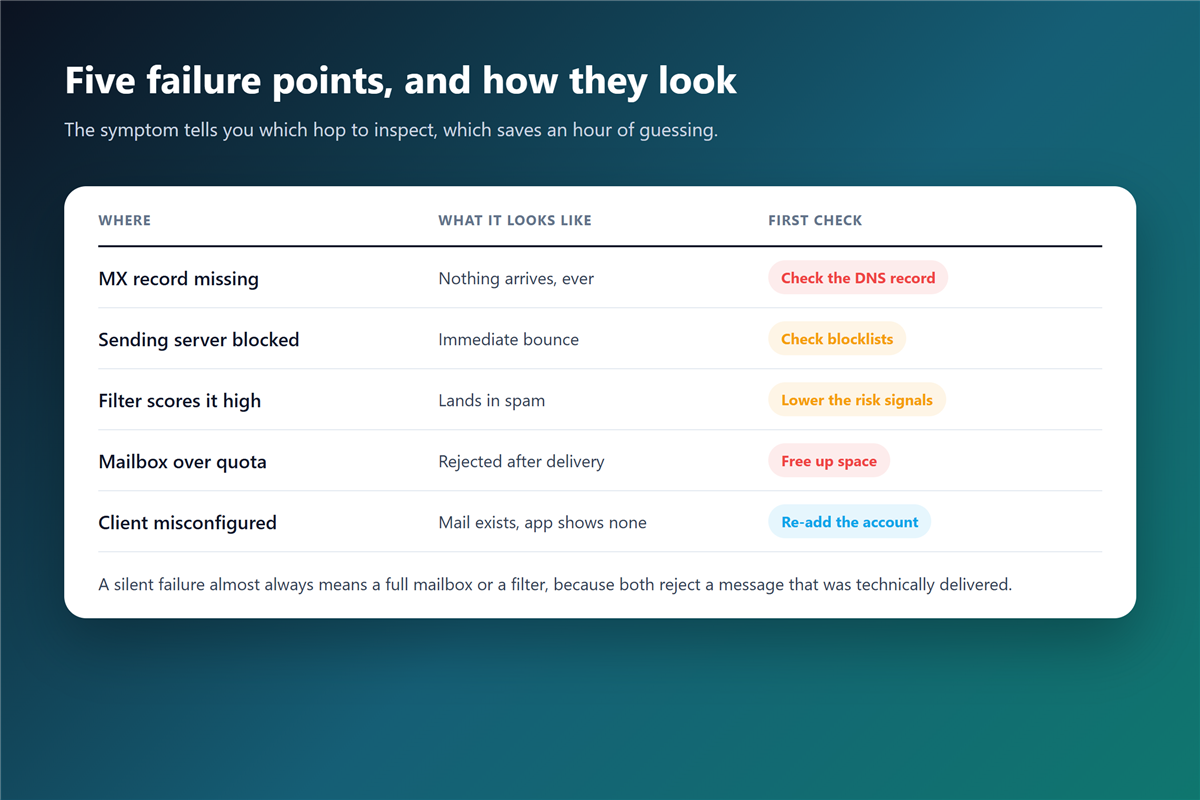
The symptom narrows the search faster than any tool. Nothing arriving at all points at DNS or at a filter on the receiving side, while a message that arrives late usually means a queue.
Moreover, a silent failure is the hardest kind. When a 邮件服务器 accepts a message and then delivers it to a spam folder, the sender sees success and the reader sees nothing.
邮件服务器 settings you actually control
If you run a domain, you control three things: the MX record, the SPF record and the DKIM key. Together they decide whether receivers trust mail that claims to come from your domain.
Additionally, check the DMARC record once a year. A published policy that nobody reads tells you nothing, and an unreviewed one drifts away from the infrastructure it describes. A 邮件服务器 that has quietly been compromised is also how most 邮箱泄露 starts.
Reading 邮件服务器 headers to prove what happened
Every delivered message carries a list of the 邮件服务器 hops that handled it. Those lines include timestamps and server names, which turn a guess into a fact. Reading a raw 邮件头 takes about five minutes to learn.
Therefore, when a client insists a message was sent at noon and you can see the queue entry at 14:07, the argument ends quietly. The receiving side also shows why a 邮件服务器 delayed a message by minutes or hours.
Mail server security in one paragraph
A server that accepts mail from anyone and forwards it anywhere is an open relay, and blocklists find it within days. Authentication, rate limits and a published policy are the three controls that keep a 邮件服务器 useful rather than dangerous. Encryption in transit belongs on that list too, and the difference between 邮件加密 in transit and end-to-end is worth knowing.
Frequently asked questions
Is 邮件服务器 the same as my email provider?
Not exactly. The provider runs the 邮件服务器 and sells you access to it, which is why you configure records but rarely touch the software.
Why does mail take minutes to arrive?
Sending servers retry on a schedule, and large receivers process queues in batches. A short delay is normal and is not a sign of a broken 邮件服务器.
Can I run my own mail server?
You can, and the software is free. The hard parts are reputation, blocklists and the on-call work when a 邮件服务器 stops accepting your mail.
What is an open relay?
An 邮件服务器 that forwards mail for strangers. Spammers find them quickly, and every major receiver starts refusing mail from that address within days.
Do I need to understand SMTP to use email?
No, but one 邮件服务器 concept pays for itself: reading a raw header. It answers questions that no support queue will answer for you.
References
延伸阅读
- 《邮件延迟是怎么回事?Where Your Mail Really Waits》
- 《邮箱域名怎么用?Running Email on a Domain You Own》
- 《邮件认证怎么做?SPF, DKIM and DMARC》
- 《邮件发送失败怎么办?Before It Ever Leaves》
- 《企业邮箱怎么选?Domain, Records and Admin Work》
- 《邮件网关是什么?The Checkpoint Before Your Inbox》
- 《邮件队列是什么?Where Mail Waits Before Delivery》
- 《邮件协议有哪些?IMAP, POP3 and SMTP Explained》
- 《邮件错误代码怎么看?SMTP Codes Decoded》
- 《邮件端口怎么选?SMTP, IMAP and POP Explained》
- 《邮件MX记录怎么看?Where Mail Is Delivered》
- 《邮件收发是怎么回事?The Path of One Message》
- 《邮件账户设置怎么做?Add an Account Correctly》
- 《邮件中继怎么工作?The Handoff Between Servers》
- 《邮件托管怎么选?Where Your Mailbox Lives》
- 《邮件API 是什么?Let Programs Send and Read》
评论
还没有评论,来说两句吧。以下为本文的引用通告: