 小影邮箱
小影邮箱邮箱登录异常怎么判断?Five Signals Someone Else Is In
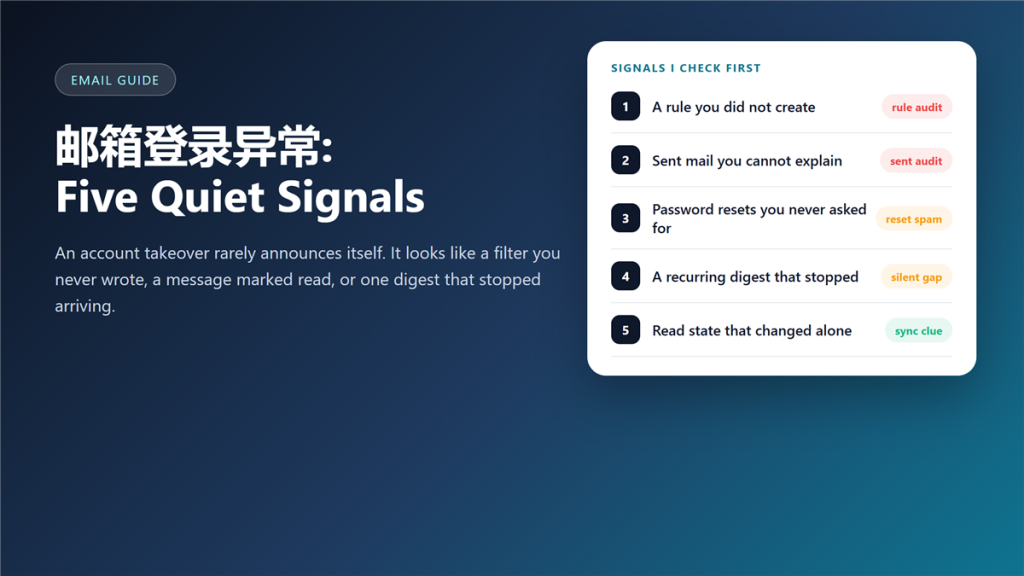
邮箱登录异常 rarely announces itself
邮箱登录异常 is usually something small you notice late: a folder you did not create, a message already marked as read, or one routine digest that stopped arriving. I have handled three compromised mailboxes, and in all three the first clue was quieter than the alert that followed.
Attackers do not want attention. Therefore, they work inside your settings rather than inside your inbox, and they change as little as possible. That is why 邮箱登录异常 is easier to spot in settings than in the inbox.
Key Takeaways
- Most takeovers start with a tiny change in the mail settings.
- A rule or forward you did not write is the strongest single signal.
- Sent mail you cannot explain usually means fraud follows within hours.
- Changing the password alone does not evict an intruder.
- Revoking sessions and app passwords is the step that removes them.
- Recovery address and phone are checked first by attackers.
- Most 邮箱登录异常 alerts reach you days after the first change.
Five signals worth checking
Each of these takes under a minute, and none of them needs a support ticket. Start with the rule list, because that is where most intrusions leave fingerprints. Most 邮箱登录异常 reports begin there.
A rule you did not write
Filters that move mail to Archive, mark it as read, or delete it are the classic tool of an intruder who wants a password reset to disappear. If you find one, treat the account as compromised until proven otherwise. A surprising 邮箱登录异常 usually starts with exactly this kind of rule.
Sent mail you cannot explain
Check the Sent folder sorted by date, not by subject. If the wording looks wrong, the raw 邮件头 shows which server actually sent it. A single message you never wrote usually means a spam relay or an invoice fraud attempt that is already reaching your contacts.
Resets you never requested
A burst of password reset mail means somebody is probing the address. On its own it is noise; combined with any other signal on this list, it is confirmation.
The read state that changed alone
Read markers that move between devices point at another client signed into the account. This is the quietest signal of the five, and the easiest to dismiss as a sync bug. Of every 邮箱登录异常 clue, this one is ignored the longest.
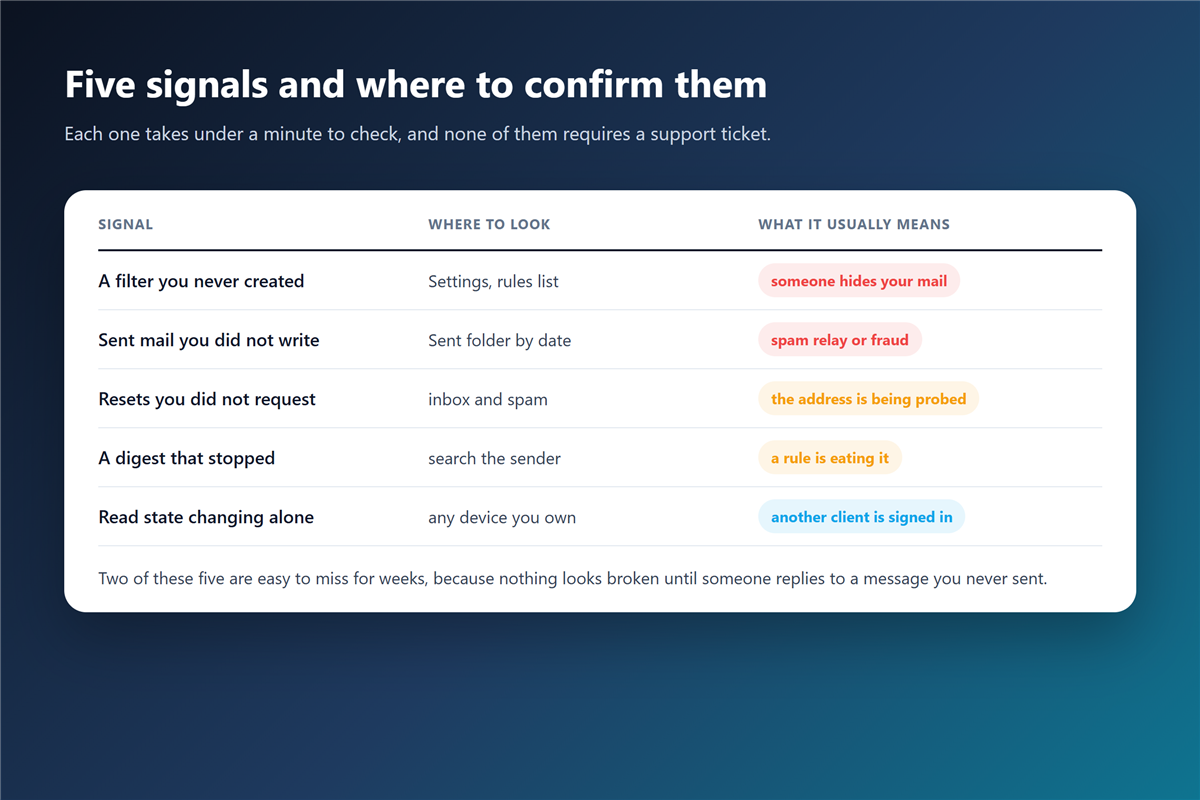
邮箱登录异常 and the read-state clue
The read-state clue deserves its own section, because it is the one people explain away. Mail clients sync flags constantly, so one odd marker proves nothing.
However, a pattern does. If messages you never opened are marked as read on a day when you only used your phone, open the session list and look for a device you do not recognise. That list is the fastest way to confirm 邮箱登录异常. Every major provider shows this list, and it also shows the last active time.
The first ten minutes of a response
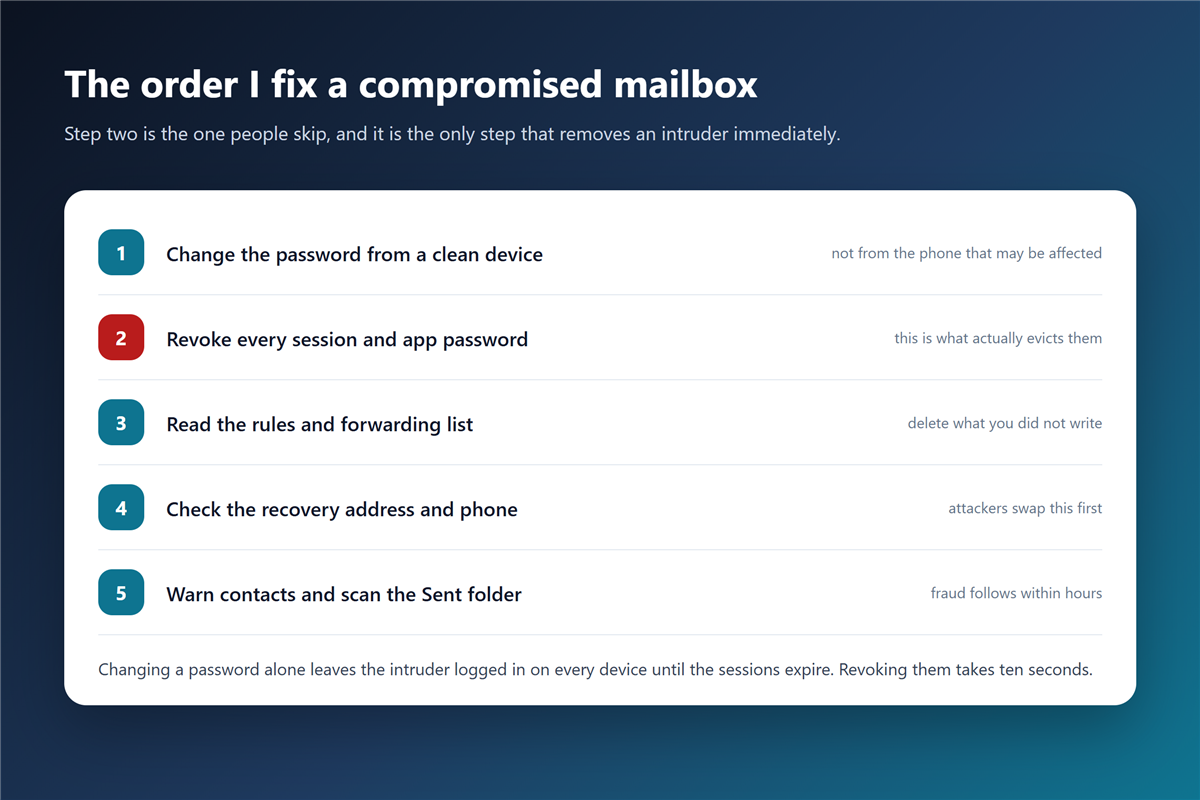
Order matters more than speed here, and a shorter 邮箱泄露 checklist covers the same ground. Change the 邮箱密码 from a clean device, then revoke every session and app password, and only then work through the settings.
Additionally, check the recovery address and the recovery phone before you relax. Attackers swap those first, which is why a password change alone leaves them a way back in. A second factor such as an authenticator app or 两步验证 makes this step far harder for them.
邮箱登录异常 on a shared or work mailbox
Shared mailboxes blur the picture. Three people read the same inbox, so an unexplained sent message may be a colleague working late rather than an intruder.
Consequently, the first question is not technical. Ask who else has access, then compare the session list against that answer. For a work address, one 邮箱登录异常 report should also reach whoever owns the mail platform.
How to make the next 邮箱登录异常 cheaper
Prevention is unglamorous and it works. Session lists, app passwords and a second factor turn a silent takeover into a noisy one, which is the entire goal.
Moreover, review the rule list once a quarter. Most people never open their 邮件规则, which is exactly why intruders prefer it, and why a filter that quietly copies mail outward can survive for months. That is the shape of a slow 邮箱登录异常.
邮箱登录异常: what the provider can and cannot see
Providers log sign-ins and IP addresses, and most of them expose that data to you. What they cannot tell you is whether a session belongs to a person or to a script using a stolen cookie.
Therefore, the session list is evidence, not proof. Treat an unfamiliar device as hostile first, and sort out the explanation afterwards. A calm reading of 邮箱登录异常 beats a fast one.
Frequently asked questions
How do I know if 邮箱登录异常 is real?
Single symptoms rarely confirm 邮箱登录异常. Look for a combination rather than one symptom: a rule plus a reset burst, or a sent message plus an unfamiliar session. One oddity is usually a sync glitch. Two oddities together are 邮箱登录异常 until you can explain both.
Should I change the password first or revoke sessions first?
Change the password, then revoke sessions immediately. Revoking without changing the password leaves the old credential valid for the next attempt. 邮箱登录异常 response needs both steps, in that order.
Can an intruder come back after I change the password?
Only if a recovery address, an app password or a rule survived your cleanup. That is why the settings review is not optional. Skipping it is how 邮箱登录异常 turns into a repeat incident.
Do login alerts cover app passwords?
Partly. Providers log the sign-in, but an app password used by a mail client looks like routine traffic, so an alert may never fire. Quiet access is the hardest 邮箱登录异常 to catch.
References
延伸阅读
- 《邮箱无法登录怎么办?A Sign-In Checklist That Works》
- 《邮箱解封怎么申诉?Signals, Steps and Timelines》
- 《网页邮箱怎么用?What It Does Well and What It Cannot》
- 《邮箱锁定怎么办?Why Accounts Get Frozen》
- 《邮箱安全怎么加固?Seven Settings Worth Changing》
- 《邮件登录提醒要开吗?Alerts You Should Keep On》
- 《邮箱登录记录怎么看?Reading Your Sign In History》
- 《邮箱异地登录是怎么回事?When the Location Looks Wrong》
评论
还没有评论,来说两句吧。以下为本文的引用通告: