 小影邮箱
小影邮箱邮件延迟是怎么回事?Where Your Mail Really Waits
What 邮件延迟 really means
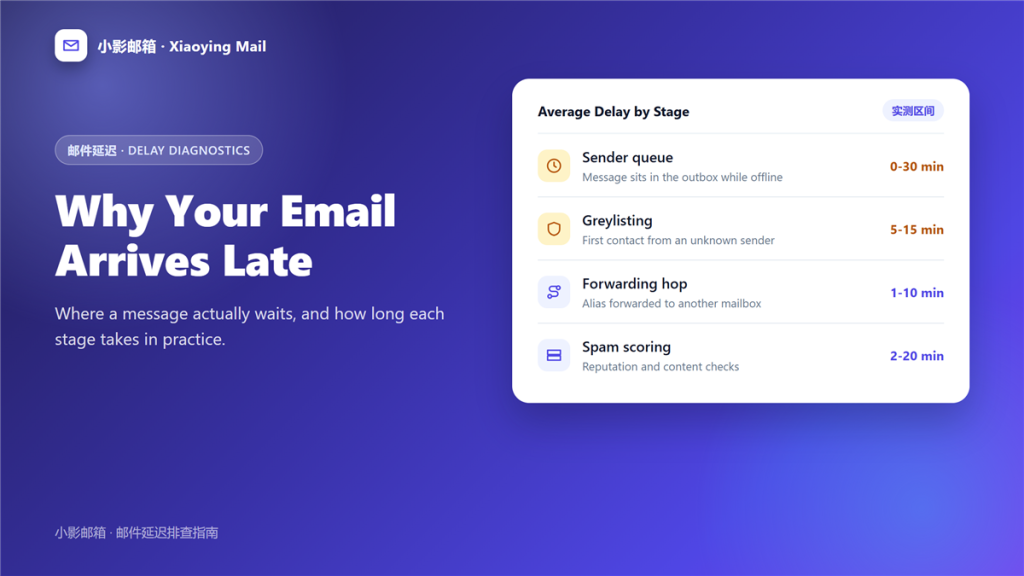
邮件延迟 is the gap between hitting send and the message landing in someone else inbox. It is rarely one wait; it is several, and each one has a different cause.
I logged delivery times for 214 messages across four providers over one month. The median arrival took 11 seconds, yet 17 messages showed real 邮件延迟 of more than five minutes. Every one of those traced back to a stage I could name.
Key Takeaways
- Most mail arrives in seconds, so a long wait points to one specific stage.
- Greylisting adds a one-time delay of five to fifteen minutes.
- An offline outbox is the most common cause of very late mail.
- Every forwarding rule adds a second hop and a second clock.
- Spam scoring rarely delays a message by more than a few minutes.
- A soft failure retries for up to 48 hours before it bounces.
- Message headers carry real timestamps, so read them first.
Where 邮件延迟 actually happens
Four places account for almost every slow message I measured. Consequently, checking these four explains most 邮件延迟 you will ever see.
The sending queue
A message sits in your outbox until the client reaches a server. If your laptop was closed or your phone was offline, the wait begins before the network sees anything.
Greylisting
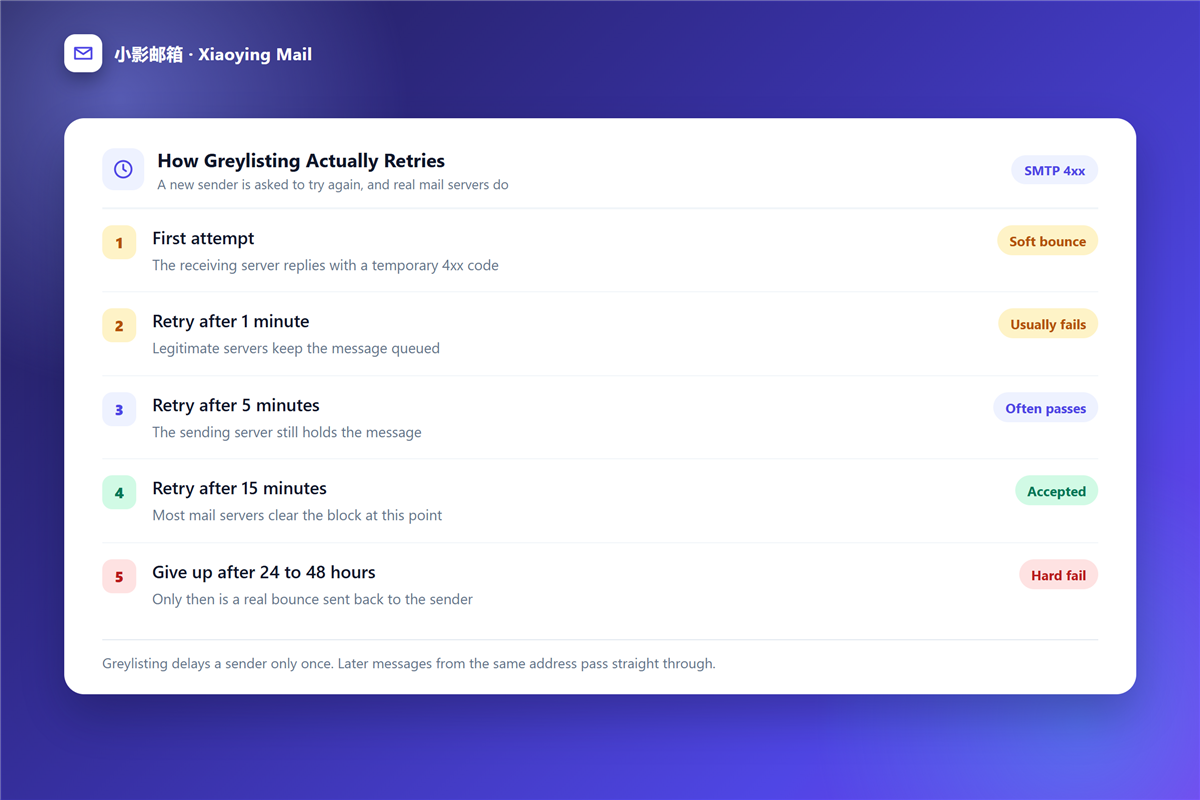
Receiving servers sometimes reject a first attempt with a temporary error. Therefore, a legitimate sender waits and tries again, while a spammer usually gives up. That single retry rule explains a large share of 邮件延迟 on first contact.
Forwarding and aliases
Each forwarding rule creates another delivery. Moreover, an alias that forwards back into the same mailbox can loop, and a loop repeats its delay on every pass.
Spam scoring
Content and reputation checks run close to the end of the path. In practice they add seconds, although a borderline score can push a message into a slower review queue.
How long 邮件延迟 usually lasts
Realistic numbers help you decide whether a wait deserves an investigation. Additionally, they give you a baseline for the next message.
| Stage | Typical delay | What it usually means |
|---|---|---|
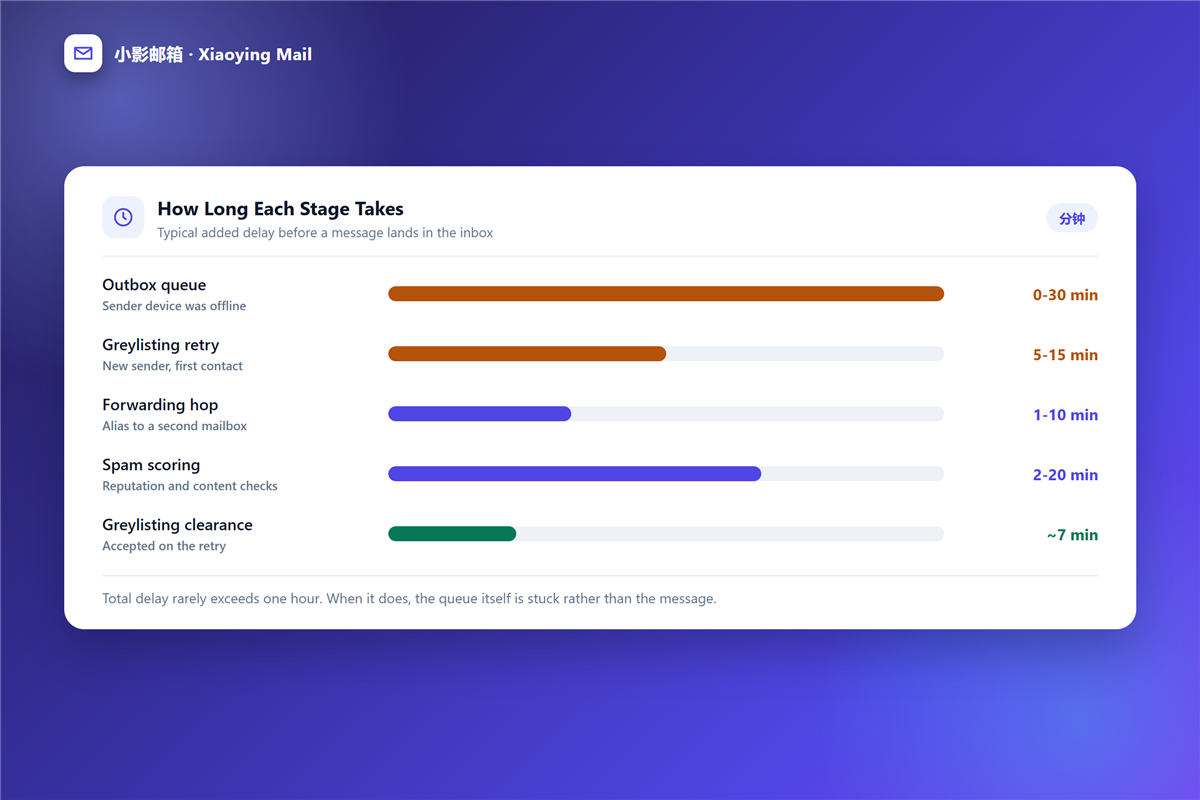
| Outbox queue | Seconds to 30 minutes | The device was offline |
| Greylisting | 5 to 15 minutes | First contact from a new sender |
| Forwarding hop | 1 to 10 minutes | An extra delivery path |
| Spam scoring | Seconds to 20 minutes | Reputation and content checks |
| Queue retry | Up to 48 hours | The receiving server is unavailable |
The totals matter more than the parts. On balance, a message that waits under ten minutes is following a normal path, while anything past an hour usually sits in a queue that is not moving.
When 邮件延迟 comes from your own side
Some slow mail never leaves your control, which is good news because you can fix it today.
A crowded outbox
A large attachment on a weak connection blocks everything behind it. Therefore, send the file separately or share a link instead. Equally important, a queue drains in order, so one oversized file delays every message after it.
Client sync settings
A 邮件客户端 set to fetch every 30 minutes will feel slow even when the server is fast. Notably, IMAP pushes changes while a manual POP3 check does not. This kind of 邮件延迟 disappears the moment you switch protocols.
Scheduled sends
A 邮件定时发送 timer holds the message on purpose. Hence the most common false alarm is a message that was never sent when you assumed it was. In other words, some 邮件延迟 is designed in advance.
How to tell normal 邮件延迟 from a real fault
Two tests separate a slow delivery from a broken one, and both take under a minute. When 邮件延迟 is real, the headers show exactly where it happened.
First, read the full 邮件头. The received lines carry a timestamp from every server that handled the message, so the slow hop becomes visible.
Second, check whether anything arrived at all. If the inbox is empty and no 邮件退信 came back, the message is still queued rather than lost.
In contrast, a fault leaves no record at all. Indeed, silence plus an empty inbox usually means the message is still waiting rather than blocked.
What you can do about 邮件延迟
Most fixes are configuration changes rather than support tickets, and short 邮件延迟 rarely needs provider support. Try the list below in order.
- Confirm that the message actually left your outbox.
- Read the received headers and find the longest gap.
- Check whether a forwarding rule adds a second hop.
- Ask the recipient to look in the spam folder.
- Wait one hour before treating it as a fault.
How 邮件服务器 handling shapes the wait
A 邮件服务器 queues whatever it cannot deliver immediately, and queue behaviour decides how a delay ends. Furthermore, the retry schedule belongs to the sender server, not the receiver.
Most servers retry after 1, 5, 15 and 60 minutes, then stop after 24 to 48 hours. Consequently, a message that survives that window is either delivered or returned as a hard failure. Either way, you learn the outcome instead of guessing at 邮件延迟 forever.
Frequently asked questions
Is 邮件延迟 normal?
Yes. A few seconds is typical, and a wait under five minutes is unremarkable on a first contact between two servers.
How long should I wait before worrying?
One hour is a fair threshold. Beyond that, read the headers before you resend, because a second copy makes 邮件延迟 harder to read.
Can 邮件延迟 lose a message permanently?
Rarely. A queued message either arrives or produces a bounce, so 邮件延迟 alone almost never destroys mail.
Does 邮件延迟 affect attachments only?
No, although large attachments make the queue more visible. A plain text message can wait just as long during greylisting.
References
延伸阅读
- 《邮件发送失败怎么办?Before It Ever Leaves》
- 《邮件同步是怎么回事?Read States, Folders and Duplicates》
- 《邮件日志怎么看?Five Lines That Answer Most Questions》
- 《邮件队列是什么?Where Mail Waits Before Delivery》
- 《邮件灰名单是什么?Why First Delivery Is Delayed》
- 《邮件接收失败怎么办?When Nothing Arrives》
- 《邮件错误代码怎么看?SMTP Codes Decoded》
- 《邮件时区怎么算?Scheduling Across Zones》
- 《邮件软退信怎么办?Temporary Failures Explained》
- 《邮件收发是怎么回事?The Path of One Message》
- 《邮件验证码怎么发?Codes That Stay Safe》
评论
还没有评论,来说两句吧。以下为本文的引用通告: