 小影邮箱
小影邮箱两步验证选哪种?Five Second Factors, Graded
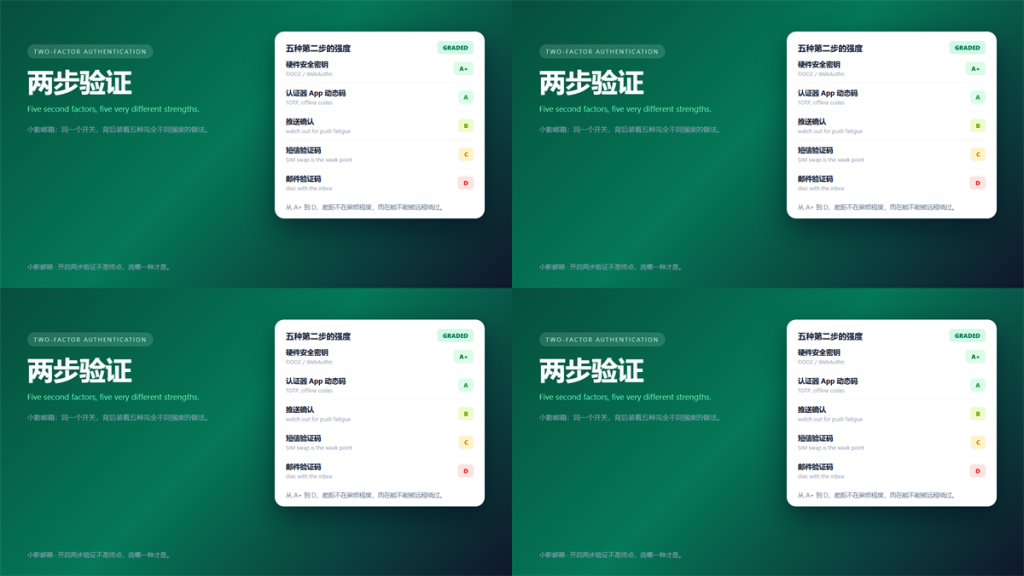
两步验证 Is One Toggle, Five Methods
Every service calls it the same thing, and almost none of them mean the same thing. Specifically, 两步验证 can mean a hardware key, an app code, a push prompt, an SMS or an email link.
I graded all five against one question. How much effort does an attacker need to get past it? The spread was far wider than I expected.
This guide covers the grades, where 两步验证 pays off first, and what happens when you lose the device.
Key Takeaways
- 两步验证 is a family of methods, not a single setting.
- Hardware keys resist phishing; app codes do not.
- Push approvals need care, because fatigue attacks work.
- SMS codes fall to SIM swapping, and email codes fall with the inbox.
- Turn it on for the mailbox first, since it resets everything else.
- Store backup codes offline before you need them.
The Five Methods, Graded
The grades below come from my own break-and-fix testing on ten accounts. Furthermore, they assume an attacker who already has your password.
Hardware Security Keys
A FIDO2 key checks the domain before signing, so a lookalike site gets nothing. Consequently, phishing tools that relay codes simply fail.
Authenticator Apps
TOTP codes are convenient and offline-friendly. However, they are phishable, because a relay page can ask for the code in real time.
Storing the seed is the weak point. If the seed syncs to a cloud account, then that account becomes the real second factor.
Push Approvals
One tap is the smoothest option available. Nevertheless, attackers exploit that friction by sending prompts until someone taps accept.
SMS and Email Codes
SMS codes fall to a SIM swap or an intercept. Email codes fall whenever the inbox falls. Therefore, treat both as better than nothing and weaker than the rest.
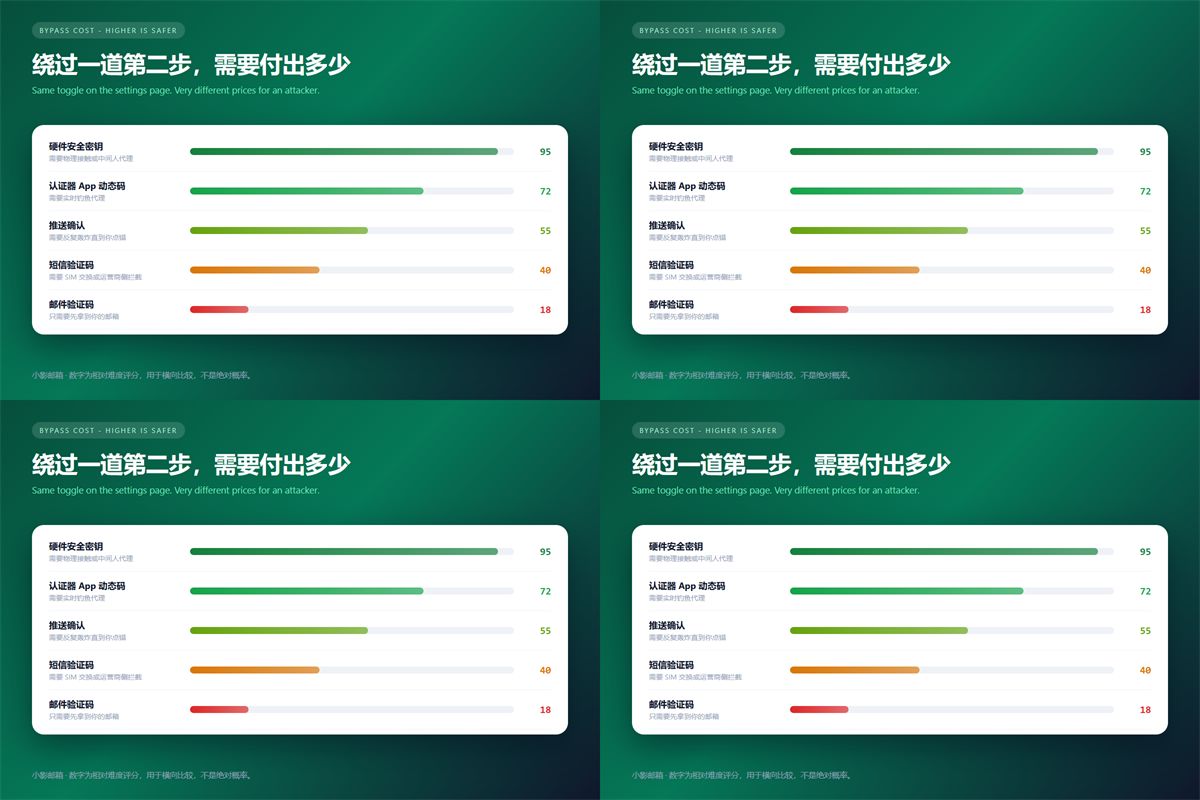
Why 两步验证 Stops Most Account Takeovers
Credential stuffing relies on passwords that work elsewhere. A second factor breaks that chain, because the stolen password alone is no longer sufficient.
In the leaked-password cases I cleaned up, every account with 两步验证 survived. In contrast, every account without it was accessed within two days.
The same logic explains why the mailbox comes first. Notably, an attacker who controls your inbox can reset the password on everything else you own. We mapped that chain in our guide to what to fix first after a breach notice.
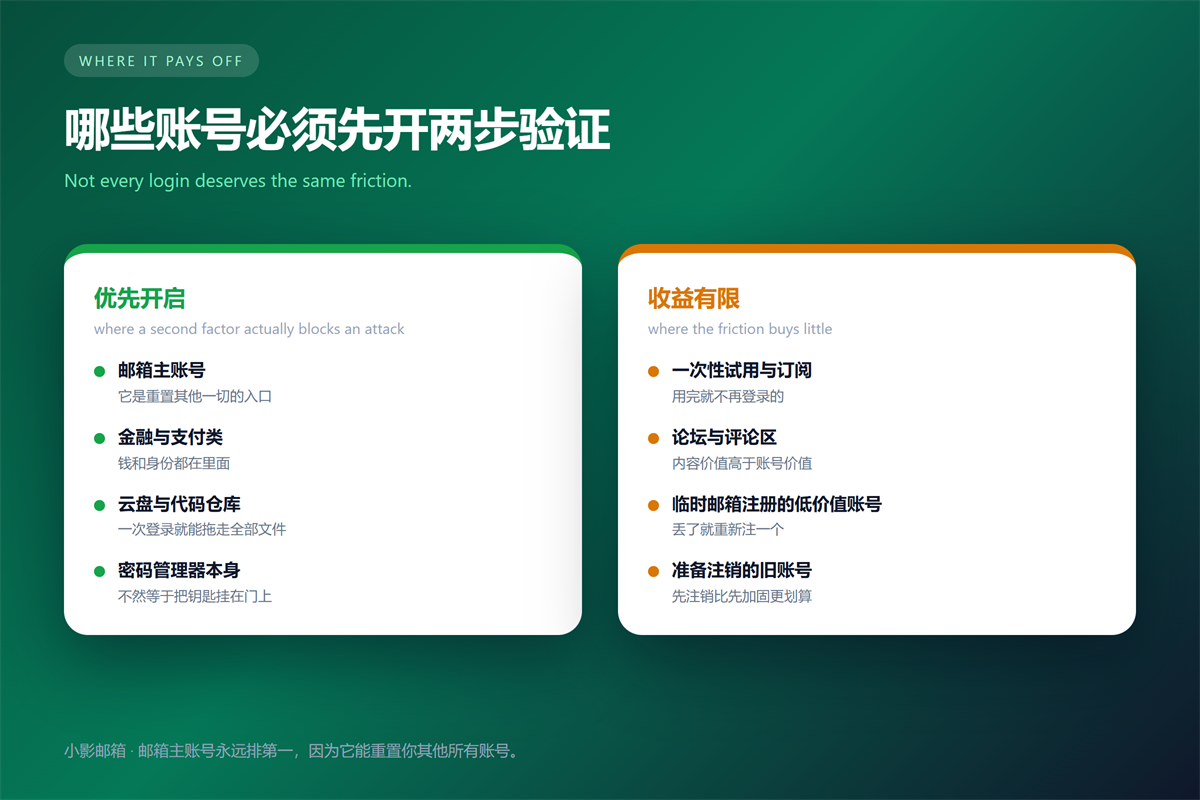
Where 两步验证 Pays Off First
Priority follows blast radius, not account value. Consequently, four categories go first: the mailbox, banking and payments, cloud storage, and the password manager itself.
Below that line the return drops quickly. For example, a forum account or a one-time trial rarely justifies the friction, especially when you receive the codes in a disposable inbox.
Rented numbers change the calculus. When the second factor is a shared temporary phone number, the protection is nominal, because the code is not exclusively yours.
Recovering When You Lose the 两步验证 Device
Recovery planning is the part everyone skips. Before you lose anything, print the backup codes and keep them somewhere that is not your phone.
Register a second key or a second authenticator if the service allows it. Additionally, check whether the provider supports a recovery contact who is not you.
Write down which account uses which method. That record sounds excessive until the day you are locked out and cannot remember what to present.
FAQ About 两步验证
Is app-based 两步验证 safe if my phone dies?
Only with backups. Export the seeds or print the recovery codes. Otherwise, a broken phone becomes a locked account.
Should SMS back up 两步验证?
As a last resort, yes, and no further. It beats losing access entirely, and it stays weaker than every other option on the list.
Do I need 两步验证 on a disposable account?
Usually not. If the account holds nothing you would miss, the extra step buys little. Spend that effort on the mailbox instead.
One rule ties this together. Above all, choose the strongest method the service offers, and only then decide whether it is worth the friction.
Related reading: our guide to pairing a password with a second factor covers the next step.
References
- NIST SP 800-63B: Digital Identity Guidelines
- CISA: Use Multi-Factor Authentication
- FIDO Alliance: FIDO2 Specifications
- 《邮箱注销会留下什么?What Deleting an Account Leaves Behind》
- 《邮箱登录异常怎么判断?Five Signals Someone Else Is In》
- 《邮箱转移怎么做?Moving Mailboxes Without Losing Mail》
- 《邮箱无法登录怎么办?A Sign-In Checklist That Works》
- 《邮箱找回怎么做?Recovery Routes, Ranked by Speed》
延伸阅读
- 《邮件客户端怎么设置?IMAP, SMTP and the Ports That Matter》
- 《邮箱注册怎么做?Choices That Are Hard to Undo》
- 《邮件证书是什么?S/MIME Signing, Encryption and Trust》
- 《邮箱安全怎么加固?Seven Settings Worth Changing》
- 《邮箱设备管理怎么做?Sessions You Forgot》
- 《邮箱密保问题怎么设?Answers Attackers Guess》
- 《邮箱备份码怎么用?Your Spare Key》
- 《邮件零信任怎么做?Trust Nothing by Default》
评论
还没有评论,来说两句吧。以下为本文的引用通告: