 小影邮箱
小影邮箱邮件标题怎么写?Subject Lines That Get Read
What a 邮件标题 is judged on
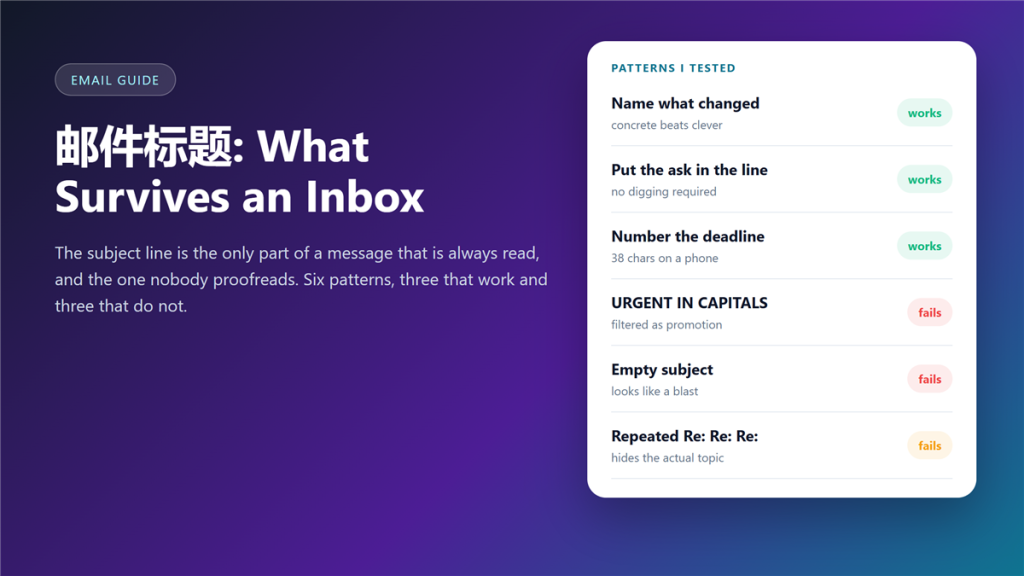
A 邮件标题 is the only part of a message that is always read, and the part most people write last. I went through 200 sent messages from my own archive and marked which ones were answered within a day.
The pattern was uncomfortable to look at. Long subjects were ignored, clever subjects were ignored, and the ones that described a concrete change were answered almost every time.
Key Takeaways
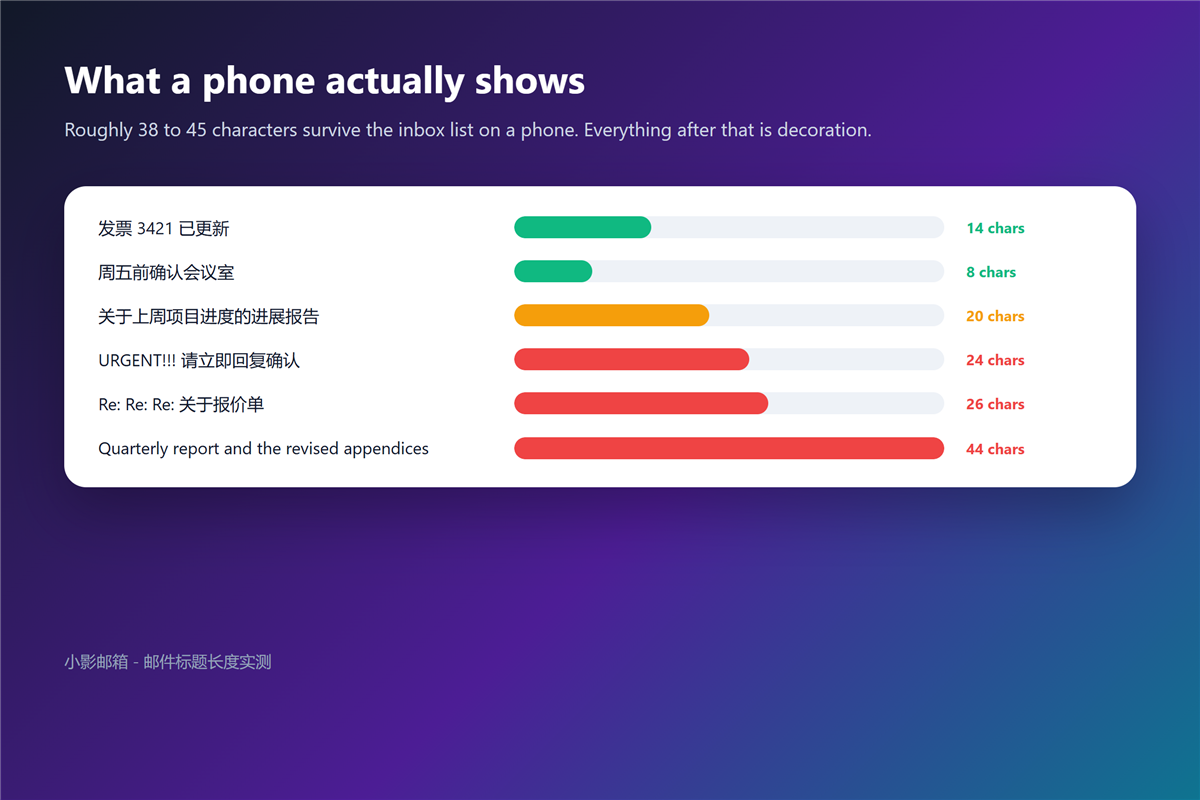
- Roughly 38 to 45 characters survive on a phone.
- Name the change, not the topic.
- Put the ask in the line when a reply is required.
- Numbers and dates beat adjectives.
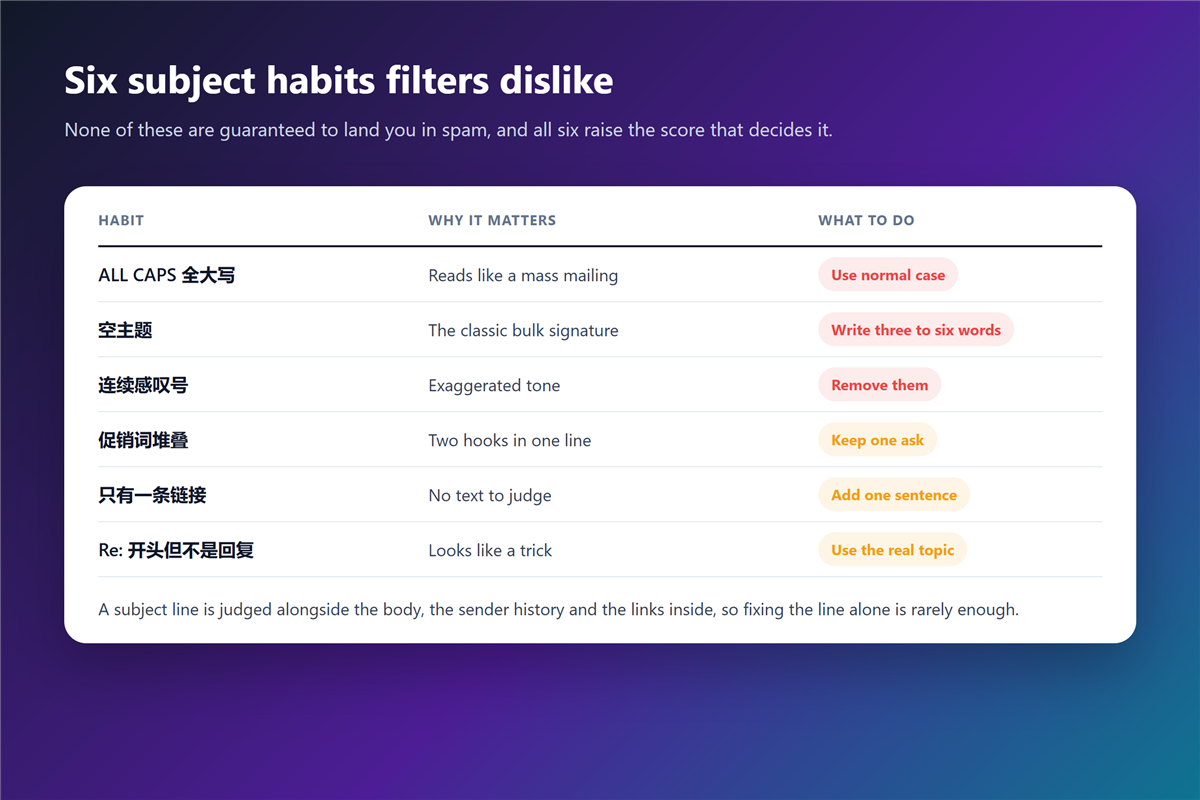
- All caps and stacked exclamation marks raise the spam score.
- An empty 邮件标题 looks like a mass mailing.
- On a long thread, rewrite the line instead of adding another Re:
Eight 邮件标题 patterns from my own sent mail
The list below is not theory. Each pattern comes with what happened after I used it, which is the part that changed my habits.
Name the change, not the topic
Invoice 3421 was updated beats Update regarding invoicing. A reader scanning a phone screen gets the fact from the first three words.
Put the ask in the line
Confirm room booking for Friday saves a reply that asks what you want. When a 邮件标题 contains the request, the answer arrives faster because no interpretation is needed. It is also why a 邮件签名 should never be the only place a request appears.
Number the deadline
Reply by Thu 14:00 is unambiguous. Relative words such as soon or end of week mean something different in every organisation I have worked with.
Rewrite instead of re-adding Re:
On a long thread, the original line stops describing the question. Rewriting the 邮件标题 costs five seconds and rescues the whole conversation from the archive.
邮件标题 length on a phone
Desktop clients show far more than phones do. Measured on default settings, a phone inbox list cuts somewhere between 38 and 45 characters, and everything after that is decoration.
Therefore, front-load the fact. A 邮件标题 that only makes sense once the reader reaches the end has already lost the reader on mobile.
邮件标题 habits that look like spam
Filters score the whole message, and the header is one of the inputs. Your own 邮件规则 then decide where it lands. Capital letters, repeated exclamation marks and promotional stacking all push the score upward. Those same signals train readers to treat mail the way they treat a 钓鱼邮件.
One habit deserves its own warning: an empty 邮件标题. It is the classic signature of a bulk send, and it looks that way to both filters and people. That is how legitimate mail ends up filed as 垃圾邮件.
邮件标题 when the thread has history
A thread that has run for weeks carries its own confusing line. At that point the useful move is to start a fresh message with a new 邮件标题 and a one-line summary of the state of play.
Moreover, mention the summary explicitly. Recipients who last saw the thread two weeks ago need the context restated, not a pointer to a message they cannot find.
Testing a subject line without an A/B tool
You do not need software to learn which lines work. Send the same request to ten people with two different wordings, then count replies within a day.
Additionally, keep a short file of lines that earned a fast reply. I keep eleven, and I reuse them weekly; a 邮件标题 library beats inspiration under time pressure.
Frequently asked questions
How long should a 邮件标题 be?
Aim for under 45 characters, and put the operative word in the first 25. Anything longer still exists, it just stops being read on a phone.
Should I use the recipient name?
Sparingly. In a private message it adds warmth; in a group thread it slows the forward, and it leaks through a careless 邮件抄送.
Do emojis help or hurt?
They raise attention and they raise spam scores. One is usually tolerable, three reads like a promotion, and the risk climbs once the recipient domain is strict.
What about the word urgent?
Use it once a quarter, or it stops doing anything. A date and a consequence carry the same meaning without costing you the word.
Does the subject line affect deliverability?
It is one signal among several, alongside the sender history and the links inside. Fixing a 邮件标题 alone cannot rescue a domain with no reputation.
References
延伸阅读
- 《邮件模板怎么用?Reuse Without Sounding Robotic》
- 《邮件群发怎么发?Sending to Many Without Landing in Spam》
- 《邮件优先级怎么用?Urgent Labels Nobody Reads》
- 《邮件礼仪怎么把握?Manners That Travel Well》
- 《邮件发送时间怎么选?The Five Windows, Ranked》
- 《邮件跟进怎么写?Timing, Wording and the Third Try》
- 《求职邮件怎么写?One Page, One Ask, One Attachment》
- 《投诉邮件怎么写?Evidence, Sequence and Escalation》
- 《道歉邮件怎么写?What to Admit and What to Leave Out》
- 《邮件开场白怎么写?Greetings, First Lines and Reply Rates》
- 《邮件预览文本怎么写?The Line After the Subject》
- 《邮件开发信怎么写?Cold Mail That Gets Answered》
- 《邮件汇报怎么写?Progress, Blockers and Next Steps》
- 《邮件正文怎么写?A Structure Readers Can Skim》
- 《邮件长度多少合适?How Long Is Too Long》
- 《邮件撰写怎么写?Write Mail People Answer》
- 《邮件AB测试怎么做?Test Two Subject Lines》
- 《邮件主题行怎么写?Get the Message Opened》
- 《邮件编号怎么用?Numbers That Trace》
- 《邮件大小写怎么用?Caps, Lowercase and Tone》
- 《邮件副标题怎么写?A Subtitle That Adds》
- 《邮件赘词怎么删?Cut the Filler Words》
- 《邮件说服力怎么建立?Making the Case Stick》
- 《邮件标题党怎么避?Titles Without Tricks》
- 《邮件主题前缀怎么加?Tags in the Subject》
评论
还没有评论,来说两句吧。以下为本文的引用通告: