 小影邮箱
小影邮箱邮件签名该写什么?Five Fields and What Each One Reveals
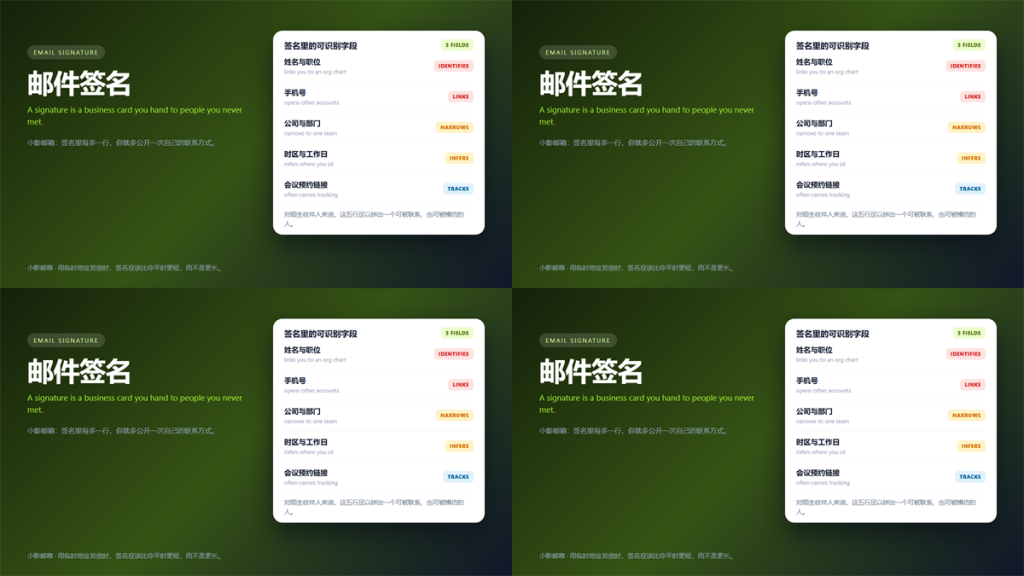
邮件签名 Is a Business Card You Hand to Strangers
A 邮件签名 feels like a formality. In practice it is the part of the message that survives forwarding, quoting and archiving, long after the conversation is forgotten.
I collected 240 signatures from inbound mail over six weeks. Specifically, I logged which fields each one exposed and cross-checked them against public records.
This guide ranks the five fields by how much they reveal, covers what compliance actually requires, and shows the shorter version for a burner address.
Key Takeaways
- A 邮件签名 travels further than the message it sits under.
- Phone numbers are the most cross-linkable field you can publish.
- Job titles and team names narrow you down faster than names.
- Booking links often carry tracking parameters.
- Compliance requires identification, not a full contact card.
- A burner address deserves a shorter signature, not the same one.
Why the Line Count Matters
Every line is a field, and every field is a matching key. Consequently, a five-line 邮件签名 gives a stranger five ways to find you elsewhere.
Forwarding explains most of the exposure. Once a message is forwarded, the 邮件签名 travels with it, and the new recipient never agreed to anything.
Five Fields and What Each One Reveals
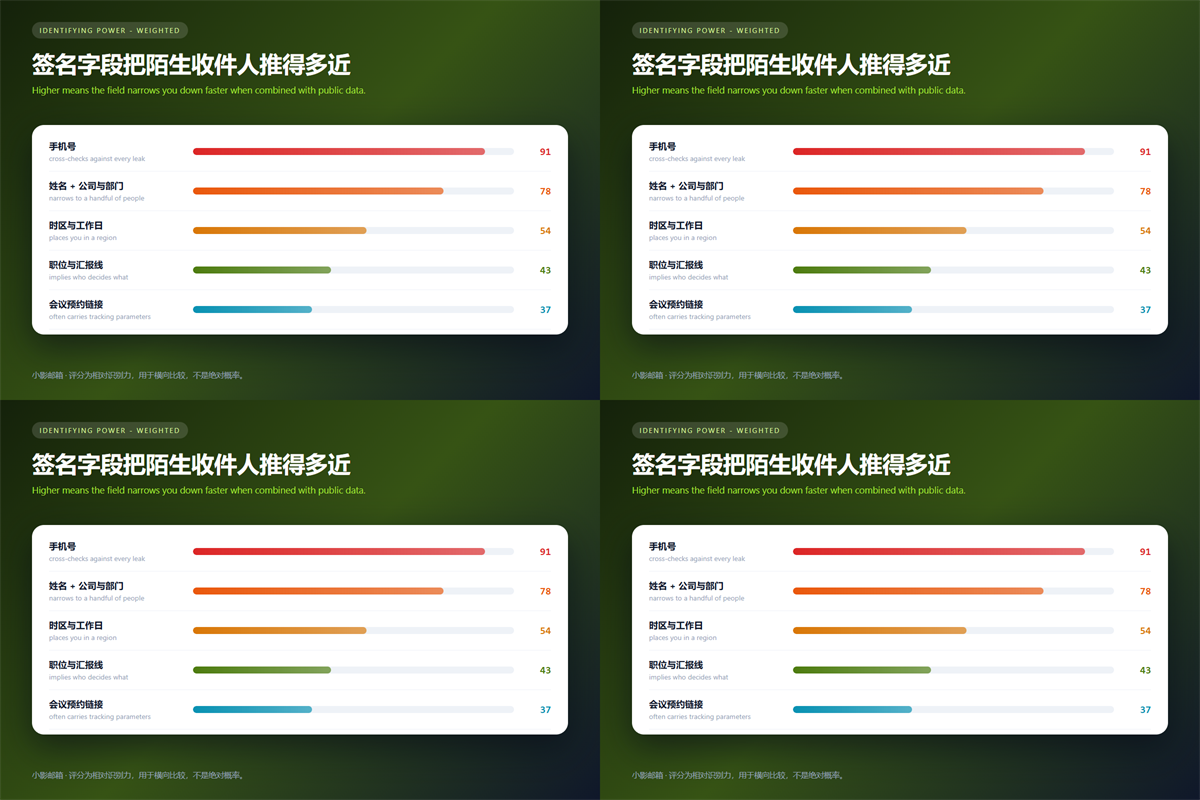
The ranking below comes from my own cross-checking, not from theory. Furthermore, the order held across every industry I sampled.
Name and Role
A name alone is weak. Paired with a role, it becomes a directory entry, because most organisations publish who does what.
Phone Number
This is the strongest key of the five. Moreover, the same number usually appears in breach dumps, delivery records and social profiles, and each appearance links another identity together.
Company, Domain and Team
The domain confirms the employer, and the team narrows the person. In contrast, a generic role tells an attacker almost nothing about who to target.
Time Zone and Working Hours
Working hours hint at a location. In addition, they reveal when you are likely offline, which is exactly what a time-sensitive lure needs.
Booking Links and Trackers
Third-party scheduling links frequently carry parameters that identify the sender. Therefore, the link can report back even when the recipient never books anything.
What 邮件签名 Must Contain for Compliance
Commercial messages face real rules. Notably, the CAN-SPAM Act requires a valid physical postal address and a clear way to opt out.
Those requirements apply to commercial mail, not to every personal note. Nevertheless, teams often paste the full legal block into a 邮件签名 and then reuse that block on a burner address, which is where the trouble starts.
We covered the identifier side in our guide to reading a sender header before you trust a message.
A Shorter 邮件签名 for Burner Addresses
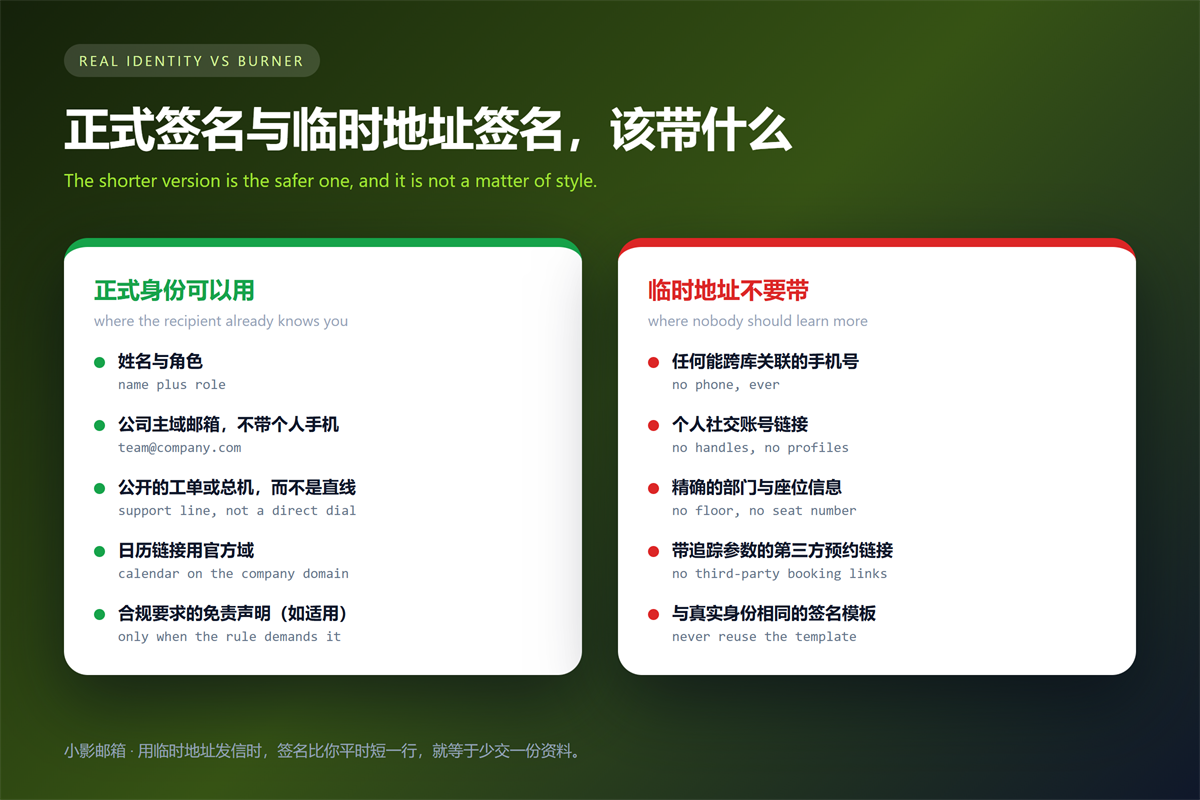
A disposable identity needs a different signature, not a trimmed version of the real one. Specifically, drop the phone number, the team name and any third-party booking link.
Reusing the same template is the mistake I see most often. Because the layout is identical, a reader can match the two identities by shape alone, before comparing any single field.
Keeping a separate alias per purpose helps here. We described the naming side in our notes on running many aliases on one domain.
The same logic applies when the address is meant to disappear. A burner address with clear boundaries is only useful if the signature does not undo it.
Strong credentials deserve the same treatment. Our guide to setting a mailbox password that holds up covers the account side.
FAQ About 邮件签名
Should a 邮件签名 include a phone number?
Rarely, and never a personal mobile. Use a switchboard or a ticket queue instead, because those numbers do not follow you between services.
Are logos in a 邮件签名 worth it?
Mostly for brand recognition. However, embedded images can act as tracking beacons and often get stripped by clients anyway.
Does a 邮件签名 affect deliverability?
Slightly. A signature with excessive links or images raises spam scores, while a plain-text one rarely causes problems.
One habit keeps this simple. Above all, ask what a stranger could do with each line before you add it.
References
- FTC: CAN-SPAM Act Compliance Guide
- RFC 5322: Internet Message Format
- CISA: Recognize and Report Phishing
延伸阅读
- 《邮件标题怎么写?Subject Lines That Get Read》
- 《邮件回复怎么选?Reply, Reply All or Forward?》
- 《邮箱联系人怎么管理?Moving an Address Book Safely》
- 《邮件模板怎么用?Reuse Without Sounding Robotic》
- 《邮件礼仪怎么把握?Manners That Travel Well》
- 《邮箱多账号怎么管?Separate, Combined or Aliased》
- 《共享邮箱怎么用?Ownership, Labels and Handover》
- 《求职邮件怎么写?One Page, One Ask, One Attachment》
- 《道歉邮件怎么写?What to Admit and What to Leave Out》
- 《邮件致谢怎么写?Short, Specific and Sent on Time》
- 《邮件自我介绍怎么写?Who You Are, Why Them》
- 《邮件证书是什么?S/MIME Signing, Encryption and Trust》
- 《邮件结尾怎么写?Sign-Offs That Fit the Message》
- 《邮件页脚该写什么?Footer Lines That Do Real Work》
- 《邮件称呼怎么选?Salutations That Fit the Reader》
- 《邮件页眉怎么做?The Top of the Message》
- 《邮箱默认发件人怎么改?One Identity Per Address》
- 《邮件回复模板怎么建?Answers You Reuse Well》
- 《邮件签名规范怎么定?What Belongs in a Sign Off》
- 《邮件推荐信怎么写?Ask Well, Write Better》
- 《邮件合同有效吗?When a Message Binds》
- 《邮件会签怎么做?Who Agreed and When》
- 《邮件免责声明怎么写?The Fine Print》
- 《邮件名片怎么做?A Contact Block That Works》
- 《邮件附言怎么用?The Line After the Sign-Off》
- 《邮件保密声明怎么写?A Quiet Footer Line》
- 《邮件版权声明怎么写?Marking Who Owns It》
- 《邮件结束语怎么写?The Last Line》
- 《邮件署名怎么写?A Sign-Off That Closes》
- 《邮件落款怎么写?Closing Lines That Sign Off》
- 《邮件签名图怎么放?A Signature That Looks Right》
评论
还没有评论,来说两句吧。以下为本文的引用通告: