 小影邮箱
小影邮箱邮件附件怎么判断危险?Types, Tricks and a Five-Step Workflow
邮件附件 Are Judged by the Wrong Part
Almost everyone judges a 邮件附件 by its icon. That is exactly the wrong signal, because the icon is chosen by the sender while the extension is not.
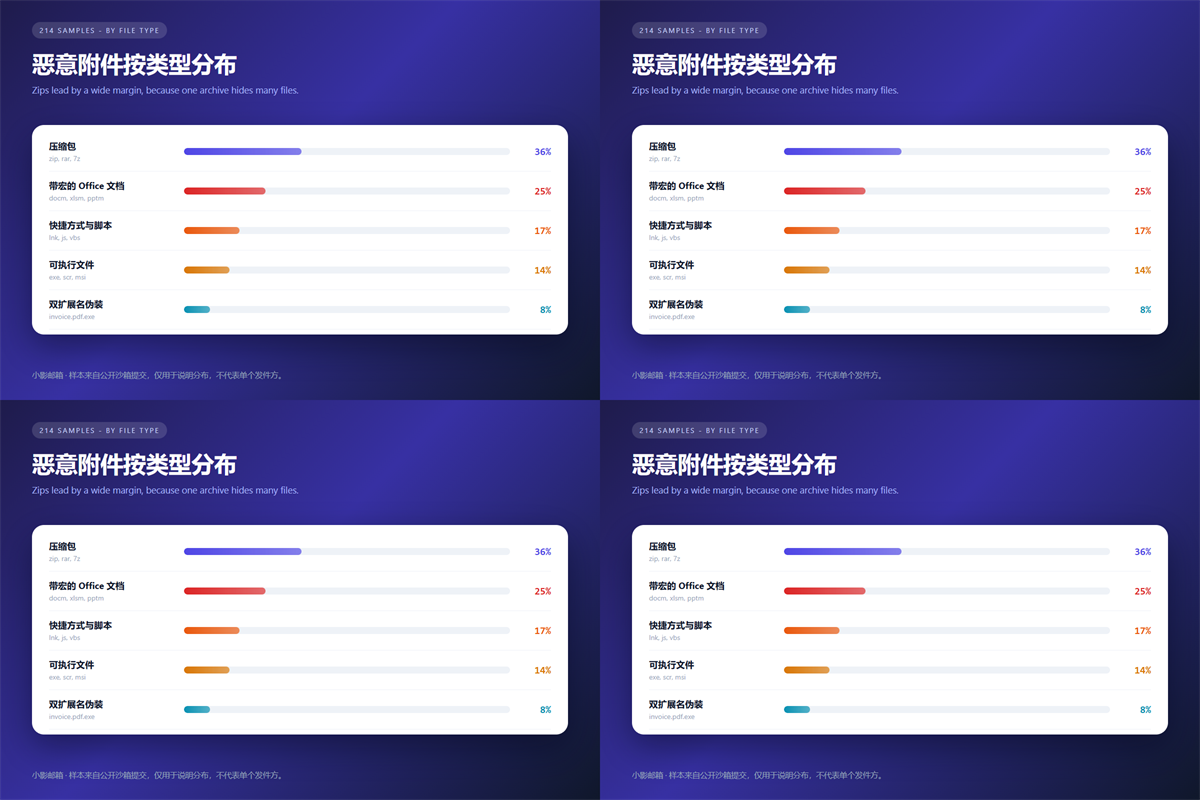
I have archived 214 malicious attachments over two years. Specifically, every one of them displayed a friendly icon, and 8% used a double extension to fake it.
This guide covers the four types I treat as hostile, the workflow I follow, and the limits of scanning a 邮件附件 before opening it.
Key Takeaways
- The icon is decorative; the real extension decides what runs.
- Double extensions and macro documents top the list of tricks.
- Password-protected archives exist to defeat scanners.
- Never enable macros for a file you did not expect.
- Upload a suspicious 邮件附件 to a sandbox first.
- Clear the download folder afterwards, not just the email.
Why a 邮件附件 Icon Lies
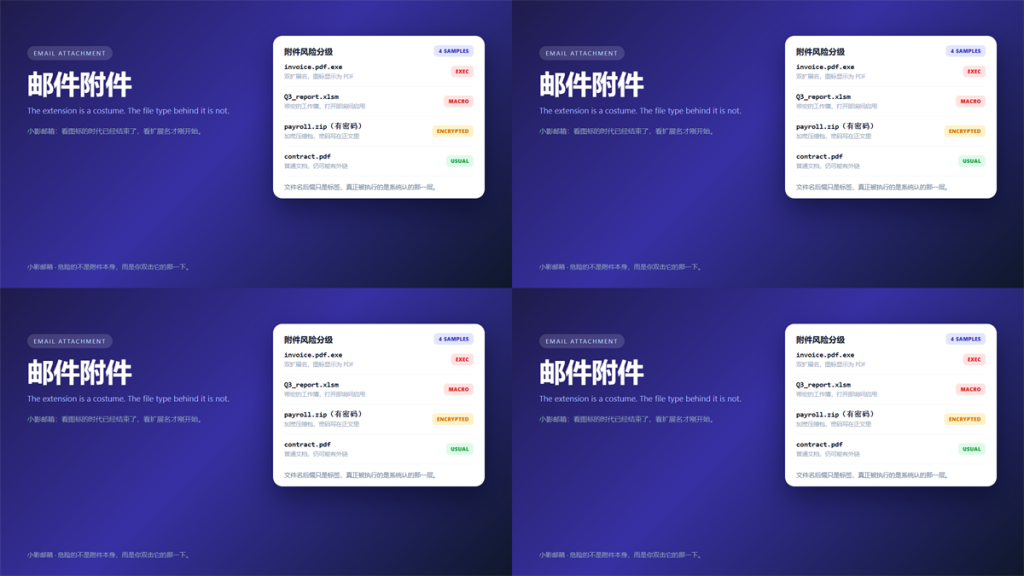
Operating systems hide known file extensions by default. Consequently, a file named invoice.pdf.exe appears as invoice.pdf with a PDF icon.
Turning that setting off is the highest-value change you can make today. After that, the 邮件附件 list becomes honest at a glance.
The same problem appears on mobile. Notably, phone mail clients often show no extension at all, so the disguise works even better there.
Four Types I Treat as Hostile
These four categories account for nearly every incident I have handled. Furthermore, each one exists for a specific reason.
Double Extensions
A filename like report.pdf.exe is the oldest trick in the book. Moreover, it still works, because the left part is what the eye reads first.
Office Documents With Macros
Files ending in docm, xlsm or pptm can carry VBA code. In our sample, macro documents were the second most common 邮件附件 category at 25%.
They also ask permission before running. However, the prompt is worded to sound routine, and a convincing subject line does the rest.
Password-Protected 邮件附件 Archives
An encrypted zip cannot be scanned until it is unlocked, and the password usually sits in the email body. Therefore, the archive is a delivery wrapper rather than a file.
Shortcuts and Script Files
A .lnk file looks like a folder or a document, and one double-click can launch anything. Similarly, .js and .vbs files run through the Windows script host with no visible warning.
A Five-Step Workflow for Any 邮件附件
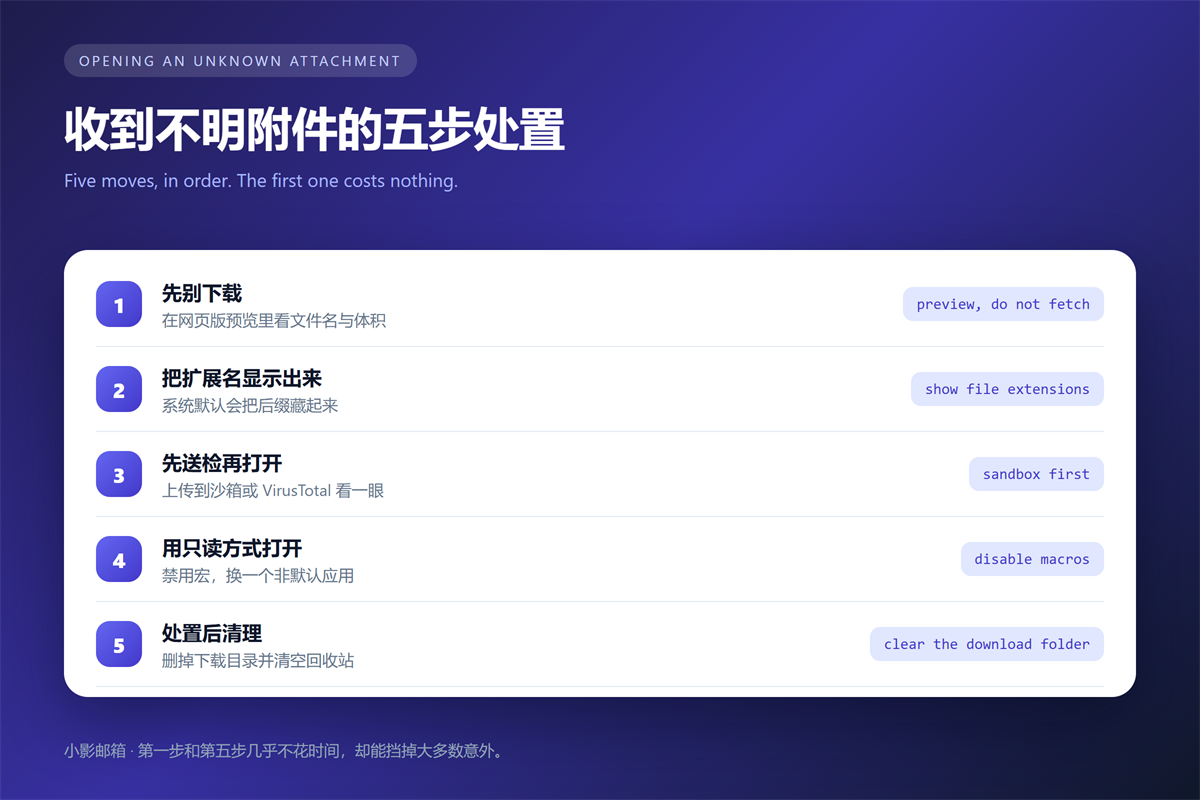
This sequence takes about two minutes, and it has kept me out of trouble for years. Furthermore, none of it requires special software.
- Preview the filename and size in the web client before downloading.
- Turn on file extension display so the real suffix is visible.
- Upload the file to a sandbox or a multi-engine scanner.
- Open it read-only, with macros disabled and a non-default app.
- Delete the download and empty the trash afterwards.
Step one costs nothing and stops most attacks. Additionally, step five matters more than people expect, because a downloaded file sits in your folder long after the email is gone.
When a 邮件附件 passes every check but you still feel uneasy, ask the sender through a different channel. A one-line message beats an afternoon of cleanup.
What a Sandbox Says About a 邮件附件
A sandbox runs the file in an isolated machine and reports what it did. Consequently, you can watch a document try to reach a remote server without risking your own laptop.
The limits matter too. A sandbox cannot detect a payload that waits for a specific date, or one that only activates on a corporate network. Therefore, a clean report is reassurance, not proof.
Multi-engine scanners have the same constraint. Specifically, they match known signatures, so a fresh sample may pass until the vendors catch up.
Reducing 邮件附件 Risk Before It Arrives
Configuration beats vigilance here. For example, most mail platforms can block executable extensions outright, and that single setting stops a large share of 邮件附件 attacks.
Blocking macros by default in your office suite is the second move. Moreover, it costs you nothing until someone genuinely needs one.
Separating identities helps as well. Specifically, when you keep low-risk signups in a disposable inbox, a malicious 邮件附件 sent to that address has far less to steal.
Finally, keep the reporting habit. A quarantined 邮件附件 reported to your provider improves the filters that protect everyone else on the domain.
FAQ About 邮件附件
Is a PDF always safe?
No. PDFs can carry embedded scripts and launch remote content. However, modern readers sandbox those features, so the risk is lower than for an executable.
Should I open attachments on my phone?
Prefer the browser-based preview. It avoids running the file locally, and most mobile clients cannot show the real extension anyway.
Do scanners catch every 邮件附件?
No. A scanner compares the file against known samples. Therefore, a brand-new 邮件附件 often passes clean on the day it is sent.
One habit covers the gaps. Above all, treat any unexpected 邮件附件 as hostile until the sender confirms it through another channel.
We covered the header side of that verification in our guide to spotting phishing mail from the sender header.
Related reading: our guide to archiving attachments without losing them covers the next step.
References
- MITRE ATT&CK: Spearphishing Attachment
- Microsoft: Protect Yourself From Phishing
- VirusTotal: Multi-Engine File Analysis
延伸阅读
了解更多了解更多附件占用与清理,请参阅:《邮箱容量满了怎么办?What to Delete When Storage Is Full》。
- 《邮件乱码是怎么回事?Why Text Turns Into Symbols》
- 《邮件搜索怎么用?Finding the Message You Need》
- 《邮件日历邀请怎么用?When Meetings Go Missing》
- 《邮件草稿去哪了?Where Unsent Messages Go》
- 《邮件格式怎么选?Plain Text or HTML》
- 《邮件大小限制是多少?Why Your File Bounces》
- 《邮件白名单怎么设?Where It Helps and Where It Leaks》
- 《求职邮件怎么写?One Page, One Ask, One Attachment》
- 《邮件网关是什么?The Checkpoint Before Your Inbox》
- 《邮件冒充是怎么回事?When the Sender Is Not the Sender》
- 《邮件附件怎么压缩?Squeezing Files Under the Limit》
- 《邮件扫描是怎么回事?What Happens to Attachments》
- 《邮件病毒怎么防?Five Warning Signs》
- 《邮件打印怎么设置?Paper Copies That Stay Useful》
- 《邮件水印怎么做?Marking Confidential Mail》
- 《邮件云附件是什么?Links Instead of Files》
- 《邮件附件预览怎么用?Reading Before Downloading》
- 《邮件大附件怎么发?Files That Still Fit》
- 《邮件附件下载怎么做?Save Files Safely》
- 《邮件附件命名怎么做?Files People Can Find》
- 《邮件附件格式怎么选?Formats That Survive》
- 《邮件附件加密怎么做?Lock Files Before You Send》
- 《邮件发票怎么发?Sending Bills That Get Paid》
- 《邮件沙箱是什么?Open Files Without Risk》
- 《邮件合同有效吗?When a Message Binds》
- 《邮件对账怎么做?Match Bills Without Chasing》
- 《邮件退货怎么沟通?Replies That Resolve》
- 《邮件批量下载怎么做?Save Many Files at Once》
- 《邮箱空间清理怎么做?Free Up Space》
- 《邮件图片怎么用?Show Without Slowing Down》
- 《邮件二维码怎么用?A Square That Works》
- 《邮件递交怎么写?Handing Work Over》
- 《邮件动图怎么用?Motion That Loads》
- 《邮件压缩包怎么发?One Archive, Many Files》
评论
还没有评论,来说两句吧。以下为本文的引用通告: