 小影邮箱
小影邮箱邮件退信怎么看?Hard, Soft and What Each One Costs
邮件退信 Is the Other Server Talking
A 邮件退信 is not a failure of your internet connection. Instead, it is a reply from the receiving server explaining why it refused your message.
I logged 318 bounces across three months of newsletter sends. Specifically, 61% were permanent, and most of those came from addresses that had been dead for years.
This guide explains the codes, the report format, and the retry rule that keeps a sender reputation intact.
Key Takeaways
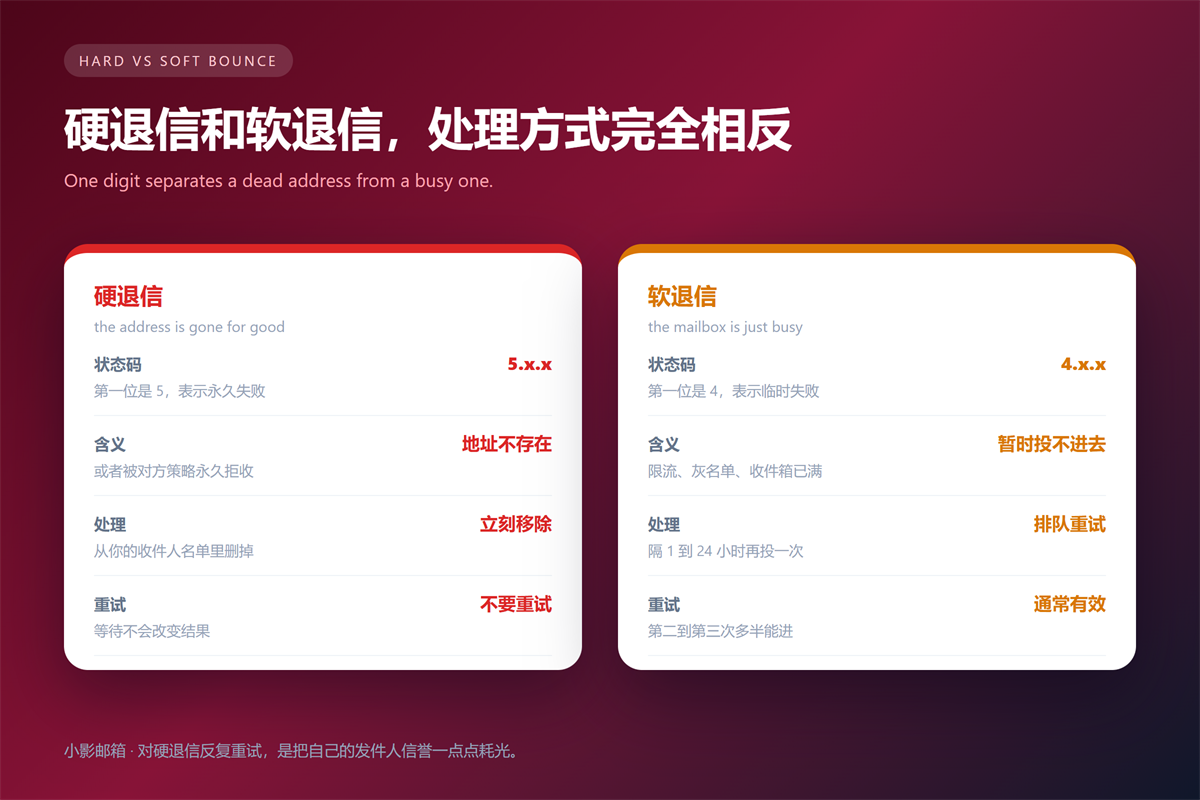
- 4.x.x means temporary; 5.x.x means permanent.
- Never retry a 5.x.x address, because the result will not change.
- Repeated retries against dead addresses damage your reputation.
- The bounce report names the exact server that refused you.
- Remove hard bounces from your list the same day.
- Soft bounces deserve patience, not immediate re-sends.
The One Digit That Decides Everything
Every status code starts with a class digit. Consequently, the first number tells you whether waiting helps.
Class 5 means a permanent condition, so retrying is pointless. Class 4 means a temporary one, so the message may succeed later. In contrast, classes 2 and 3 are success and redirect codes, and you rarely see them in a bounce.
That distinction saves more time than any other habit here. Furthermore, it protects your domain, because mailbox providers score you on how you handle failures.
The scoring is real and measurable. Providers track the ratio of bounces to delivered messages, and they throttle senders who ignore it. Therefore, list hygiene is not politeness; it is deliverability.
Five Codes You Will Meet Often
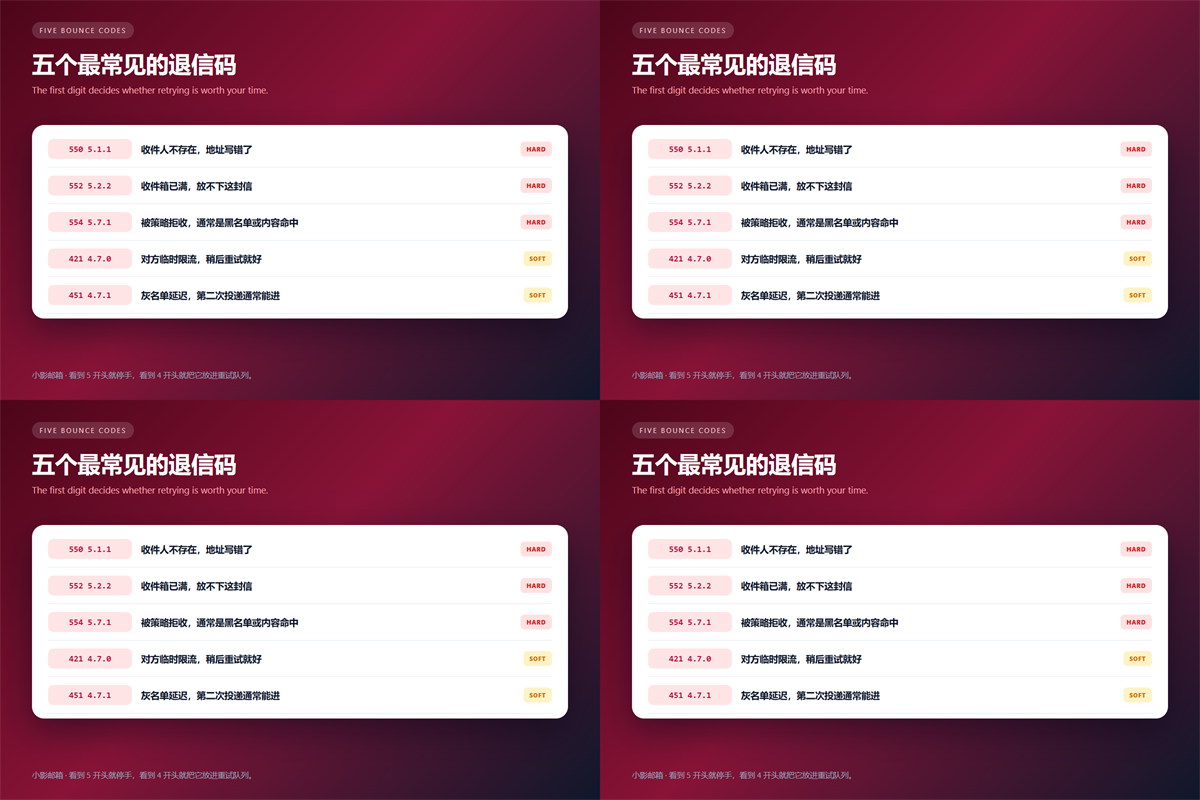
| Code | Meaning | What to do |
|---|---|---|
| 550 5.1.1 | The recipient does not exist | Remove the address |
| 552 5.2.2 | The mailbox is full | Remove or pause the address |
| 554 5.7.1 | Refused by policy or blocklist | Check your domain reputation |
| 421 4.7.0 | Temporary rate limiting | Slow down and retry later |
| 451 4.7.1 | Greylisting delay | Let the queue retry |
What a 邮件退信 Report Actually Contains
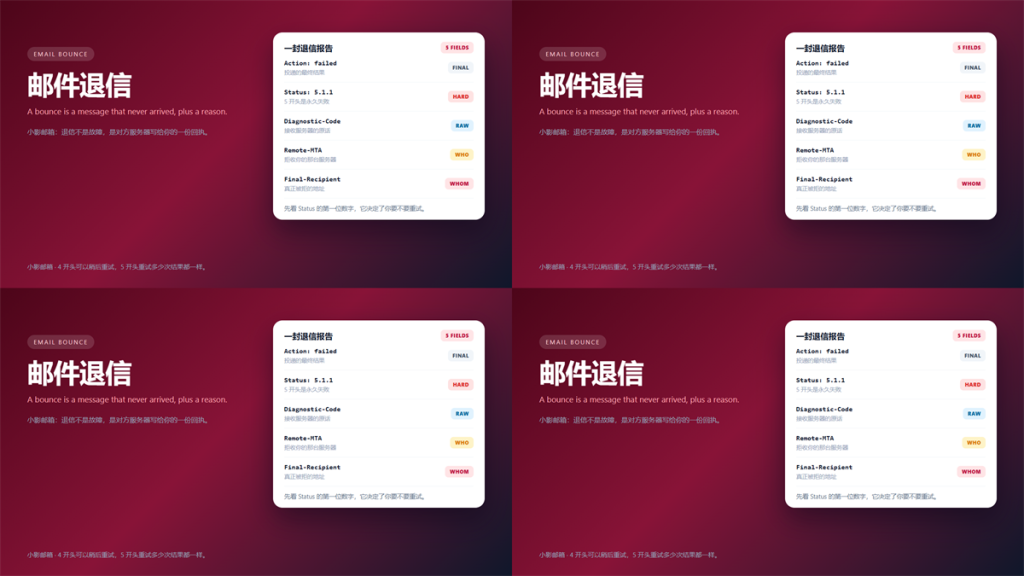
The report is a structured attachment, not a friendly note. Specifically, it carries a final action, a status code, a diagnostic string and the name of the refusing server.
The diagnostic string is the most useful part. It contains the remote server own words, which often say more than the numeric code does.
Read the diagnostic string before the status code when you debug. For instance, a 550 containing user unknown means a dead address, while a 550 about policy means a blocklist problem. Same number, completely different fix.
We covered the surrounding fields in our guide to reading a raw mail header.
How to Reduce 邮件退信 Volume
Most bounces come from list hygiene rather than from content. Consequently, four habits remove the majority of them.
- Remove hard bounces the day they arrive.
- Re-verify addresses that have been inactive for six months.
- Never import a purchased list.
- Retry soft bounces on a schedule, not on impulse.
Re-verification is the one people skip. Meanwhile, addresses go stale quietly, and a list that worked last year can be a fifth dead today.
Verification has a limit worth knowing. Specifically, a syntactically valid address can still bounce, because validity checks confirm format and domain, not whether a human still reads it.
Velocity matters too. Sending a large batch to an old list at once invites rate limiting, which produces soft bounces that look alarming and mean very little.
We compared the wider consequences in our guide to where spam really comes from.
FAQ About 邮件退信
Does a bounce mean my account is blocked?
Usually not. A single 邮件退信 describes one message and one recipient. However, a sudden wave of 554 codes can indicate a blocklist entry.
Should I retry a 邮件退信 immediately?
No for hard bounces, and not immediately for soft ones. Wait at least an hour, and prefer a 24-hour gap, because rate limits reset slowly.
Can I stop all 邮件退信?
No, and you should not try. Some bounces are unavoidable. The goal is a low rate, not a zero rate, since a zero rate usually means you never send.
One habit keeps this manageable. Above all, treat every 邮件退信 as data about your list rather than as an error to be silenced.
Attachment problems produce a different kind of failure. We covered them in our guide to handling an unknown email attachment.
Related reading: our guide to keeping bounce reports as records covers the next step.
References
- RFC 3463: Enhanced Mail System Status Codes
- RFC 3464: Extensible Message Format for Delivery Status Notifications
- Google Postmaster Tools
延伸阅读
- 《邮件服务器是什么?Mail Server Basics Without the Jargon》
- 《邮件延迟是怎么回事?Where Your Mail Really Waits》
- 《邮件黑名单是怎么回事?Two Sides of a Blocked Address》
- 《邮件大小限制是多少?Why Your File Bounces》
- 《邮件误判怎么办?Why Good Mail Lands in Spam》
- 《邮箱验证怎么做?Links, Codes and Expiry》
- 《邮件发送失败怎么办?Before It Ever Leaves》
- 《邮件营销怎么做?Permission, Flows and a Six-Item Pre-Send Check》
- 《邮件日志怎么看?Five Lines That Answer Most Questions》
- 《邮件灰名单是什么?Why First Delivery Is Delayed》
- 《邮件接收失败怎么办?When Nothing Arrives》
- 《邮件重发怎么做?Resending Without Confusion》
- 《邮件错误代码怎么看?SMTP Codes Decoded》
- 《邮件重试怎么做?Retry, Rewrite or Stop》
- 《邮件DMARC怎么设?Policy for Failing Mail》
- 《邮件硬退信是什么?Why an Address Dies》
- 《邮件软退信怎么办?Temporary Failures Explained》
- 《邮件退信率怎么看?Read the Early Warning》
- 《邮件到达率怎么看?Did It Really Land?》
- 《邮件退信分析怎么做?Reading a Bounce》
- 《邮件回复地址怎么设?Where Replies Land》
- 《邮件申诉怎么写?Asking to Be Let Back In》
评论
还没有评论,来说两句吧。以下为本文的引用通告: