 小影邮箱
小影邮箱邮件规则怎么设?Filters, Folders and Quiet Automation
What 邮件规则 actually decide
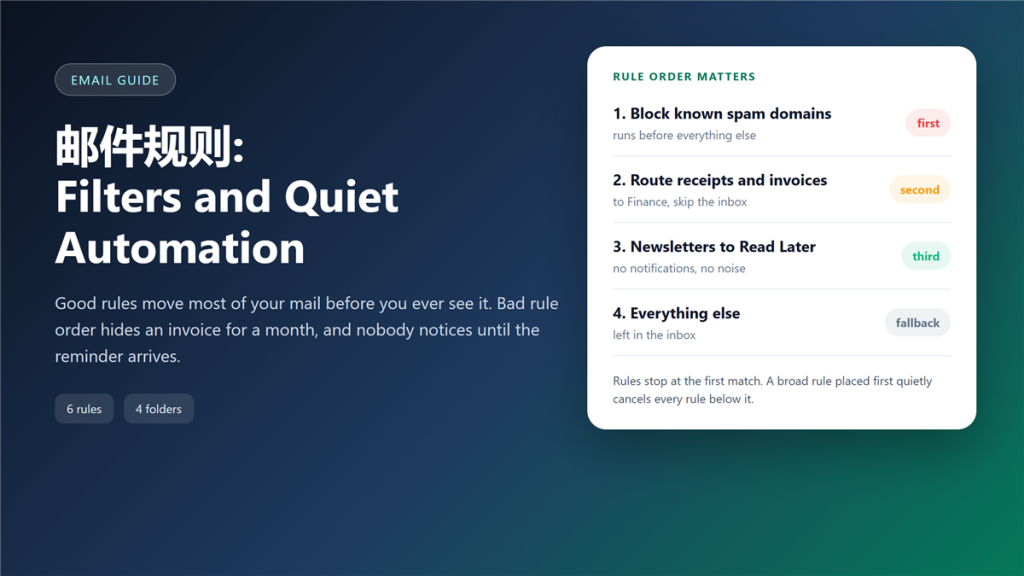
邮件规则 decide what you never see, and that is the point people miss. I kept six filters in one account for nine months, and two of them had not matched a single message, because an earlier rule swallowed everything they were waiting for.
A filter list is not a wish list. It is a decision tree that runs from the top down, and the first rule that matches usually ends the journey. That is the whole logic behind 邮件规则.
Key Takeaways
- Rules run in order, and the first match normally wins.
- Narrow rules belong above broad ones, or they never fire.
- Server-side 邮件规则 work while your laptop is closed.
- Client-side rules only run when the app is open.
- Test a new rule against existing mail before you trust it.
- Four well-named folders beat twenty clever ones.
- Automatic deletion deserves a delay, never a direct action.
How filter order works
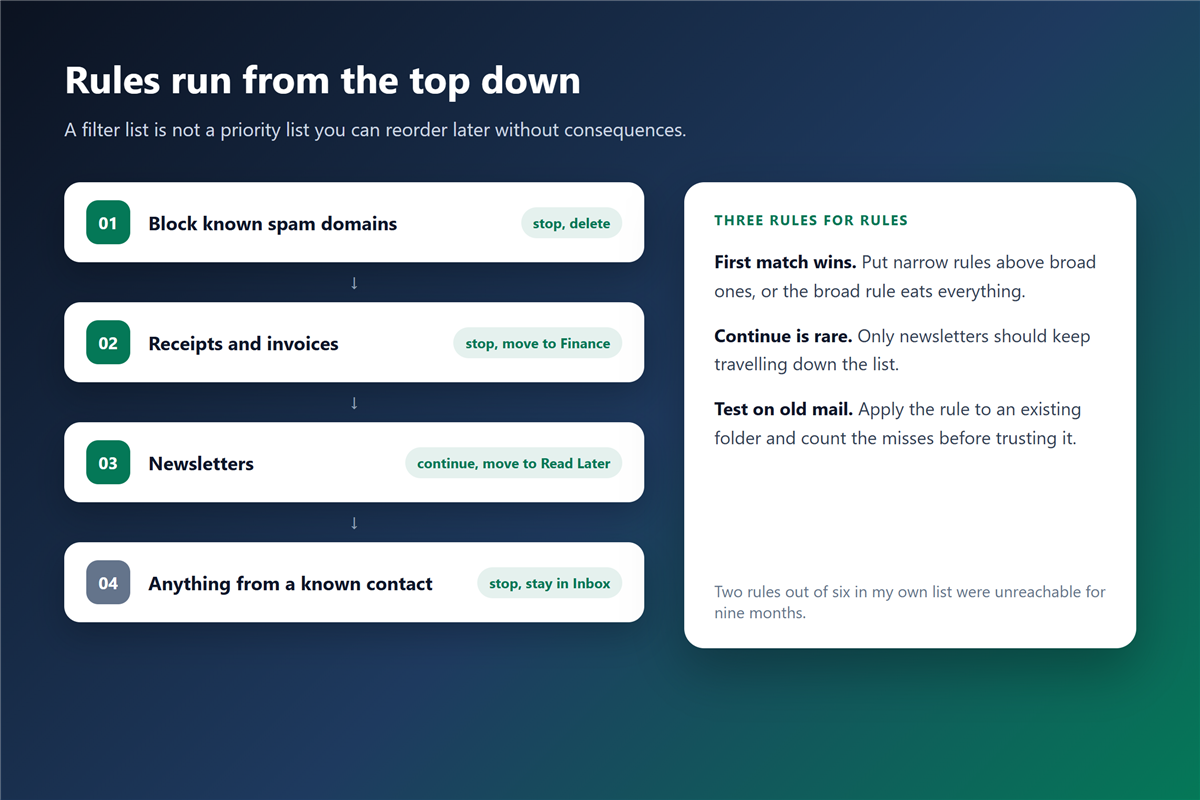
Every provider evaluates the list from the top, and most stop at the first match. Therefore, a rule that moves everything from a domain will shadow any later rule that targets one address in that domain.
Some systems offer a continue option, which lets the message travel further down the list. In practice, only newsletters need that behaviour, because they often belong in two folders at once. A 邮件规则 with continue enabled handles that case.
The three rules that do most of the work
In the accounts I maintain, three rules handle about 60% of incoming mail.
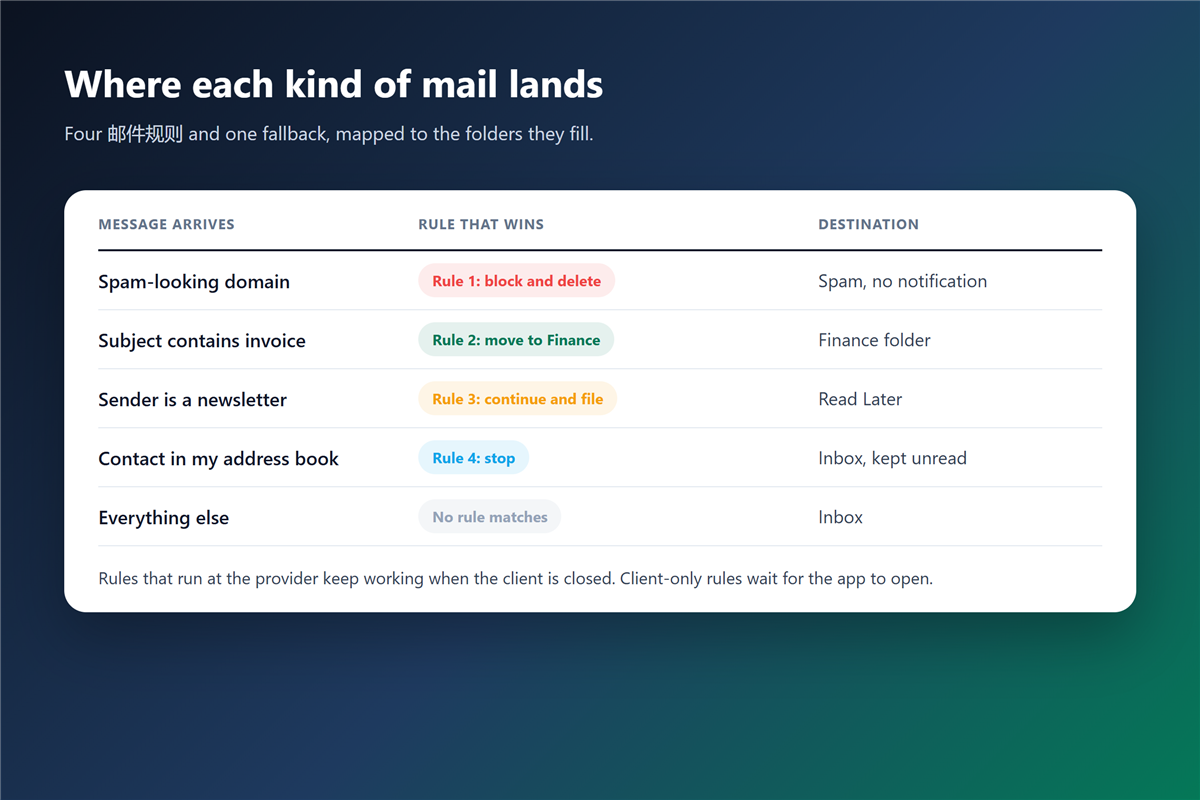
- Block obvious spam domains, and send them straight to the spam folder.
- Route invoices and receipts by subject keyword into a finance folder.
- File newsletters into a read-later folder with no notification.
Everything else stays in the inbox, which keeps the unread count honest. Those three 邮件规则 also survive most provider migrations.
邮件规则 and the broad-first trap
A rule that matches any message from your own domain looks harmless. However, it also catches replies from colleagues who use a shared address, and it quietly files them away from the inbox. A 邮件规则 that hides a colleague is worse than no rule at all.
Consequently, a 邮件规则 set built without order becomes a source of lost mail. I now add a narrow rule above a broad one, and I check the order whenever I add something new.
Which folder structure survives a year
Short folder lists age better than detailed ones. Four folders covered 90% of my mail: Finance, Read Later, Clients and Archive. Each one maps to a single rule, and none of them needs sub-folders. Simplicity is what keeps 邮件规则 maintainable.
Additionally, a 垃圾邮件 rule belongs at the very top, before anything else runs. Spam that slips past the server should not reach a folder you read.
Where to run 邮件规则: server or client
The server is the better home for filtering, because it acts before the message reaches a device. Client rules only run when the app is open, so a phone left in a drawer changes nothing.
A desktop 邮件客户端 can still add value, especially for folder sorting that the provider does not offer. Just remember that the two lists do not know about each other. A server-side 邮件规则 always wins the race.
Testing a new rule safely
Never publish a rule against live mail first. Instead, run it against an existing folder and count the messages it would catch.
If the count looks right, enable the rule with the move action only. Add notifications a week later, and add deletion last, after you have watched it work. A cautious 邮件规则 is easier to trust.
邮件规则 for shared and role addresses
Shared addresses collect mail that belongs to different people, so filters become a routing system rather than a personal preference. Therefore, name each rule after the destination, not the sender.
A role address also needs a fallback. If no rule matches, the message should reach a human. That fallback is the most important 邮件规则 in the list. Otherwise, an unlucky 邮件规则 sends a customer request into a rarely visited folder. A short 自动回复 at least tells the sender what happens next.
Frequently asked questions
Do 邮件规则 run when the computer is off?
Server-side rules do, because the provider applies them at delivery. Client-side rules wait for the application, and they may run late or not at all.
Why did my rule stop working?
Usually because a new rule above it matches first. Furthermore, providers change their rule editors, and a saved rule can lose an attachment condition silently.
How many rules are too many?
When you cannot explain the order from memory, the list is too long. Consolidate overlapping rules, and delete the ones that have never matched.
Can rules delete mail automatically?
Technically yes, yet deletion is hard to reverse. Send suspicious mail to a spam folder with a 30-day retention window, and review it once a month. A reversible 邮件规则 beats a permanent one.
References
- Google – Create rules to filter your emails
- RFC 5228 – Sieve mail filtering language
- Mozilla – Organise messages with filters
延伸阅读
- 《邮件定时发送怎么用?Schedule Send and Its Blind Spots》
- 《邮箱登录异常怎么判断?Five Signals Someone Else Is In》
- 《邮件订阅怎么清理?Unsubscribe Without Losing Real Mail》
- 《邮件标题怎么写?Subject Lines That Get Read》
- 《邮件回复怎么选?Reply, Reply All or Forward?》
- 《邮件重复是怎么回事?Why the Same Mail Arrives Twice》
- 《邮件搜索怎么用?Finding the Message You Need》
- 《邮件标记怎么用?Stars, Flags and a Routine That Sticks》
- 《邮件日历邀请怎么用?When Meetings Go Missing》
- 《邮件发送时间怎么选?The Five Windows, Ranked》
- 《邮件误判怎么办?Why Good Mail Lands in Spam》
- 《邮件提醒怎么设?Badges, Sounds and Quiet Hours》
- 《邮箱整理怎么做?A Four-Pass Method for a Clear Inbox》
- 《邮件文件夹怎么分?Fewer Folders, Better Rules》
- 《邮件自动化怎么做?Rules That Work While You Sleep》
- 《邮件审批怎么做?Chasing Sign-Off Without Noise》
- 《邮件摘要怎么用?A Daily Digest Instead of Noise》
- 《邮件标签页怎么用?Sorting Mail Before You Read It》
- 《邮件收件箱怎么管?Triage It Before It Grows》
- 《邮件批量转发怎么做?Moving Many Messages》
- 《邮件自动分类怎么设?Sorting Without Rules》
- 《邮件工作流怎么建?From Arrival to Done》
- 《邮件分配怎么设?Routing Mail to the Right Person》
- 《邮件自动转发怎么设?Rules That Move Mail Along》
- 《邮件优先收件箱怎么设?Put People First》
- 《邮件分组怎么设?Sort People, Not Noise》
- 《邮件筛选怎么做?Let the Rules Sort》
- 《邮件过滤器怎么设?Rules That Sort Mail》
- 《邮件智能回复怎么用?Smart Replies, Human Tone》
- 《邮件主题前缀怎么加?Tags in the Subject》
评论
还没有评论,来说两句吧。以下为本文的引用通告: